
Scalable Audio Visual for Multi‑Site Enterprises
Define the Goal: What Corporate AV Standardization Really Means
Corporate AV standardization is the intentional shift from piecemeal, one-off room installs to a documented, repeatable framework that scales across sites, countries, and teams. It establishes how rooms are designed, built, secured, monitored, and supported – so every space works the same way and every rollout follows the same playbook. Done right, a corporate audio visual standard accelerates deployment, reduces cost and complexity, and delivers a predictable user experience across the enterprise.
“Employees save an average of 8 minutes per meeting by starting meetings more efficiently – translating to a three-year, risk-adjusted total benefit (PV) of $19,051,276 for organizations.” – Source
From one-off installs to a corporate AV standard
Ad hoc deployments solve local needs in the moment, but they create long-term friction: different gear, interfaces, cabling, and firmware across rooms means inconsistent experiences, difficult support, and higher lifecycle costs. A formal corporate AV standard flips the script by defining:
- A normalized catalog of room types and “approved” kits
- Reference designs and bills of materials (BOMs) that are globally repeatable
- Consistent user interfaces and workflows (join, present, share, control)
- Serviceability baselines: monitoring, patching, spares, SLAs, and escalation paths
Tie the standard to business outcomes:
- Speed: pre-approved designs enable faster design, procurement, and installation.
- Consistency: familiar workflows in every room reduce meeting delays and training needs.
- Cost control: volume pricing, fewer SKUs, and streamlined support lower TCO.
- Supportability: standardized corporate AV systems are easier to monitor, troubleshoot, and maintain at scale.
Shared outcomes for multi-site enterprises
A strong corporate AV standard translates directly into measurable outcomes:
- Consistent UX from campus to country: unified interfaces, controls, and join workflows in every space.
- Predictable performance and serviceability: known signal paths, qualified devices, managed firmware, and documented SLAs.
- Faster rollouts: repeatable room kits and reference designs reduce engineering time, site variation, and rework.
Scope of a scalable AV standard
Define what’s in bounds so your AV solutions can scale without reinvention.
- Room types covered
- Focus/huddle rooms
- Small/medium conference rooms
- Large boardrooms
- Training and divisible rooms
- Town hall/all-hands and multipurpose spaces
- Technology domains
- Conferencing: platform strategy (native vs. agnostic), cameras, mics, DSPs, room codecs
- Presentation: wired and wireless sharing, BYOD/BYOM policies, content formats and resolutions
- Audio: speech reinforcement, program audio, zoning, loudspeaker coverage, assistive listening
- Control: touch UI standards, button maps, automation logic, occupancy sensors
- Networking: AV over IP, VLAN design, QoS, PoE budgets, multicast, security segmentation
- Signage: player standards, content specs, CMS governance
- Room scheduling: panels, platform integration, naming conventions, occupancy analytics
- People and process
- Governance: who owns standards, approvals, exceptions, and change control
- Security: credential management, certificate handling, device hardening, logging
- Support model: tiered support (L1–L3), RMA/spares, monitoring, remote remediation
- Lifecycle and refresh: version control, firmware cadence, end-of-life planning, sustainability considerations
Alignment with IT and facilities
Treat AV as an extension of IT to ensure reliability, security, and operational efficiency in av systems integration:
- IT standards and controls: change management, configuration baselines, credential rotation, patching cycles, SNMP/REST monitoring, SIEM integration, and role-based access.
- Network readiness: dedicated AV VLANs, QoS for media streams, multicast design, DHCP/DNS reservations, certificate-based auth, and documented port requirements.
- Facilities partnership: power and thermal planning, mounts and safety certifications, ADA/local accessibility requirements, cable pathways, room acoustics, and lighting standards.
Clarify decision rights with a RACI model to keep global standards intact while allowing necessary regional variance:
- Global: core UX, approved platforms, network/security baselines, certified kits, firmware minimums, monitoring standards.
- Regional: power standards, building codes, language packs, mounting hardware variations, local regulatory and accessibility requirements.
When your corporate AV solutions are codified as a scalable standard – with clear scope, governance, and IT alignment – you gain the speed and predictability to deploy rooms anywhere, support them efficiently, and deliver a reliable, familiar experience for every user.
The Business Case: Why Standardized Corporate AV Solutions Win
Standardized corporate AV solutions compress deployment timelines, drive down cost, and deliver a consistent experience at scale. By moving from bespoke, one-off installs to repeatable room kits and reference designs, enterprises gain faster time-to-value, predictable performance, and simplified av systems integration across every site.
“You want someone to be able to fly from London to New York, walk into a meeting room, and immediately know how it works.” – Source
Faster time-to-value and lower total cost of ownership (TCO)
- Procurement efficiencies through volume, fewer SKUs, and global frameworks:
- Consolidate to a standardized catalog for displays, cameras, mics, DSPs, control, and mounts to unlock volume pricing and reduce vendor complexity.
- Global purchasing agreements rationalize logistics, taxes, and lead times across regions.
- Reduced design/engineering cycles via templates and room blueprints:
- Pre-approved reference designs for focus, small/medium conference, and boardrooms shorten engineering and site surveys.
- Standard BOMs, cable schedules, and rack layouts enable repeatable builds and predictable labor.
- Fewer change orders and site-specific exceptions reduce both risk and rework.
Support and uptime advantages
- Fewer unique parts to stock; simplified spares strategy:
- A minimal set of interchangeable components means smaller on-site spares, faster RMAs, and lower carrying costs.
- Standard firmware baselines and device imaging streamline refresh and remediation.
- Repeatable troubleshooting flows and lower mean time to resolution (MTTR):
- Consistent signal paths and control logic enable scriptable diagnostics and remote support.
- Common UI and device telemetry make issues detectable earlier and resolvable at Level 1/2, reducing truck rolls.
- Centralized monitoring of standardized kits improves uptime and SLA performance.
Experience and adoption
- Familiar UI across rooms/platforms; lower training overhead:
- Unified touch panel layouts and button maps build user muscle memory across campuses and countries.
- Consistent join/share workflows for corporate audio visual meetings reduce pre-meeting friction.
- Consistency boosts confidence and reduces meeting friction:
- Predictable audio and camera behavior creates trust in the room – and in the technology.
- Standardized BYOD/BYOM policies and presentation flows minimize setup time and errors.
Executive metrics that matter
- Room readiness, utilization, SLA compliance, incident rates, truck rolls avoided:
- Standardized corporate AV systems enable like-for-like measurement across the estate, making trends obvious and action-oriented.
- KPI dashboarding for leadership (experience-level agreements, adoption rates, NPS for rooms):
- Experience-Level Agreements (XLAs) quantify user satisfaction, not just uptime.
- Adoption metrics track platform preference, feature use, and meeting modality to inform future investment.
- Net Promoter Score (NPS) for rooms benchmarks perceived quality – by room type, site, or region – to focus improvements where they matter most.
When corporate av solutions are standardized, the enterprise moves faster, spends less, and supports more with the same resources – while delivering a familiar, reliable experience in every meeting space.
Governance First: Your Corporate AV Standards Framework
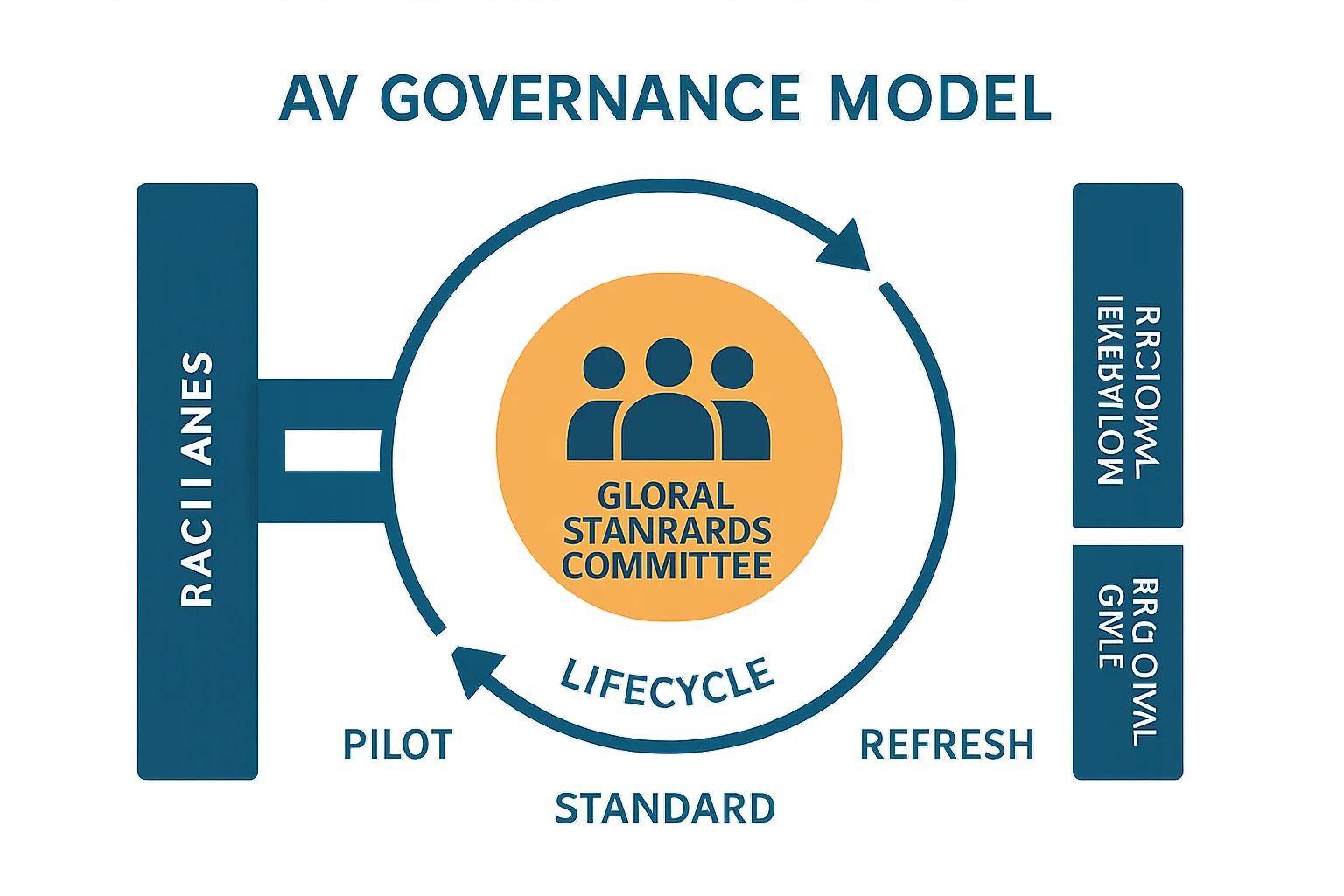
A strong governance model is the single most important enabler of scalable, supportable corporate AV. It codifies decision rights, ensures security and compliance, and makes room for innovation without derailing consistency.
Define the standard and who owns it
- Establish a Global AV Steering Committee with representation from IT (network, collaboration, endpoint), Security, Facilities/Real Estate, Procurement, and key business stakeholders (HR, Legal, Communications, Executive Office).
- Use a RACI to clarify who is Responsible, Accountable, Consulted, and Informed for:
- Design approval and certification of room kits
- Exception management and variance approvals
- Change control, patch windows, and maintenance freezes
- Refresh cadence, lifecycle budgets, and sustainability targets
Documentation and versioning
- Publish a standards package for each room type that includes:
- Bill of Materials (BOM), one-line diagram, detailed schematics, elevations, cable schedule, and rack layouts
- Network specification (VLANs, QoS, multicast), IP addressing guidance, and DNS/DHCP requirements
- Security posture (hardening checklist, credential policy, logging, remote access constraints)
- UX guides: control layouts, button maps, join/share workflows, accessibility guidance
- Maintain version control with semantic versioning and release notes; issue regional addenda for power, building codes, seismic/mounting, and language packs.
Naming, IP schema, and credentials
- Enforce a consistent device naming convention that encodes site, building, floor, room ID, and function (e.g., NYC-B02-F15-RM154-CAM01).
- Define IP schema standards:
- Dedicated AV VLANs by room class; documented DHCP reservations and lease times
- Certificate handling (SCEP/EST), mTLS where supported, and device identity lifecycle
- Role-based access control mapped to AD/Azure AD groups for admins, operators, and vendors
Security-by-design and compliance
- Firmware and patch policy: approved versions, test rings (pilot → early adopter → production), and rollback procedures.
- Logging and telemetry: syslog/SIEM integration, API/REST monitoring, SNMP traps, and audit trails.
- Least privilege and credential rotation: password vaulting, per-role tokens, just-in-time access, and vendor account time-boxing.
- Remote access control: Zero Trust principles, VPN/Privileged Access Management (PAM), IP allowlists, and session recording for break/fix.
Exceptions and innovation intake
- Create a controlled pilot pathway for new technologies:
- Business case and risk assessment, lab validation, and limited site pilots
- Success criteria (UX, reliability, security, TCO) and user feedback scoring
- A documented rollback plan with spares and support coverage
- Graduation criteria for inclusion into the standard, with training and support updates
Governance roles and responsibilities
| Role | Primary Responsibilities |
|---|---|
| Global AV Lead | Owns the standard; approves kits and UX; manages roadmap, versioning, and release notes. |
| Regional IT | Adapts standards to local power/codes; executes deployments; first-line support and telemetry. |
| Security | Defines hardening, credential, and logging policies; reviews exceptions and vendor access. |
| Procurement | Manages global frameworks, vendor SLAs, and lifecycle/budget alignment; consolidates SKUs. |
| Facilities | Ensures room readiness (power, HVAC, mounts, acoustics, lighting) and local code compliance. |
| Collaboration/UC Ops | Monitors rooms, manages firmware rings, handles incident response and MTTR metrics. |
| Executive Sponsor | Resolves cross-functional conflicts; sets funding, sustainability, and experience targets. |
Room Profiles That Scale: Reference Designs and Kits
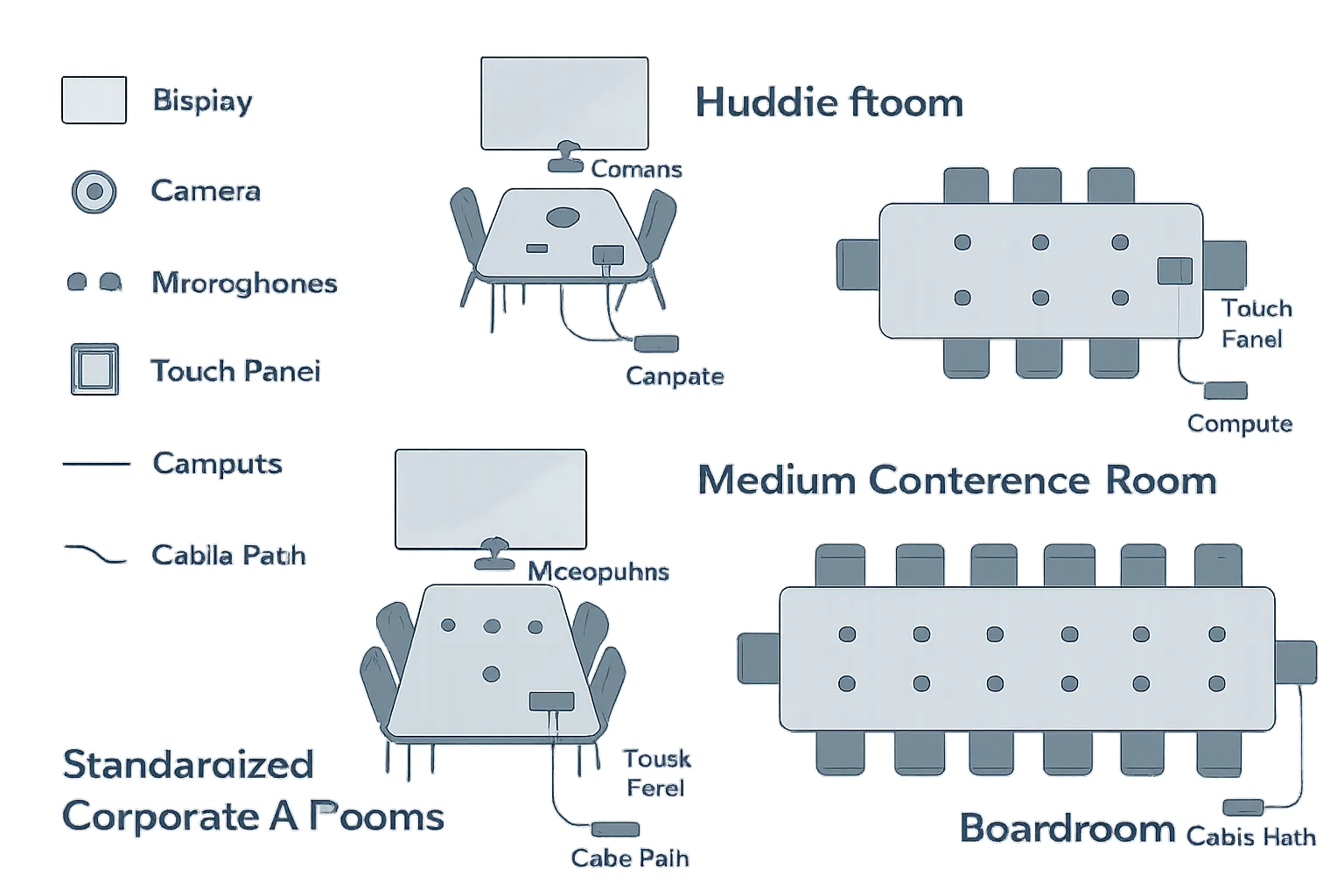
Standardized room profiles allow global teams to deploy and support spaces quickly, with predictable UX and performance. These reference designs are intentionally vendor-agnostic and map to common corporate av solutions used in multi-site enterprises.
Huddle and small rooms
- Single display (55–65″), integrated soundbar with camera/mic array, and table connectivity (USB-C/HDMI) for simple sharing.
- Native Microsoft Teams Rooms or Zoom Rooms appliance with BYOD fallback via front-of-room USB-C or HDMI ingest.
- Touch controller with consistent join/share layout and room status indicator.
Medium conference rooms
- Dual displays (65–75″) for gallery + content; PTZ camera centered under display.
- Ceiling or table mics feeding a small DSP; stereo or front-of-room audio.
- Touch controller, occupancy sensor for auto-wake, and secure wireless presentation.
Boardroom and large training spaces
- Multi-camera (speaker-tracking and auto-framing) with preset zones; confidence monitors at presenter/podium.
- Beamforming ceiling mics or distributed arrays to a room DSP; distributed audio with amplification.
- Producer mode for training (program/aux audio paths) and integrated assistive listening.
Town hall/all-hands and divisible spaces
- Networked audio (Dante/AVB), scalable amplification, and distributed video to side screens and overflow areas.
- Production switcher or NDI/soft-switch workflow for live events, record/stream to corporate platforms.
- Partition sensors and recallable presets for divisible rooms; redundant core for resilience.
Standards detail
- Approved platforms: Teams Rooms, Zoom Rooms, Webex (select one or two as primary to simplify support).
- Compute model: appliance for small/medium; dedicated UC compute or codec + server-assisted management for large/complex.
- Camera tiers: integrated bar cam (huddle), PTZ with presets (medium), multi-camera with tracking (boardroom/training).
- DSP options: none/in-bar processing (huddle), small room DSP (medium), enterprise DSP with expansion (large).
- Control UX: unified touch layout, accessible controls, consistent button maps, and room state indicators.
- Accessibility and DEI: captioning enabled by default where supported, mic coverage for all seating positions, easy-reach controls and ports, assistive listening, and visual alerts.
Reference Room Profiles
| Room Type | Capacity | Displays | Camera Tier | Mic/DSP | Compute | Control/Touch | Primary Platform Mode | BYOD Method | Typical BOM Notes |
|---|---|---|---|---|---|---|---|---|---|
| Huddle/Small | 2–6 | 1 x 55–65″ | Integrated bar cam | In-bar mics; no external DSP | Appliance (MTR/Zoom) | 7–10″ touch panel | Native room system | USB-C/HDMI ingest at table | Soundbar + display mount; single cable path to table; occupancy sensor optional |
| Medium Conference | 6–12 | 2 x 65–75″ | Single PTZ | Ceiling/table mics to small DSP | Appliance or UC compute | 10″ touch panel + room sensor | Native room system | Secure wireless + table HDMI | PTZ under main display; dual display brackets; small amp + front speakers |
| Boardroom | 12–20 | 2 x 75–98″ + confidence monitor(s) | Multi-cam with auto-framing | Beamforming arrays to enterprise DSP | UC compute/codec | 10–15″ touch + producer panel | Native + advanced meeting modes | BYOD via USB-C hub/bridge | Distributed speakers, assistive listening, rack-mounted DSP/amp, redundant PSU |
| Training | 12–40 | 2–3 displays + instructor confidence | Multi-cam (presenter + room) | Table/ceiling mics to DSP | UC compute + capture | Touch + scheduling panel | Native + lecture capture | USB-C/HDMI at podium | Program/aux audio, content capture, record/stream integration |
| Town Hall/All-Hands | 50–300+ | LED wall or large projection + side screens | Production camera(s) or fixed PTZs | Distributed mics to large DSP | Event compute + switcher | Event control surface + touch | Streaming broadcast + native overflow | NDI/SDI ingest, overflow streaming | Networked audio (Dante), scalable amps, failover core, intercom/comms |
| Divisible Space | Flexible | Per-partition displays | PTZ per zone | Zonal mics to matrix DSP | UC compute per zone | Touch with partition logic | Native per zone + combined mode | Table HDMI + wireless per zone | Partition sensors, preset recall, matrixed audio/video, flexible IO |
AV Systems Integration at Scale: From Design to Global Rollout
Delivering standardized corporate AV at scale is a program – not a project. The difference is a disciplined playbook that moves from pilot to template to mass deployment, with logistics, site readiness, and documentation that keep quality high and schedules predictable across regions. Here’s how to operationalize enterprise-grade av systems integration for a global rollout.
Pilot → template → scale
- Start with 3–5 pilot rooms per type across varied sites (HQ, regional office, high-density floor). Include different network conditions and local facility constraints to surface real-world variables.
- Define success criteria before you start: time-to-join targets (<30 seconds), audio clarity (MOS targets), camera framing accuracy, failure rates, mean time to resolution (MTTR), and user satisfaction (post-meeting survey/NPS for rooms).
- Collect UX data and telemetry: platform analytics, room monitoring alerts, CPU/thermal metrics, packet loss/Jitter/QoS stats, and qualitative user feedback.
- Finalize standards and lock BOMs: freeze approved components, firmware minimums, UX layouts, and naming/schema policies. Establish a “golden image” and configuration baseline for each corporate av system.
- Create implementation templates: room one-lines, rack elevations, cable schedules, device imaging scripts, acceptance checklists, commissioning forms, and training assets.
Kitting and logistics
- Pre-stage and rack-build: assemble, label, and cable in an integration facility; load golden images; apply certificates; burn-in test with simulated networks and platforms.
- Imaging and QA: validate audio paths, camera framing presets, control UX, occupancy behaviors, and BYOD/BYOM flows. Document pass/fail results with photos and serials.
- Serial capture and asset tagging: scan and log device serials, MACs, and warranty dates into the CMDB; apply QR labels that link to room guides, diagrams, and support forms.
- Packaging for global transit: shock/tilt indicators, custom foam, and palletization by room kit to reduce on-site staging time.
- Global spares and forward stocking: define RMA paths, minimum on-hand spares per region, and advance replacements for critical SKUs. Track consumption and auto-replenish via procurement workflows.
- Customs planning and regional SKUs: harmonized tariff codes, country-of-origin documentation, Incoterms, and local variants (power cords, mounts, plug types, language packs). Plan alternatives for constrained items to keep schedules on track.
Site readiness and risk management
- Construction checklists: verify power circuits and isolated grounds, data drops and PoE budgets, blocking and structural loads for displays/LED, conduit/pathways, acoustics (RT60 targets), lighting glare, and sightlines/camera FOV.
- Network readiness: VLANs, DHCP scopes, DNS, QoS/multicast, certificate enrollment, firewall rules, NTP, and monitoring probes validated ahead of arrival.
- Dry runs and mock cutovers: simulate join/share workflows, failover of networked audio, and rollback procedures. Confirm change freezes and maintenance windows with IT and Facilities.
- Risk register and mitigations: account for regional holidays, union/labor rules, after-hours access, freight delays, and permit timelines. Define rollback plans (fallback BYOD kit), on-site spares, and escalation paths to reduce MTTR.
- Final commissioning: document acceptance against the checklist, capture calibrated DSP files and control code hashes, and enroll devices in monitoring.
Documentation closeout
- As-builts and records: deliver signed one-lines, schematics, elevations, rack layouts, and a final network map with VLANs, IPs, and DNS entries.
- Device registry: CMDB export with serials, MACs, firmware versions, certificates, warranty dates, rack locations, and QR codes.
- Support runbook: L1–L3 troubleshooting flows, known-good configs, firmware ring plan, credential and certificate rotation policy, SLAs/XLAs, and escalation contacts.
- QR-coded room guides: quick-start steps, join/share workflows, accessibility instructions, and a link to request support – posted at the room entry and near the touch panel.
- Handover and training: conduct operator training for IT/Facilities, provide video guides, and capture sign-off with punch-list tracking and closeout dates.
With a repeatable pipeline – pilot, template, kit, deploy, document – you transform corporate audio visual from bespoke installations into a reliable, global program. The payoff is faster time-to-value, consistent experiences, and corporate av solutions that scale smoothly across campuses and countries.
Operate, Monitor, and Support: Keeping Corporate AV Systems Reliable
Operational excellence is where standardized corporate AV solutions prove their value daily. With a single pane of glass, tiered support, and disciplined change management, enterprises can minimize downtime, reduce truck rolls, and keep corporate AV systems performing consistently across campuses and countries.
“Organizations implementing application performance monitoring reduced mean time to resolution (MTTR) by 50–70%.” – Source
Single pane of glass
- Cloud/device management for status, alerts, firmware, and utilization analytics:
- Centralize monitoring for room kits, UC compute/appliances, cameras, mics/DSP, control processors, and signage players.
- Enforce firmware baselines, schedule updates in rings (pilot → early adopters → production), and validate with pre/post health checks.
- Dashboards by region and room type:
- Track room readiness (online, firmware, certificates), incident queues, and SLA timers by site and business unit.
- Visualize utilization trends (occupancy, meeting modality, no-shows, failure-to-join rates) to optimize capacity planning.
- Proactive health checks:
- Automated pings, synthetic join/share tests, and audio/video loopbacks detect issues before users do.
- Threshold-based alerts for packet loss, jitter, CPU/thermal, and DSP headroom to preempt incidents.
Tiered support and SLAs
- Tier 0 self-help (QR quick guides):
- QR codes link to room-specific guides, short videos, and “one-minute fixes” (mute/unmute, cable reseat, restart workflows).
- Tier 1 service desk:
- Verify symptoms, gather logs, trigger remote scripts, and escalate with complete context (room profile, firmware, last changes).
- Tier 2 AV NOC:
- Deep-dive diagnostics, remote remediation (config push, firmware rollback), and coordination with network/security teams.
- Tier 3 field/integrator:
- On-site break/fix and commissioning support using standardized runbooks and pre-staged spares.
- Experience-level agreements (XLA):
- Align response and restore targets to business-critical spaces (boardrooms, town halls) and measure user sentiment alongside uptime.
Incident, problem, and change management
- ITIL-aligned workflows:
- Incident: restore service fast with predefined playbooks per room type.
- Problem: root-cause analysis (RCA) and preventive actions (config baselines, vendor firmware fixes).
- Change: governed windows, approvals, and back-out plans to protect peak business hours.
- Maintenance windows and release cadence:
- Ring-based updates with canary rooms; freeze periods for quarter-end/board meetings.
- Documented rollback testing per device class (UC compute, control, DSP, cameras).
- Configuration drift control:
- Golden images and config hashes; daily drift reports and automated re-baselining to maintain consistency.
Continuous improvement
- Monthly ops reviews:
- Present KPIs by region and room type: incident volume, MTTR, first-time fix rate, remote resolution percentage, truck rolls avoided.
- Trend analysis:
- Correlate incidents with firmware versions, network segments, and room profiles; prioritize fixes that impact the most spaces.
- Training refresh:
- Update Tier 0–2 playbooks and microlearning content based on top issues; refresh end-user training for new features and UI changes.
- Lifecycle planning:
- Use utilization and incident trends to inform refresh timing, right-size room mixes, and standard upgrades for camera tiers, DSP capacity, and control UX.
When av systems integration is backed by robust operations – monitoring, tiered support, and continuous improvement – corporate audio visual becomes dependably “always on.” The result: fewer disruptions, faster recovery, and consistently better experiences across your global estate.
Security, Compliance, and Sustainability for Corporate Audio Visual
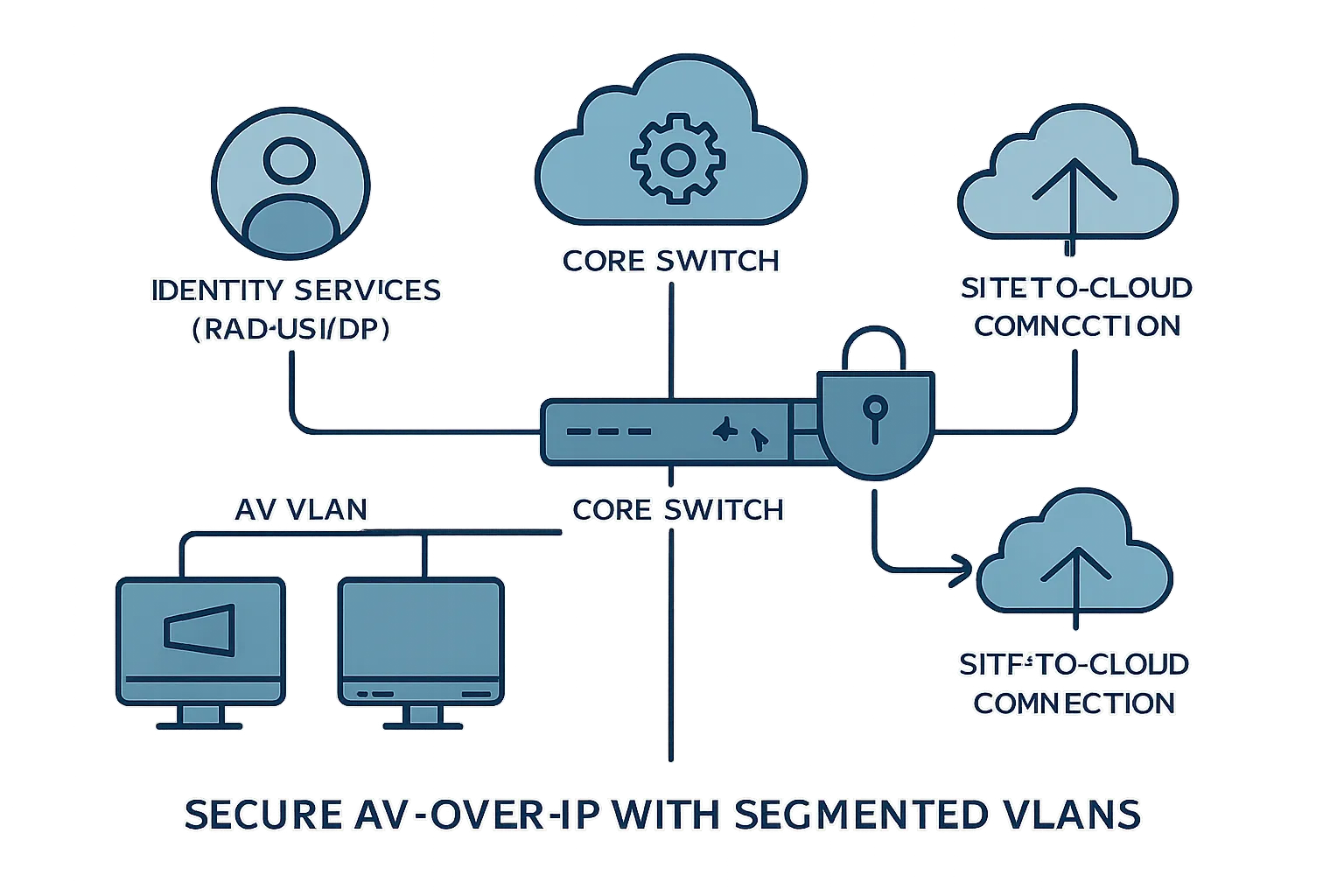
Secure, compliant, and sustainable corporate AV isn’t an add-on – it’s part of the standard. From segmented networks to responsible end-of-life practices, build these requirements into your corporate av solutions so they scale globally without risk or waste.
“Segment connected devices on dedicated networks, enforce strong identity and access controls, and maintain secure update processes to reduce risk.” – Source
Network and device security
- Segmented AV VLANs with ACLs, QoS, and multicast control; 802.1X for port access, device certificates for mutual TLS, and encrypted signaling/media where supported.
- Credential management: unique device credentials vaulted with rotation; RBAC tied to IdP groups; just-in-time admin elevation.
- Logging and SIEM integration: syslog/SNMP/API to central logging, anomalous behavior alerts, and audit trails mapped to NIST/ISO controls.
- Remote access controls: PAM-gated vendor access, IP allowlists, session recording, and time-boxed credentials.
Data privacy and compliance
- Region-aware data flows and sovereignty: align cloud and recording storage to regional requirements (e.g., GDPR, CCPA), with residency controls where available.
- Recording governance: retention and legal hold policies; DLP where appropriate; watermarking and consent prompts for sensitive meetings.
- Role-based access: least-privilege permissions for scheduling, control, monitoring, and retrieval of recordings; SSO with MFA and SCIM provisioning.
Sustainability and energy efficiency
- Equipment selection: prioritize ENERGY STAR and EPEAT where available; evaluate embedded compute vs. centralized processing for lifecycle emissions.
- Power and automation: auto power down, occupancy-based wake/sleep, and scheduled deep sleep in low-usage windows.
- Circularity: specify modular, repairable components with field-replaceable parts; extend useful life via firmware support; plan for certified e-waste and responsible recycling partners.
Audit and assurance
- Annual security and sustainability reviews baked into the AV standards refresh:
- Penetration testing and config hardening attestations for representative room profiles.
- Firmware lifecycle and CVE exposure review; patch cadence validation.
- Sustainability scorecard: energy use, utilization, repair vs. replace decisions, and end-of-life outcomes.
- Compliance artifacts: maintain evidence packs – network diagrams, RBAC matrices, vendor SBOMs, DPIAs – ready for audits and customer due diligence.
By embedding security, compliance, and sustainability into your av systems integration standard, you reduce risk, meet regulatory obligations, and shrink operational footprints – without sacrificing user experience.
UX, Training, and Adoption: Make Every Room Feel the Same
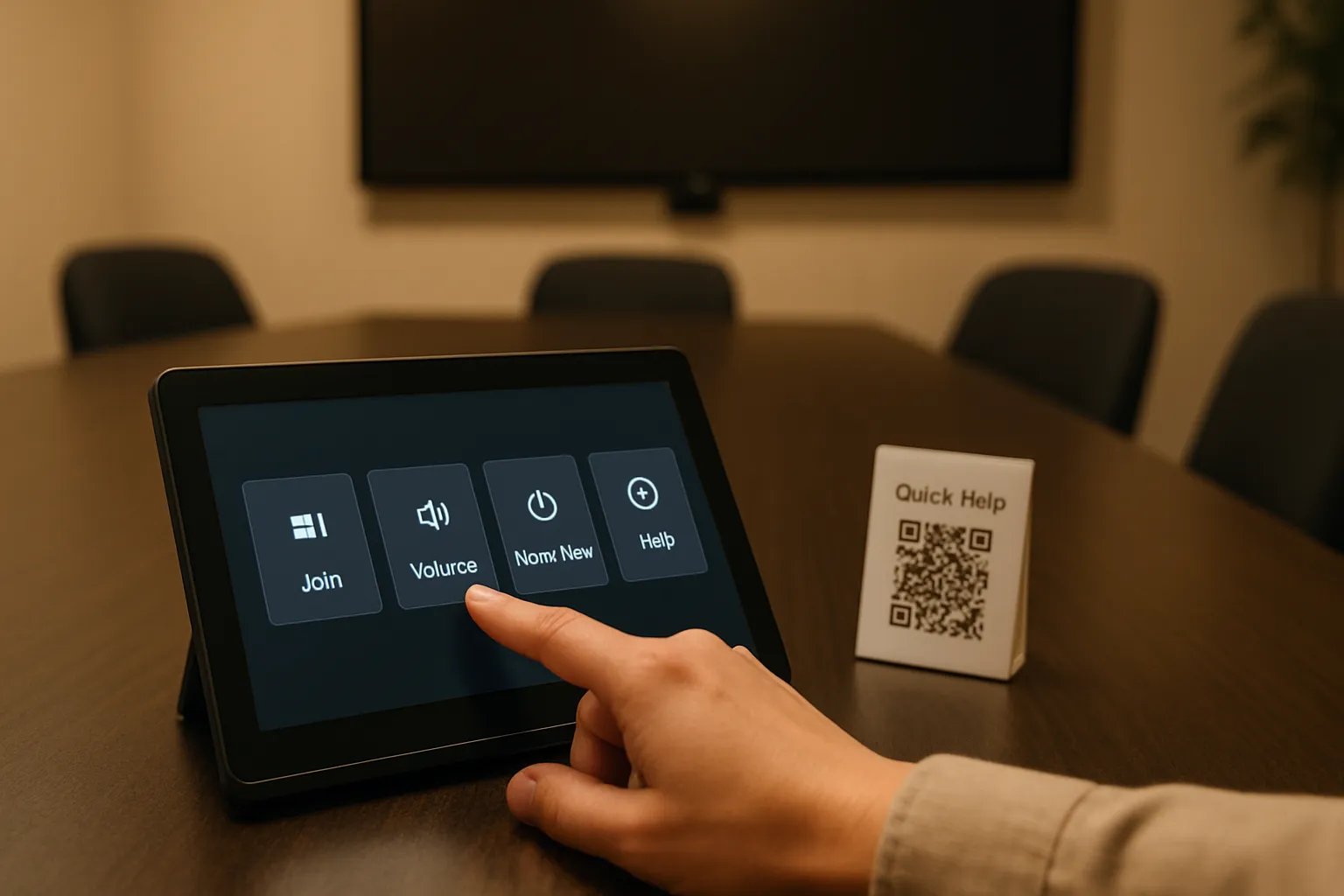
Standardized UX turns corporate av solutions into muscle memory. When every space behaves the same – join, share, adjust volume, ask for help – users start faster, make fewer mistakes, and feel more confident. Design for inclusivity, then train and reinforce with lightweight, repeatable learning.
Design the control experience
- Shared UI pattern across platforms:
- Primary actions visible on the home screen: Join, Share, Volume, Room Mode, Help.
- Consistent navigation language and button maps across Teams Rooms, Zoom Rooms, and Webex.
- Accessibility:
- Clear labels, high-contrast themes, and logical focus order.
- Screen-reader compatibility where applicable; tactile feedback or audible cues if supported.
- Easy-reach controls and ports; visual indicators for mute, camera on/off, and room status.
Training that scales
- Role-based curricula:
- End users: joining/sharing, BYOD etiquette, accessibility features, quick fixes.
- Admins: monitoring, firmware rings, remote remediation, config drift control.
- Executives/EA teams: white-glove workflows, concierge scheduling, confidence monitor use.
- Snackable microlearning:
- 2-minute “first-time in this room” videos for each room type.
- Laminated quick-start cards at the table and digital versions via intranet.
- Quarterly refreshers aligned to UI version updates.
In-room guidance and self-service
- QR codes link to:
- Room-specific quick guides, live chat or hotline, and a one-tap “Report an issue” form prefilled with room metadata.
- Status indicators:
- At-a-glance readiness: online, in use, or needs attention.
- Contextual help: on-screen prompts for common errors (no input detected, mic muted, camera blocked).
Feedback loops
- Post-meeting surveys:
- Trigger lightweight prompts asking about audio clarity, join time, and overall satisfaction.
- Measure UX KPIs:
- Failure-to-join rate, first-time success rate, time-to-share, and help requests per meeting.
- Iterate with versioning:
- Treat UI like software – release notes, A/B tests on layouts, and regional language packs.
- Roll improvements back into the corporate audio visual standard so every room benefits.
Budget, TCO, and Roadmap: Funding Corporate AV Solutions Over 36 Months
A 36‑month funding plan turns your standard into a predictable investment cycle. By sequencing work, locking standards early, and aligning refresh with leases and procurement windows, you control cost, compress timelines, and demonstrate ROI from your corporate av solutions.
Build the multi-year plan
- Phase by criticality and readiness:
- Standardize first: governance, reference designs, golden images, procurement frameworks.
- Upgrade second: priority sites (executive/board, customer-facing, high-utilization floors), then expand regionally.
- Refresh cadence by room tier:
- Huddle/small: 36–48 months; appliance lifecycle.
- Medium: 48 months; DSP/camera upgrades at mid-cycle if needed.
- Boardroom/event: 60 months; proactive component refresh and spares staging.
- Align with leases and procurement windows:
- Bundle site upgrades near lease renewals, remodels, or campus moves to capture construction synergies.
Where costs live
- Hardware and accessories: displays/LED, cameras, mics/DSP, compute/appliances, control, mounts, cabling.
- Software/licenses: room platform (MTR/Zoom/Webex), device management, analytics, signage, recording/compliance.
- Services: design/engineering, integration labor, commissioning, project/program management.
- Network enablement: switching/PoE, QoS/multicast, certificates/PKI, security review.
- Operations: monitoring, support (Tier 1–3), spares, RMA logistics, training, documentation.
- Facilities: electrical, blocking, acoustics, lighting, low-voltage pathways.
- Contingency: 5–10% for supply variance, regional code-driven changes, and currency swings.
Show the ROI story
- Reduced incidents and faster MTTR via standard kits, proactive monitoring, and remote remediation.
- Faster deployments from pre-approved BOMs and repeatable av systems integration templates.
- Higher utilization through consistent UX, training, and scheduling alignment.
- Fewer truck rolls and energy savings from remote management, occupancy-based automation, and power policies.
- Executive-ready KPIs: room readiness, adoption, XLA scores, and cost-to-support per room.
Communicate the roadmap
- Quarterly release notes:
- What changed in standards (UX, firmware rings, approved device tiers) and why.
- Leadership dashboards:
- Spend vs. plan, site progress, utilization trends, incident rates, and XLA outcomes.
- Regional roll plans:
- 90-day look-ahead with site readiness gates, dependencies, and risk flags.
36‑Month Rollout and TCO Planner (Sample)
| Phase (Months) | Sites/Rooms (Sample) | CapEx (Equip + Install) | OpEx (Licenses/Monitoring/Support) | Key Milestones | Success Metrics |
|---|---|---|---|---|---|
| P0: Standardize (1–3) | 3 sites / 12 rooms (pilot set) | $350,000 [localize] | $12,000/mo run-rate [localize] | Standards ratified; reference kits/BOMs frozen; procurement framework signed; monitoring platform stood up | Time-to-join <30s; pilot NPS ≥60; baseline incident rate established |
| P1: Foundation (4–9) | 6 sites / 60 rooms | $1,250,000 [localize] | $28,000/mo run-rate [localize] | Regional staging center online; spares program live; Tier 0–2 training completed | MTTR <45 min; 30% fewer truck rolls vs. baseline; readiness ≥97% |
| P2: Scale (10–18) | 12 sites / 180 rooms | $2,400,000 [localize] | $55,000/mo run-rate [localize] | Parallel crews deployed; customs/regional SKUs validated; wireless presentation standardized | Utilization +15%; incident volume per room −25%; XLA ≥95% critical rooms |
| P3: Expand + Optimize (19–27) | 10 sites / 220 rooms | $2,000,000 [localize] | $68,000/mo run-rate [localize] | Divisible/event spaces commissioned; analytics-driven right-sizing; accessibility enhancements rolled in | First-time success ≥98%; failure-to-join ≤1%; energy use −12% per room |
| P4: Refresh + Sustain (28–36) | 8 sites / 140 rooms (tiered refresh) | $1,100,000 [localize] | $70,000/mo run-rate [localize] | Mid-cycle camera/DSP updates; firmware ring v3; contract renewal with performance incentives | Total TCO −10% YoY; truck rolls −40% vs. baseline; satisfaction NPS ≥70 |
Note: Figures are illustrative and should be localized by finance for currency, tax, labor rates, and regional logistics.
With a transparent 36‑month plan, finance sees predictable spend, IT sees stable operations, and users see consistent, reliable corporate audio visual experiences – room after room, site after site.
Conclusion: Put This Playbook to Work
Standardized corporate AV isn’t just a technology decision – it’s a business strategy that reduces cost, speeds deployments, and delivers a consistent user experience at scale. With a strong governance model, reference designs, global kitting, and an operations-first mindset, you can deploy reliable corporate audio visual across every campus and country.
Your next steps
- Finalize governance and standards package; run 3–5 pilot rooms per profile.
- Lock SKUs, set up monitoring, and align SLAs – with an operations runbook in place before scale.
Why start with The Audiovisual Consultant
- Educational guidance on corporate AV systems, AV systems integration, and global standardization best practices.
- Use our checklists and templates to accelerate your standard and avoid costly rework.


