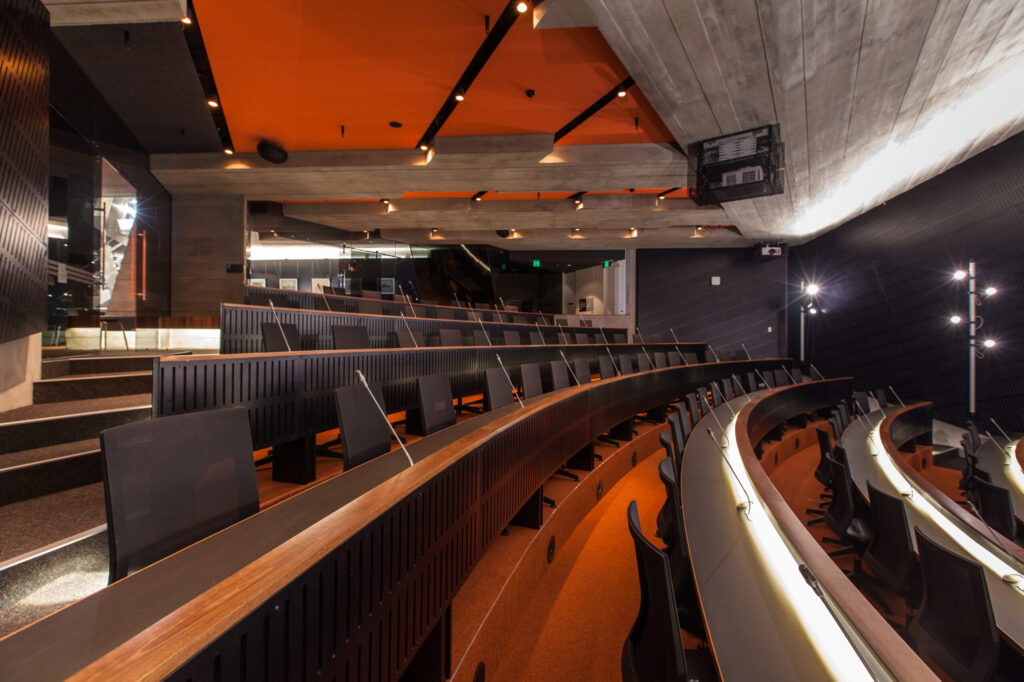

Conference System for Council Chambers and Meeting Halls: Read This Before You Buy
From city councils to school boards, the right conference system can make the difference between crystal‑clear debate and a confusing public experience. In this guide, The Audiovisual Consultant demystifies what makes a modern conference audio system work – covering microphones, DSP, loudspeakers, camera tracking, voting, interpretation, and hybrid streaming. We’ll also clarify commonly mixed‑up terms like conference system, conference audio system, conference sound system, audio visual sound system, and what “great conference room sound” really means for public meetings.
“IDC reports that with 67% of professionals working remotely, poor AV quality is undermining collaboration and impacting return‑to‑office efforts.” – Source
TL;DR
- You’ll learn how to design and specify a conference system that delivers clear conference room sound, smooth discussion control, reliable voting, and inclusive interpretation/assistive listening.
- We compare microphone options, DSP and networking choices, camera auto-tracking, hybrid streaming, and security – plus budgeting/RFP checklists.
- Outcome: a vendor‑neutral blueprint you can use to evaluate proposals and avoid costly rework.
What this guide covers
- Core components of a modern conference audio system for public meetings
- Room planning: layout, acoustics, power/data, and ADA accessibility
- Microphones, loudspeakers, DSP, and audio networking (Dante/AVB)
- Video, automatic camera tracking, and electronic nameplates
- Discussion management, e‑voting, interpretation, and assistive listening
- Hybrid (Teams/Zoom/Webex), streaming, recording, and transcription
- IT, security, monitoring, and lifecycle management
- Budget tiers and an RFP checklist; sources for deeper reading
Who this is for
- City/County/School councils, boards, and legislative chambers
- Facilities, IT, and communications leaders at civic venues and meeting halls
- AV consultants, architects, and general contractors scoping public meeting spaces
Why this beats typical vendor pages
- Vendor‑neutral selection framework that maps use‑cases to technology
- Practical checklists, intelligibility targets, and budgeting guidance
- Clear definitions for conference system, conference audio system, conference sound system, audio visual sound system, and conference room sound – so you can compare bids apples‑to‑apples
Plan the Room First: Layout, Acoustics, Accessibility, and Infrastructure
Great conference room sound starts with the room – not the gear. Before you select a conference system, map your space for intelligibility, sightlines, access, and cabling. A well‑planned chamber reduces echoes, prevents feedback, simplifies hybrid streaming, and ensures your conference audio system, cameras, and e‑voting all work together.
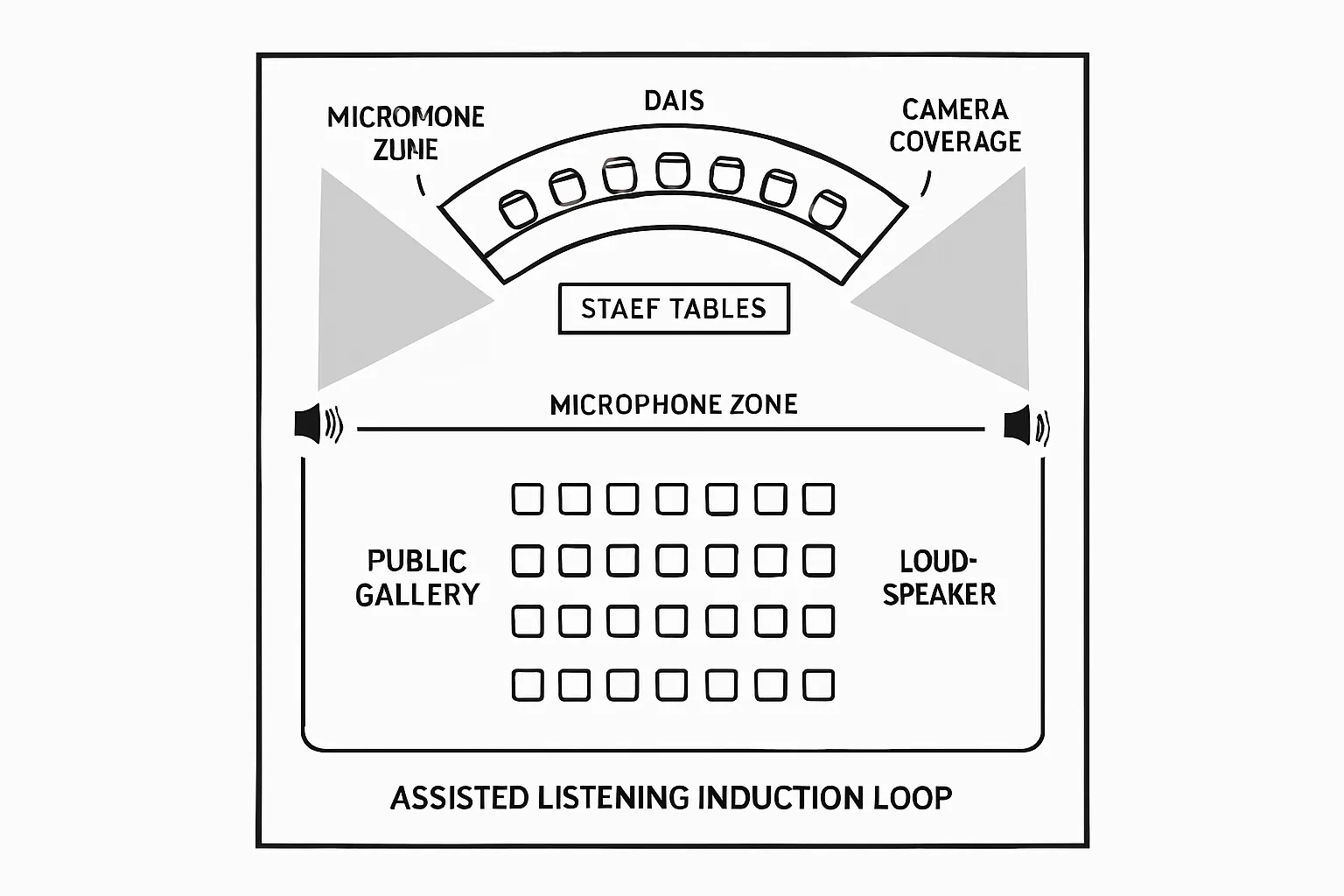
Target outcomes for council chambers and meeting halls
- Ensure speech intelligibility at every seat (council dais, staff tables, public gallery). Aim for consistent coverage and low variance so every voice is heard clearly on the floor, in overflow, and on the stream.
- Provide clear sightlines for displays and cameras; minimize visual clutter. Plan where monitors, nameplates, and camera positions won’t block faces or create awkward angles for auto‑tracking.
- Build ADA‑compliant access, assisted listening, and transcription workflows. Integrate hearing assistance, captioning, and language access into your audio visual sound system from day one.
Acoustic benchmarks and noise control
Room acoustics determine how hard your conference sound system has to work. Target:
- RT60 between 0.6–1.0 seconds (smaller rooms near 0.6 s; larger volumes may tolerate up to ~1.0 s).
- Low background noise from HVAC/mechanicals (design for quiet diffusers and vibration isolation).
- Speech Transmission Index (STI) ≥ 0.60 for clear intelligibility across the chamber.
Practical steps:
- Treat first reflections: Apply absorptive treatments at side walls/ceiling where early reflections hit listeners and microphones.
- Balance materials: Mix absorptive and diffusive finishes to control flutter echo without over‑deadening.
- Quiet the room: Seal door gaps, specify soft‑close hardware, isolate podiums and camera mounts to avoid rumble.
Seating layouts and microphone density
The seating plan drives microphone count, type, and discussion control. Align the conference system design to meeting formats and room geometry.
Common layouts:
- Dais: Semicircle or straight bench focuses camera angles and minimizes mic‑to‑mic crosstalk. Good for moderated debate and electronic voting.
- Horseshoe: Encourages discussion but requires careful loudspeaker zoning and camera presets to maintain face framing.
- Classroom/Public‑hearing: Audience mics and a clear public podium path for consistent levels during comment periods.
Microphone strategy:
- Mic‑per‑seat vs shared mic zones: Mic‑per‑seat yields the best conference room sound consistency, auto‑mixing, and name‑to‑mic mapping; shared mics reduce cost but complicate clarity and camera switching.
- Roles and priorities: Chair/Mayor priority, staff lectern, counsel table, and public podium should have defined logic in the discussion system.
- Coverage and gain before feedback: Keep mics close to talkers (gooseneck boundary/desktop mics at each position or low‑profile arrays) and avoid pointing loudspeakers back at open microphones.
Power, data, and cable pathways
Clean infrastructure keeps your conference audio system reliable and serviceable for years.
- Conduit to dais/podium/interpreter booths: Provide dedicated floor boxes with power, network, and spare capacity for future stations or nameplates.
- Separate pathways: Isolate AV and IT conduits to reduce interference and simplify maintenance. Reserve home‑run paths for cameras and assisted‑listening emitters/loops.
- Place devices early: Lock in camera sightlines, loudspeaker positions, and display heights during design development to prevent clashes with lighting, signage, and HVAC.
- Network design: Plan for Dante/AVB VLANs, PoE budgets for discussion units and cameras, and redundant switches where uptime is critical.
Accessibility and inclusivity
A public meeting must be accessible to be effective. Bake these into your baseline:
- Assisted listening: Choose hearing loop, FM, or IR based on construction and audience needs; coordinate loop layout with rebar and electrical to prevent interference.
- Wheelchair clearances: Provide accessible paths to the dais, lectern, and public comment mic; ensure reach ranges for control panels and nameplates.
- Sightline equity: Maintain camera angles and display sizes that include wheelchair users and sign language interpreters.
- Language access and transcription: Integrate interpretation booths or portable kits, plus live captioning/transcription for in‑room and streaming audiences.
“Public entities must ensure that communications with people with disabilities are as effective as communications with others.” – Source
Early coordination checklist
Align stakeholders by the Design Development (DD) phase to avoid costly rework and change orders:
- Team alignment: Architect, MEP, IT/network, AV integrator/consultant, broadcast/recording team, and facilities operations.
- Meeting formats: Define moderated debate rules, voting flows, public comment process, and hybrid participation (Teams/Zoom/Webex).
- Performance targets: RT60, STI, noise criteria, camera sightline rules, and assisted‑listening coverage.
- Infrastructure: Floor box locations, conduit sizes, PoE/network design, DSP/IO counts, and loudspeaker zoning.
- Lifecycle and security: Remote monitoring, device firmware policies, network segmentation, and spares strategy.
Getting the room right first ensures your conference system – microphones, DSP, cameras, voting, and interpretation – delivers consistent, intelligible results for every meeting.
The Conference Audio System: Microphones, Loudspeakers, DSP, and Networking
A reliable conference audio system starts with intentional mic selection, predictable loudspeaker coverage, powerful DSP, and resilient networking. Done right, your conference system delivers consistent conference room sound for every participant – on the floor, in overflow, and on the stream – while supporting discussion control, voting, and interpretation.
Microphone strategies for intelligibility and control
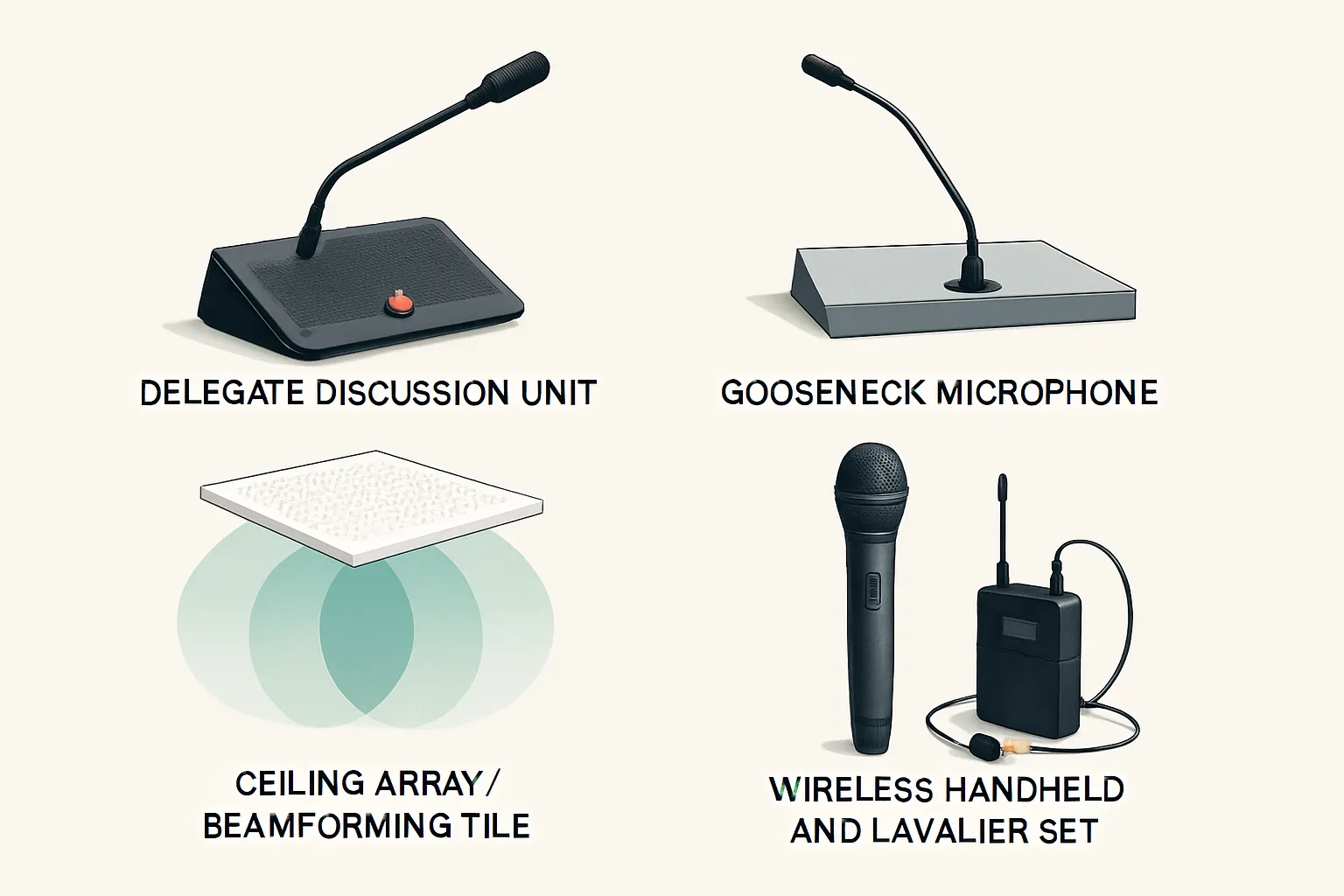
- Delegate discussion units (wired/wireless) with push‑to‑talk and speaker: Best for chambers prioritizing orderly debate, automatic camera tracking, and name‑to‑mic mapping.
- Gooseneck mics at dais and lecterns for precise pickup and priority logic: Close‑talk placement maximizes gain‑before‑feedback and supports chairman override.
- Ceiling array and beamforming options for flexible setups: Useful in multi‑purpose rooms where table layouts change; pair with strong DSP and acoustic control.
- Wireless handheld/lavalier for presenters and public comment: Add mobility for staff briefings, guest speakers, and remote overflow.
Loudspeakers and coverage
- Distributed ceiling speakers for even SPL in meeting halls: Aim for consistent coverage (+/‑3 dB) across dais, staff tables, and gallery.
- Column arrays near dais/public gallery: Improve direct‑to‑reverb ratio and preserve sightlines; steerable models help keep energy off hard surfaces.
- Zoning: Chamber, overflow, lobby, and recording/broadcast mix: Independent zones enable tailored levels, delays, and mixes without compromising the room.
DSP: the brain of conference sound
- Automixing, AEC, adaptive EQ, dynamics, and feedback suppression: Keep open microphones under control and maximize intelligibility.
- Routing presets per meeting type: Switch quickly between regular session, public hearing, executive session, and hybrid modes.
- Chairman override and N‑1 mixes for hybrids: Guarantee the chair’s priority and provide clean mixes to remote platforms without echo.
Audio networking and I/O
- Dante/AVB for scalable I/O: Use managed switches with QoS and VLANs to separate AV traffic from enterprise data.
- Redundant paths and PoE budgeting: Dual‑network uplinks for mission‑critical nodes; confirm PoE headroom for discussion units, ceiling arrays, and PTZ cameras.
- Recording feeds and assistive‑listening sends: Provide dedicated post‑fader and pre‑fader buses for archives, streams, interpretation, and hearing assistance.
Intelligibility metrics to design by
- STI targets and verification: Commission to STI ≥ 0.60; measure with STIPA and validate after seating/furnishing.
- Measurement mics and room tuning: Capture baseline data (RT60, NC, STI), apply EQ and delays by zone, and retest post‑tuning.
“An STI value of 0.60 or higher is classified as ‘good,’ with typical targets for conference and lecture spaces ranging from 0.60 to 0.75 or above.” – Source
Microphone options comparison
| Option | Best use cases | Pros (intelligibility/control/flexibility) | Watch‑outs (spill, HVAC noise, battery/RF) | Typical accessories (shock mounts/pop filters/nameplates) |
|---|---|---|---|---|
| Delegate unit (wired/wireless) | Council dais, committee rooms needing orderly debate, voting, camera auto‑tracking | Excellent talker proximity; built‑in PTT logic; integrates discussion control, voting, ID; consistent levels | Table real estate; potential table thumps; wireless versions need charging and RF planning | Low‑profile shock pads, mini windscreens/pop filters, e‑ink/nameplate integration, cable management kits |
| Gooseneck (dais/lectern) | Fixed seating at dais, staff lectern, public podium | Highest gain‑before‑feedback; precise pickup; easy chairman priority | Visual presence; picks up table noise if un‑isolated; requires good operator discipline | Shock mounts/isolation bases, foam windscreens/pop filters, nameplate stands, gooseneck length options |
| Ceiling array/beamforming | Reconfigurable rooms, clean table aesthetic, limited cable access | Flexible coverage zones; minimal table clutter; fast reconfiguration | Lower G‑B‑F vs close mics; susceptible to HVAC and ceiling noise; requires robust DSP | Ceiling backcans/frames, acoustic backer boxes, commissioning software, alignment templates |
| Wireless handheld/lavalier | Presenters, roaming staff, public comment overflow | Mobility; easy handoff to speakers; body‑worn options for hands‑free | Battery management; RF coordination; handling noise (handheld) and clothing rustle (lav) | Rechargeable battery kits/chargers, antenna distro, bodypack clips, handheld clips/windscreens |
Video and Camera Auto‑Tracking That Follows the Microphone
When cameras follow microphones, your audience sees the right person at the right time – with smooth pacing on streams and recordings. Designing camera placement, presets, and signal flow around discussion mic logic creates tight cuts, reduces operator load, and keeps hybrid participants engaged.
Camera placement and lenses
- Cross‑shooting angles: Place PTZs at opposing angles to the dais and staff tables to capture faces, not profiles; add a dedicated podium camera to anchor public comment.
- Heights and lenses: Mount just above eye level to avoid unflattering perspectives; select focal lengths that frame seated speakers without excessive zoom “breathing.”
- Seat presets: Create discrete presets for every council and staff position; include safe, slow pan/tilt limits and headroom to accommodate minor seat shifts.
- Prevent motion sickness: Use conservative pan/tilt speeds and short travel distances between adjacent presets; avoid whip pans across the chamber.
Mic logic → camera presets
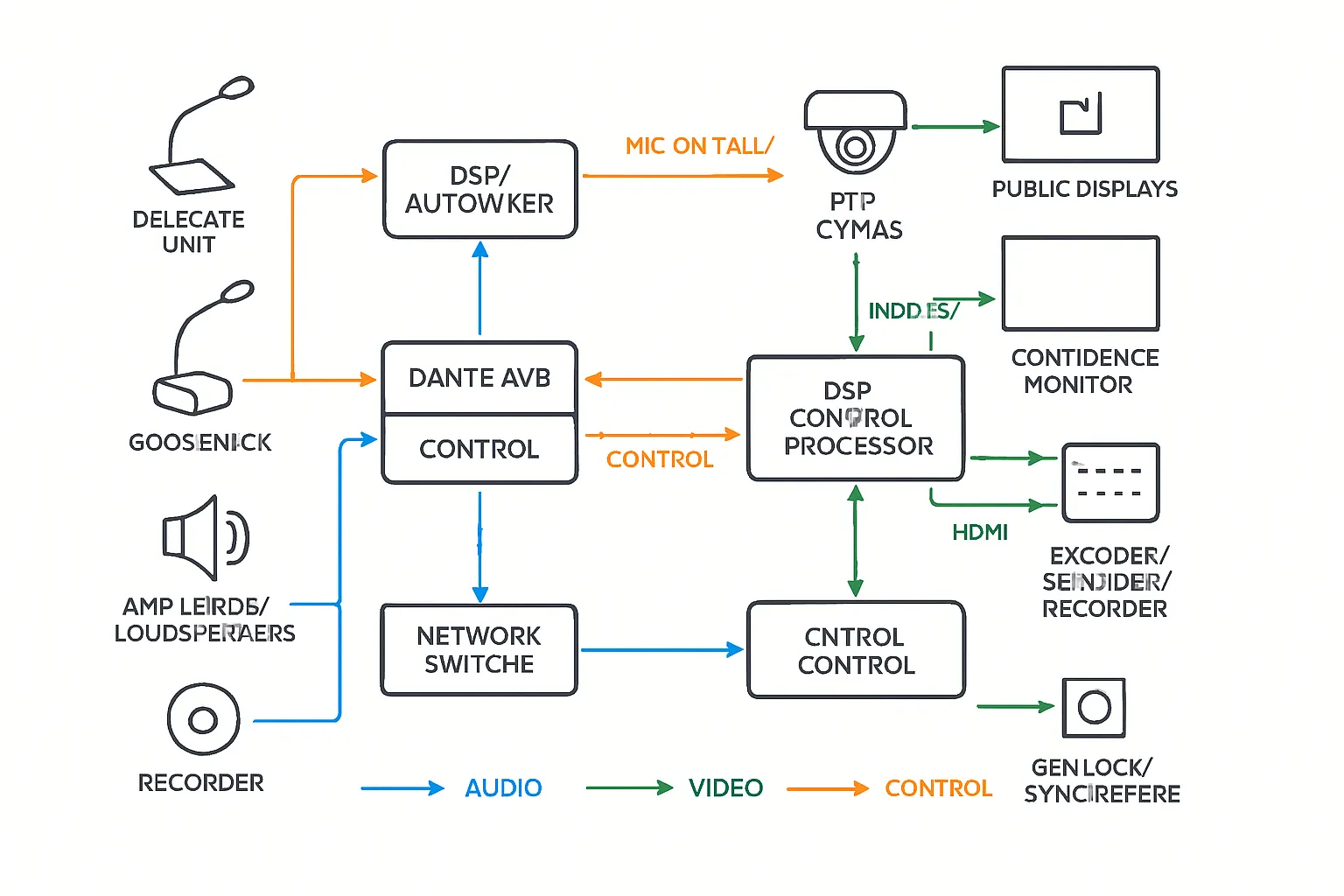
- ‘Mic on’ tally to preset recall: Discussion systems or DSPs publish mic‑active events to a control processor or directly to PTZ cameras via API (e.g., VISCA/IP).
- Switching behavior: Define logic to cut to the active speaker; fall back to a wide shot if multiple mics open, or prioritize the chair when tie‑breaking.
- Multi‑camera logic: Use round‑robin or “last‑shot exclusion” to prevent jump cuts between similar angles; employ gentle fades/dissolves for room‑wide transitions.
- Redundancy: Maintain a global “wide” preset per camera and an operator override panel for unscripted moments.
Display and nameplate considerations
- Confidence monitors and public displays: Position confidence screens where councilors can see agendas, timers, vote results, and remote participants without eye‑line drift.
- Electronic nameplates: Sync e‑ink/LCD nameplates to the seating chart so on‑screen lower‑thirds and camera presets reference the correct person; include phonetic name support for the clerk and captioners.
- Sightline protection: Keep displays and nameplates low‑profile to avoid blocking faces or microphones; validate during mock‑ups.
Signal flow and synchronization
- A/V sync targets: Maintain audio‑video sync within ±45 ms for lip‑sync acceptability; tighter for close‑ups.
- Production buses: Create dedicated record and stream mixes, plus a separate program feed for chamber displays and overflow.
- Transport choices: Use SDI for long‑run reliability to the switcher, HDMI for short in‑rack hops, and NDI/SRT for flexible IP contribution when needed.
- Control and timing: Centralize camera control via the room processor; if available, use genlock or timing references to keep multi‑camera cuts stable during hybrid events.
Designing video around microphone logic turns meetings into a clear, viewer‑friendly experience – on site and online.
Discussion, Voting, and Interpretation: Running Order and Inclusivity
A well‑orchestrated conference system does more than pass audio – it structures debate, records the public record, and includes every participant. Build your discussion workflow first, then align microphones, DSP, control, and displays so the conference audio system, e‑voting, interpretation, and assisted listening work as one.
Discussion management
- Moderated queues and request‑to‑speak (RTS): Enable RTS from delegate discussion units or software clients. Support FIFO, chair‑ordered, and agenda‑ordered queues. Limit NOM (number of open microphones) to protect gain‑before‑feedback and maintain clean conference room sound.
- Chairman priority and speech timers: Chair override mutes or lowers other mics instantly. Visible timers (on confidence monitors and public displays) keep debate fair; include extend/pause rules and audible chimes if appropriate.
- Templates per meeting type: Store presets for standard session, committee, and public hearing (mic logic, NOM, camera cuts, and display layouts).
- Agenda tie‑ins and logging: Link speaking turns to agenda items; automatically time‑stamp speaker name, position, and duration. Export speaker order and durations to the minutes to streamline clerking.
- Public comment flow: Provide a podium mic with clear stage directions, lighting, and visible countdown. Optionally integrate barcode/QR check‑in so the clerk can preload names and phonetics for accurate captions and nameplates.
- Redundancy and operator control: Give the clerk a “global wide shot,” “mute all,” and “clear queue” button. Provide an operator panel for manual camera and mic interventions if the discussion changes course.
Electronic voting
- Motion types and rules: Support Y/N/Abstain, multi‑option (ranked choice), and roll‑call votes. Configure quorum detection, majority thresholds, tie‑break logic, and anonymity (open vs secret ballot) per motion.
- Prompts and confirmations: Show clear on‑screen prompts at delegate units and confidence monitors. Require confirmation for binding votes; time out inactive seats with chair override to proceed.
- Instant display of results: Publish totals to chamber displays and the stream in real time, with per‑member breakdown for open votes. Include accessible color/contrast and screen‑reader‑friendly outputs for hybrid viewers.
- Audit trail and exports: Archive full vote logs (member, option, timestamp, revotes) with cryptographic checksums where supported. Export to CSV/PDF and push to agenda/minutes systems. Maintain an operator “reopen vote” permission with audit logging.
Interpretation and language distribution
- Onsite vs remote interpretation: Onsite booths minimize latency and rely on local audio; remote simultaneous interpretation (RSI) increases flexibility and language availability but needs robust low‑latency links and return audio. Choose per meeting scale and staffing.
- Standards and consoles: Specify interpreter consoles that follow recognized industry practices (e.g., cough/mute, relay, handover) and provide two‑interpreter workflows per language channel for long sessions.
- Channel counts and routing: Plan language capacity up front (e.g., 4/8/16+ channels). DSP should route “floor” and “return” to/from booths with independent headroom and mix‑minus to avoid echo.
- Audience distribution: Use IR for contained coverage and privacy, RF for broad/low‑cost distribution and outdoor/overflow flexibility. Provide labeled receivers, spare headsets, alcohol wipes, and replacement earpads; implement a check‑in/charge‑out process with charging carts.
- Hygiene and ergonomics: Stock disposable mic covers for interpreter talkback, supply low‑handling‑noise headsets, and ensure adequate ventilation and lighting for interpreter comfort.
Assisted listening and accessibility
- Hearing loop vs IR/FM:
- Hearing loop (induction) integrates directly with T‑coil hearing aids and should be commissioned to meet IEC 60118‑4 performance across the listening plane – excellent for permanent chambers with fixed seating.
- IR offers privacy and is immune to RF spill – good for adjacent rooms/closed sessions.
- FM is cost‑effective and robust for large overflow areas and temporary setups.
- Coverage, signage, and receivers: Design for even field strength/line‑of‑sight, post internationally recognized symbols at entries and on the dais, and keep an inventory of receivers with asset tags, spare batteries, and sanitization protocol.
- Live captioning and transcription: Provide captions in‑room and on the stream. Choose human captioners for critical sessions or high‑accuracy ASR for routine meetings; archive transcripts alongside recordings for public access and ADA‑aligned effective communication.
- Inclusive user experience: Ensure prompts, timers, vote results, and captions meet readability/contrast targets on displays; provide phonetic name fields for accurate pronunciation; keep podiums wheelchair‑accessible with reachable push‑to‑talk.
A tightly integrated discussion and voting workflow – anchored by a well‑tuned conference sound system and inclusive language/assisted‑listening services – keeps meetings orderly, transparent, and accessible to everyone in the room and online.
Hybrid Meetings and Streaming Without Echoes or Dropouts
Hybrid attendance shouldn’t compromise clarity. Design your system so conference room sound is stable, echo‑free, and consistent across platforms – while your stream and archive stay reliable and accessible.
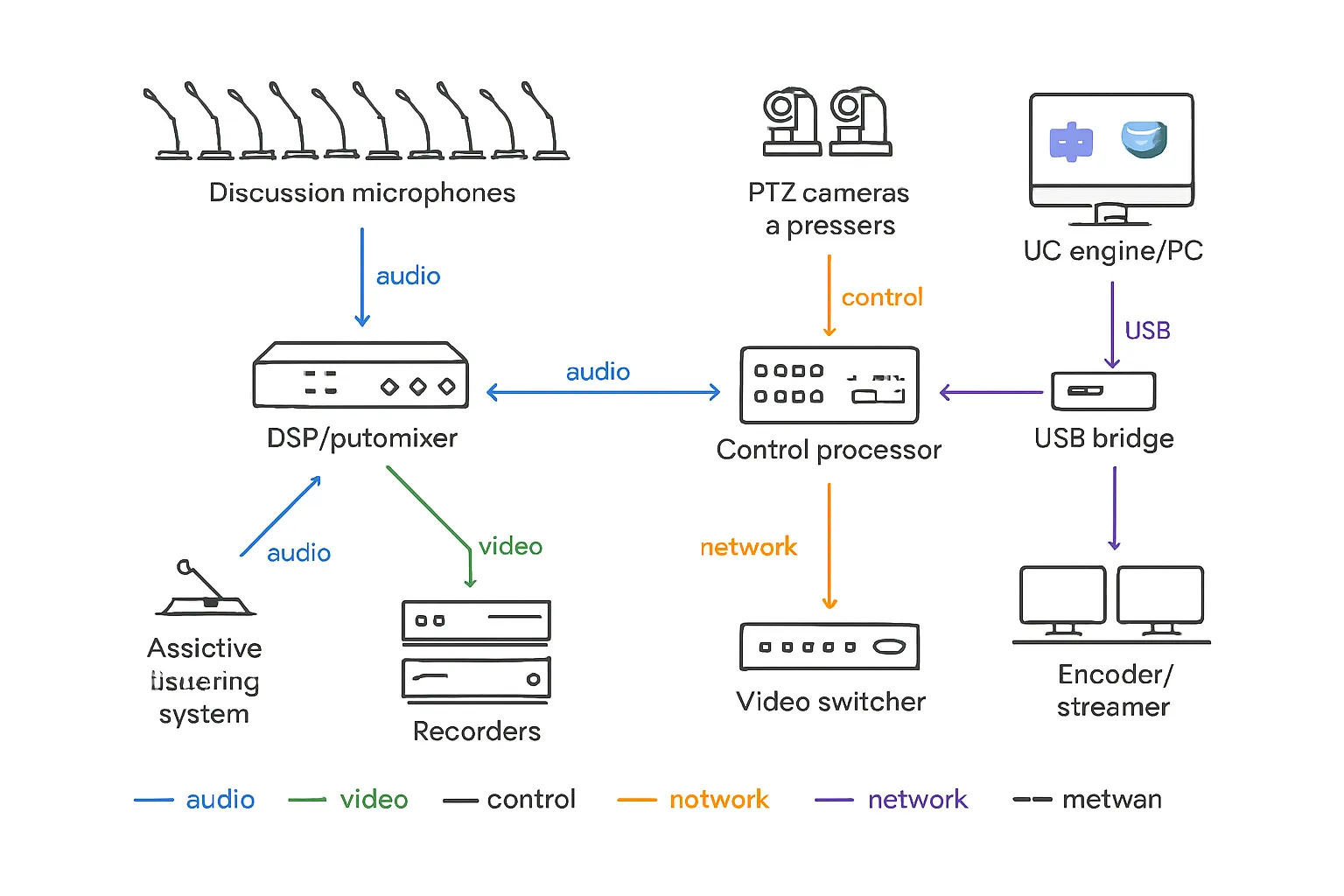
Platform integration
- Teams/Zoom/Webex with USB bridging: Use a certified USB bridge or UC engine to expose the room’s microphones, loudspeakers, and cameras as native devices to the platform.
- Echo‑free mixes and AEC alignment: Provide the platform a clean N‑1 mix with no far‑end audio returning to the far end; disable either the DSP’s AEC or the platform’s AEC on the return path to avoid “dueling AECs.”
- Manage double‑talk and far‑end noise: Set noise reduction and gate thresholds conservatively; use adaptive automixing and priority for the chair. Verify mute sync both ways (hardware/software).
- Operator safeguards: Include a hard “mute all room mics” and “hold music” bus for recessed sessions or technical resets.
Streaming and recording
- Encoders and CDNs: Feed a program mix to a hardware or cloud encoder and distribute via a primary CDN (e.g., public site or social platform) with a backup RTMP/SRT path for failover.
- Redundant streaming paths: Configure automatic failover to a secondary encoder or cellular/SRT contribution; keep a local on‑prem encoder as hot standby.
- Recording formats: Capture both a multitrack audio file (for post mixing/transcription) and a program mix (for fast publishing). Record time‑stamped bookmarks aligned to agenda items.
- Metadata and search: Embed speaker IDs, motion tags, and agenda item metadata in the file or sidecar so archives can be searched by person, topic, or vote.
Accessibility and transparency
- Live captions: Provide captions on‑platform and in‑room, with a human captioner for critical sessions or high‑accuracy ASR for routine meetings. Archive transcripts alongside video.
- Language channels: Stream alternate audio tracks or separate language streams; publish receiver pick‑up instructions for in‑room attendees.
- On‑demand archives: Publish promptly with retention policies that meet open‑records requirements; include indexes by agenda item and speaker.
- Privacy and redaction: Define workflows to blur faces or mute segments when legally required, retaining an audit trail of edits for compliance.
Security, Monitoring, and Lifecycle Management for AV on the Network
When your conference system lives on the enterprise network, security and reliability are as important as intelligibility. Treat the conference audio system and related devices (cameras, encoders, discussion units, nameplates) like any other critical IT workload: segmented, authenticated, monitored, and documented. The payoff is predictable conference room sound, fewer outages, and faster recovery when issues arise.
Secure by design
- Network segmentation and traffic control:
- Place AV on dedicated VLANs with ACLs that allow only necessary east–west and north–south traffic (DSP to endpoints, control to devices, encoders to CDN, etc.).
- Apply QoS for Dante/AVB or other real‑time media. Honor manufacturer DSCP markings and verify switch queues; enable IGMP snooping and queriers for multicast audio where applicable.
- Contain service discovery: constrain mDNS/Bonjour to specific VLANs or use controlled gateways that advertise only required services to defined subnets.
- Hardened identity and access:
- Enforce device certificates for management interfaces; prefer 802.1X (where supported) to prevent rogue connections.
- Standardize firmware policies: approved versions, test in staging, then deploy in windows with rollback plans. Lock down default credentials, require complex passwords, and disable unused services.
- Implement SSO and role‑based access for control GUIs (operator, clerk, engineer, admin). Require MFA for admin‑level access and log all permission changes.
- Perimeter and cloud considerations:
- Use VPN or zero‑trust brokers for remote access – no open port forwarding to AV devices.
- If using cloud monitoring/control, allowlist vendor endpoints by FQDN, restrict egress, and document data flows for compliance.
Monitoring and support
- Telemetry and logging:
- Collect SNMPv3/REST metrics from DSPs, discussion units, network switches, encoders, and PTZ cameras (status, latency, clock sync, PoE draw, temperature).
- Send syslog to your SIEM with alerts for link down, clock loss, DSP licensing errors, stream failures, high CPU/temp, and storage thresholds.
- Track stream health (bitrate, dropped frames, CDN ingest errors) and assisted‑listening device counts during sessions.
- Remote management and recovery:
- Maintain a centralized configuration vault for DSP files, control processor projects, camera presets, nameplate layouts, and switch configs – automated nightly backups with versioning.
- Use out‑of‑band tools (managed PDUs, service console NICs) for safe reboots and firmware rollbacks when the main network is impaired.
- Spares and swap strategy: Keep N+1 spares for critical devices (DSP, PoE switch, discussion unit chargers, microphones, encoders). Pre‑provision spare images and label licensing dependencies to minimize downtime.
- Runbooks and support flow:
- Publish tiered runbooks: operator checklist (before/during meeting), engineer escalation (network/DSP), and emergency procedures (“audio only” fallback, local record path).
- Define RTO/RPO targets for the conference sound system, stream, and recording – test recovery drills quarterly.
Reliability and power
- Power and thermal resilience:
- Size UPS for core AV racks (DSP, switches, encoders, control) to ride through short outages and allow graceful shutdown. Include network cards to signal shutdown scripts.
- Validate PoE budgeting with 20–30% headroom across switches and midspans, considering worst‑case draw for ceiling arrays, PTZs, and discussion units during charging.
- Plan rack airflow and thermal limits; monitor intake/exhaust temps and keep dust control on a PM (preventive maintenance) cadence.
- Startup/shutdown and maintenance policies:
- Define boot order (switches → control → DSP → endpoints → encoders) and scripted restores for presets and routing. After power events, auto‑verify Dante/AVB subscriptions and camera presets.
- Change management: use tickets for all modifications (firmware, presets, QoS, VLANs). Test in staging, document impacts, and schedule after‑hours windows for public meeting spaces.
- Documentation and lifecycle:
- Maintain as‑built drawings, IP and VLAN schemas, QoS policies, cable IDs/patch maps, device inventory with warranty dates, and password escrow procedures.
- Set a refresh cycle for high‑duty components (batteries, mics, chargers, encoders) and a quarterly review for security advisories and firmware bulletins from vendors.
With a secure, observable, and well‑documented audio visual sound system, your chamber gains the stability to support clear debate, dependable voting, and accessible broadcasts – meeting after meeting.
Budget Tiers, RFP Checklist, and Sources
Right‑sizing your conference system budget is about matching use‑cases to outcomes: intelligible conference room sound, orderly debate and voting, and accessible public records. Use the tiers below as order‑of‑magnitude guidance, then tailor quantities and finishes to your chamber.
Budget tiers (order‑of‑magnitude)
| Room size | Good (core mic+DSP+two PTZ) | Better (discussion units+auto‑tracking+assistive listening) | Best (full discussion/voting+interpretation+redundant streaming) |
|---|---|---|---|
| Small meeting hall (≤12 seats) | ~$25k–$60k. Close‑talk goosenecks (or a compact ceiling array), small DSP with automixer/AEC, 2x PTZ cameras with presets, distributed ceiling speakers, basic program/stream recorder, USB bridge for Teams/Zoom/Webex. | ~$55k–$110k. 8–12 delegate units with push‑to‑talk and integrated loudspeakers, DSP with camera follow‑mic logic, 2x PTZ + confidence display, assisted listening (FM/IR or small loop), operator touchscreen, branded graphics for stream. | ~$100k–$180k+. Full discussion system with nameplates, e‑voting, automated camera switching, assisted listening loop to IEC 60118‑4, hybrid kit with failover encoder, multitrack recording, policy‑based archives, starter interpretation (1–2 languages). |
| Medium council (13–30) | ~$60k–$140k. Mixed gooseneck/ceiling arrays, larger DSP with more I/O, 2–3 PTZs and a compact switcher, better loudspeaker zoning (dais/gallery/overflow), N‑1 hybrid mix, on‑prem encoder to primary CDN. | ~$120k–$260k. 14–30 delegate units, chair priority and request‑to‑speak, 3–4 PTZs with auto‑tracking, assisted listening system with receiver inventory, confidence/public displays for agenda/timers/vote results, monitoring and remote management. | ~$220k–$420k+. Discussion + e‑voting with quorum/roll‑call, electronic nameplates, 4+ PTZ with redundant switcher/encoders (primary/backup), language distribution (IR/RF) 2–4 channels, transcription/captioning pipeline, storage retention with indexing. |
| Large chamber (31+) | ~$140k–$260k. High‑density mic plan (goosenecks or beamforming), 3–4 PTZs, scalable DSP, distributed column/ceiling loudspeakers, hybrid integration for multiple dais/staff/podium feeds, program + multitrack record. | ~$250k–$520k. 31–60+ delegate units, robust auto‑tracking presets per seat, signage/large displays, assisted listening loop across seating bowl, device monitoring, operator panel, improved acoustics and STI commissioning. | ~$450k–$900k+. Enterprise‑grade discussion/voting, advanced interpretation (6–16 channels, booths or RSI), redundant streaming paths (RTMP/SRT), on‑prem + cloud archives with metadata/bookmarks, network redundancy (stacked switches, PoE headroom), full lifecycle management. |
Notes: Ranges are indicative and vary by region, finishes, furniture, acoustics, cabling distances, and redundancy/security requirements.
RFP/specification checklist
- Meeting formats and capacity
- Intended formats (moderated debate, committee, public comment, hybrid) and seat count by role (council, staff, public podium, press).
- Number of simultaneous open mics (NOM) and chair priority behavior.
- Acoustic and intelligibility targets
- RT60 and noise criteria (NC/RC) targets, treatment locations, and commissioning; required STI ≥ 0.60 (design and verification method).
- Microphones and endpoints
- Mic types/quantities (delegate units, gooseneck, ceiling arrays, wireless handheld/lavalier), nameplates, and podium.
- Assisted listening (loop/FM/IR) coverage plan, receiver inventory, signage.
- Interpretation: channel counts, booths/RSI, audience distribution (IR/RF).
- Cameras, displays, and switching
- PTZ camera count, lensing, mounting, and per‑seat presets; rules for multi‑mic shots and fallback wide shots.
- Confidence/public displays for agenda, timers, captions, and vote results.
- Streaming, recording, and archives
- CDN/streaming targets, redundancy/failover, multitrack vs program recording, time‑stamped bookmarks, transcription/captioning, retention and privacy policies.
- DSP, networking, and control
- DSP features: automix, AEC, adaptive EQ, feedback suppression, presets per meeting type, N‑1 mixes.
- Audio networking: Dante/AVB, QoS, VLANs, PoE budgets, redundancy (stacked switches/dual NICs).
- Monitoring/management: SNMP/REST, syslog, remote backups, configuration vault, alerting thresholds.
- Security and IT operations
- Authentication (SSO/RBAC/MFA), certificate/802.1X, mDNS containment, firewall/ACL requirements, approved firmware policy and rollback plan.
- Deliverables and handover
- As‑builts (floor plans, elevations, risers, IP/VLAN schema, QoS/ACLs), device inventory with warranty, operator/administrator training, commissioning reports (STI/RT60), test recordings, runbooks, and spares list.
Sources and further reading (selected)
- ADA.gov – Effective Communication (Title II): https://www.ada.gov/resources/effective-communication/
- Rane Note 148 – Speech Transmission Index (IEC 60268‑16 overview): https://www.ranecommercial.com/legacy/note148.html
- Shure/IDC – Research on hybrid work and AV quality impact: https://www.shure.com/en-US/about-us/press/idc-research-shows-poor-av-impacts-rto
- Microsoft Teams Rooms – Tech docs for room system design: https://learn.microsoft.com/teams/rooms/
- Audinate (Dante) – Networking QoS and best practices: https://www.audinate.com/learning/faqs/qos
- Televic Conference – Live streaming in 3 steps (process overview): https://www.televic.com/en/conference/stories/blog/live-stream-your-city-council-meetings-in-3-essential-steps
Use this checklist and tiering to evaluate proposals apples‑to‑apples and invest where it matters most: intelligible conference room sound, dependable discussion and voting, and an audio visual sound system that’s secure, serviceable, and future‑ready.
Conclusion: Build Clarity, Transparency, and Trust
Your council chamber deserves a conference system that elevates public discourse. With a coherent plan and the right technology, you’ll deliver clear conference room sound, smooth discussion control, reliable voting, and inclusive access for every citizen.
Key takeaways
- Prioritize intelligibility (STI ≥ 0.60), close‑talk mic discipline, and DSP automixing to keep voices clear and feedback at bay.
- Map camera presets to microphone logic for natural, speaker‑focused shots; plan inclusive access with assisted listening, captions, and interpretation.
- Engineer hybrid/streaming paths with proper AEC, clean N‑1 mixes, and redundancy; secure and monitor every device on the network with VLANs, QoS, RBAC, and alerting.
Your next step
- Use the RFP checklist to scope your conference sound system, then bring us your floor plan, seat counts, and meeting formats.
- An AV Integrator will help you compare options, tune your audio visual sound system, and avoid costly redesigns by aligning layout, acoustics, DSP, cameras, voting, and accessibility from day one.


