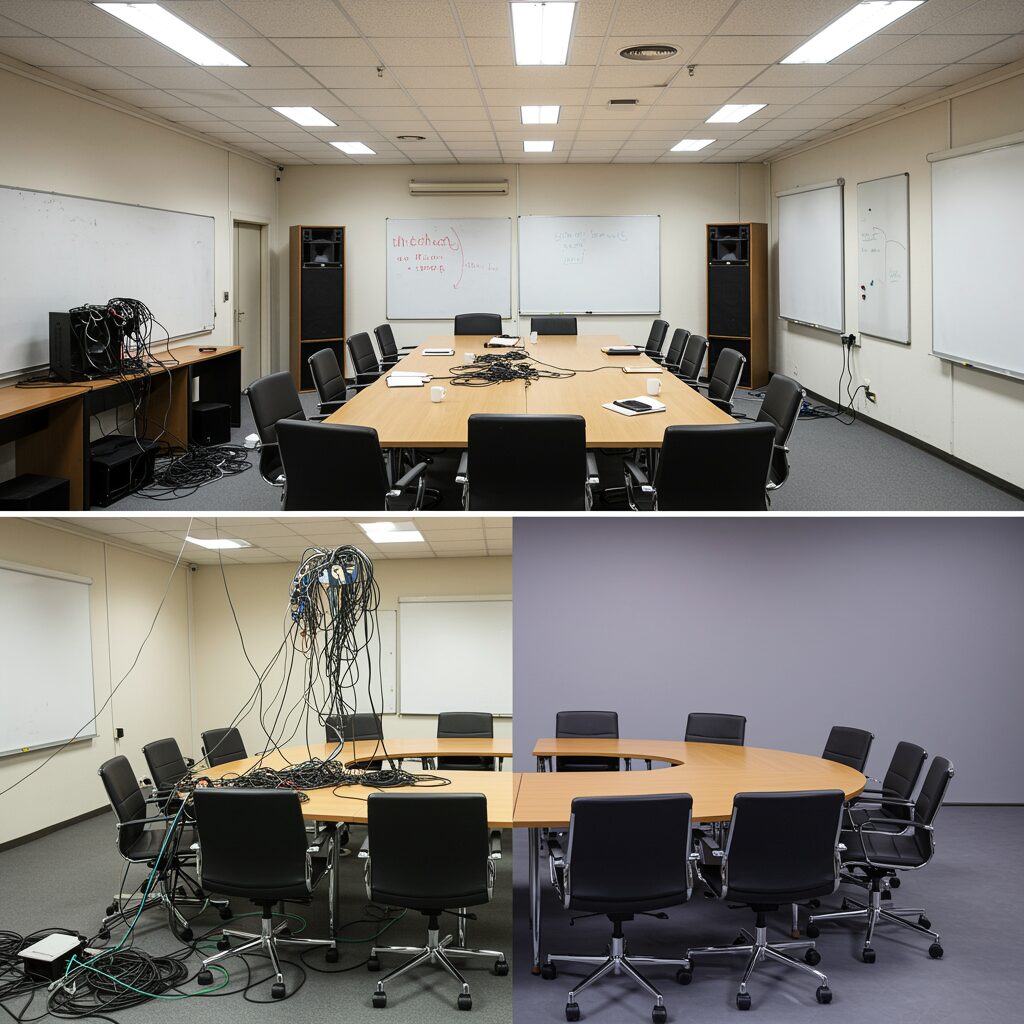

Are Sound Bars Ready for Commercial Spaces in 2025?
What this guide covers (and what it doesn’t)
- A practical, room-by-room look at when a sound bar is a smart choice in commercial AV – and when distributed speakers or arrays make more sense.
- We focus on: small meeting rooms, lobbies/reception, hospitality suites, retail/digital signage bays, classrooms/church overflow rooms, restaurants and sports bars.
- Not a “best soundbar” roundup. We’re applying audio visual tech principles (intelligibility, coverage, SPL, durability) to decide where a sound bar makes sense – and where it doesn’t.
Where a sound bar can shine:
- Small meeting/huddle rooms: Near-field listeners, predictable seating, minimal HVAC noise. A sound bar’s coherent sound bar sound and improved dialogue enhancement in 2025 can be a win.
- Hospitality suites and executive offices: Controlled, contained spaces with modest SPL needs and a premium aesthetic.
Where distributed loudspeakers usually win:
- Lobbies/reception and retail/signage bays: You need even coverage across open footprints and walkways; a single bar can’t keep levels uniform.
- Classrooms and church overflow: Speech intelligibility at the back row and under balconies demands ceiling or wall-distributed loudspeakers and proper gain structure.
- Restaurants and sports bars: Multi-zone control, higher ambient noise, and sightline/sound coverage conflicts favor ceiling/wall speakers and subs per zone.
Why this matters now
- In 2025, a sound bar can deliver better bass management, clearer dialogue, and smarter upmixing than earlier generations. For small, contained rooms, that’s compelling – and cost-effective.
- Commercial requirements still rule the decision: speech intelligibility targets, coverage uniformity, reliability, serviceability, and code compliance (mounting, power, plenum, listings). A sound bar is a device; a commercial system must meet performance criteria in the whole space.
- Think beyond “does the sound bar sound good here?” to “does it maintain level and clarity for every listener, hour after hour, with simple service paths and future expandability?”
“For spoken word, aim for STI ≥ 0.60 (‘Good’) to ensure intelligible speech in small rooms, per IEC 60268-16.” – Source
TL;DR
- A sound bar can be the right tool for small, contained rooms with near-field listeners and controlled noise. For larger, noisier, or multi-zone spaces, distributed loudspeakers win almost every time.
Quick Decision Framework: When a Sound Bar Works (and When It Won’t)
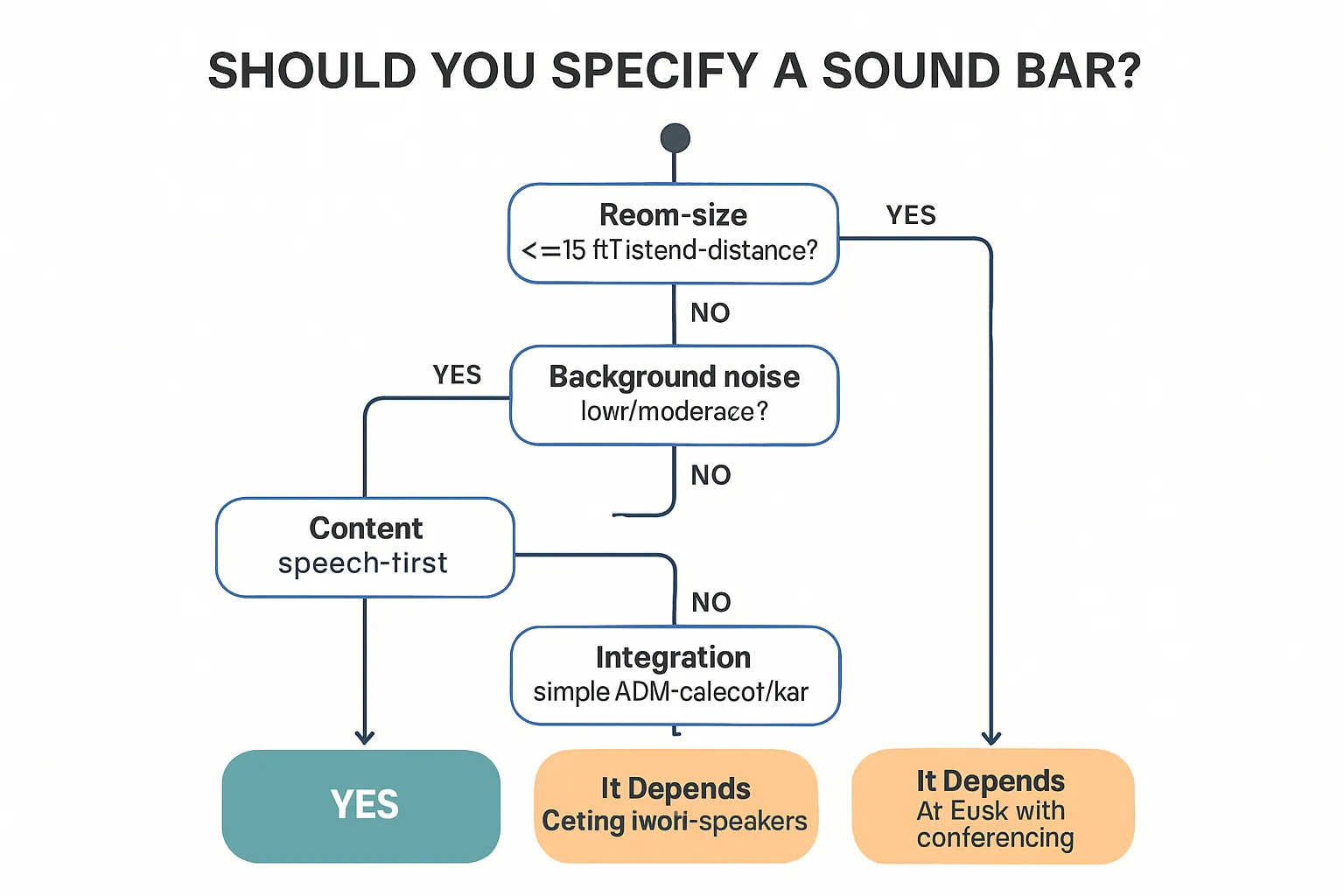
The five fast checks
- Room size and listener distance: within ~12–15 ft (3.6–4.5 m) of the sound bar, primarily near-field.
- Background noise: consistently low-to-moderate; not competing with HVAC or crowd noise.
- Content type: speech-first content (presentations, video calls, news, light music beds), not live music or venue-level SPL.
- Coverage: single audience focus area (one display wall), not multiple seating zones.
- Integration: simple source routing (HDMI eARC/ARC), or an A/V bar with built-in conferencing for Teams/Zoom.
Green-light use cases in commercial AV
- Huddle/focus rooms (2–8 seats)
- Executive offices and small meeting enclaves
- Hospitality suites, amenity lounges, model homes/sales centers
- Retail endcaps or signage bays with targeted listening
- Church classrooms/overflow rooms with small groups
Red-light indicators (choose distributed speakers instead)
- Open lobbies, large conference/board rooms, divisible spaces
- Classrooms >500 sq ft (46 m²), auditoriums, sanctuaries
- Restaurants and sports bars with high ambient noise
- Multi-zone listening, wide seating spreads, or variable layouts
Pro tip
- If you’re pushing beyond 75% coverage with consistent level, or you need separate zones, shift to distributed ceiling/wall speakers or steerable columns.
“Audio Coverage Uniformity (ACU) targets are typically ±3 dB across at least 75% of the seating area.” – Source
Decision matrix by room type
| Room type | Sound bar fit | Distributed speakers fit | Notes (noise, distance, zones) |
|---|---|---|---|
| Huddle room | Strong | Optional | Low noise; near-field listeners within 12–15 ft; single display wall |
| Executive office | Good | Optional | Low noise; focused seating; single zone; premium aesthetic |
| Lobby | Poor | Strong | Open footprint; varying listener distance; multiple walkways/zones |
| Classroom | Limited | Strong | >500 sq ft typical; back-row intelligibility; mic reinforcement needs |
| Hospitality suite | Good | Optional | Controlled noise; small audience; single zone entertainment |
| Retail endcap | Good | Optional | Targeted listening cone; short dwell times; single wall focus |
| Restaurant | Poor | Essential | High ambient noise; multiple zones; background music + paging |
| Sports bar | Poor | Essential | High SPL/ambient noise; many screens; zoning and subs required |
| Church overflow | Conditional | Preferred | Small groups may qualify; varied seating and program material |
Best-Fit Design Recipes for Sound Bars in Commercial AV
Huddle/focus rooms (2–8 seats)
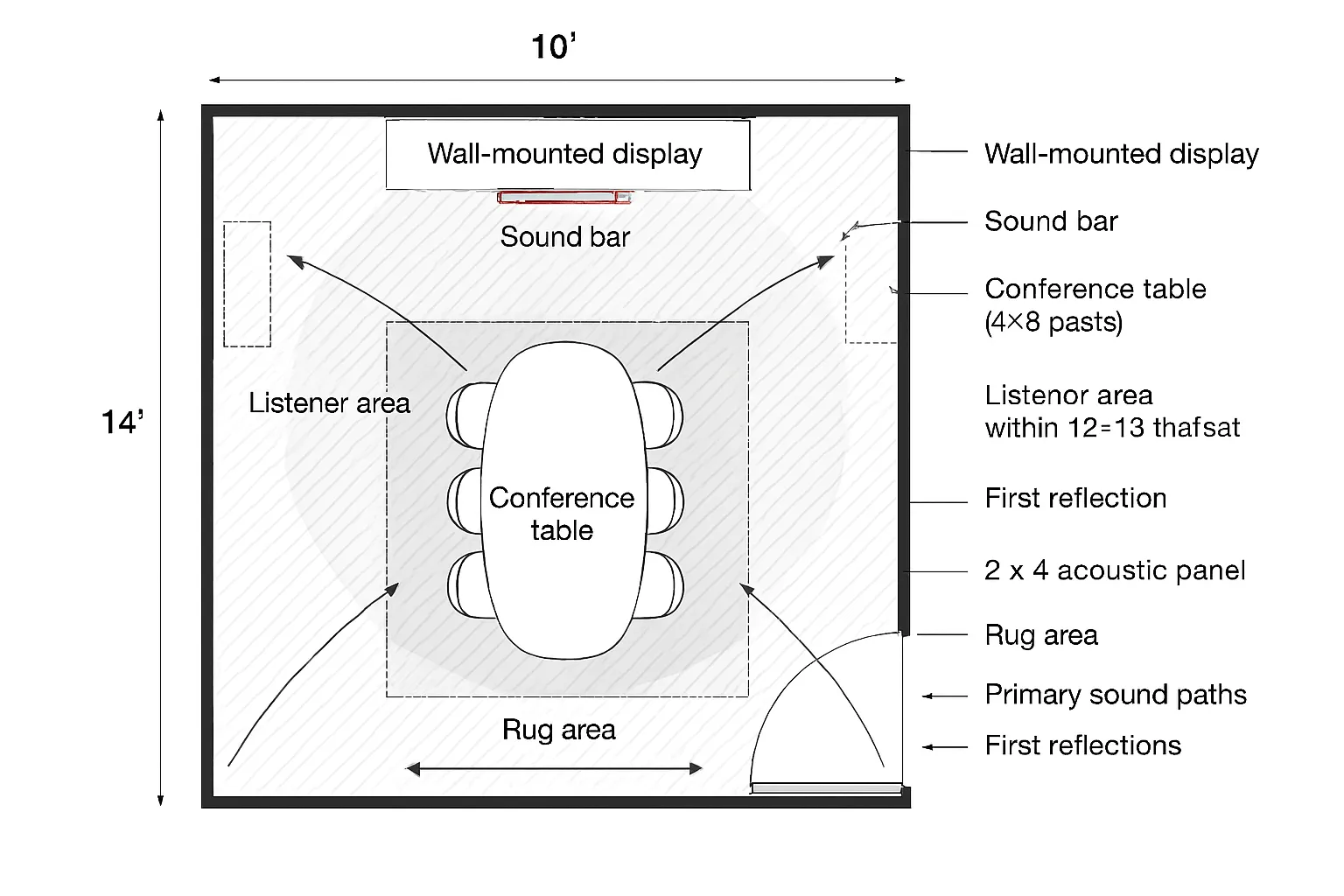
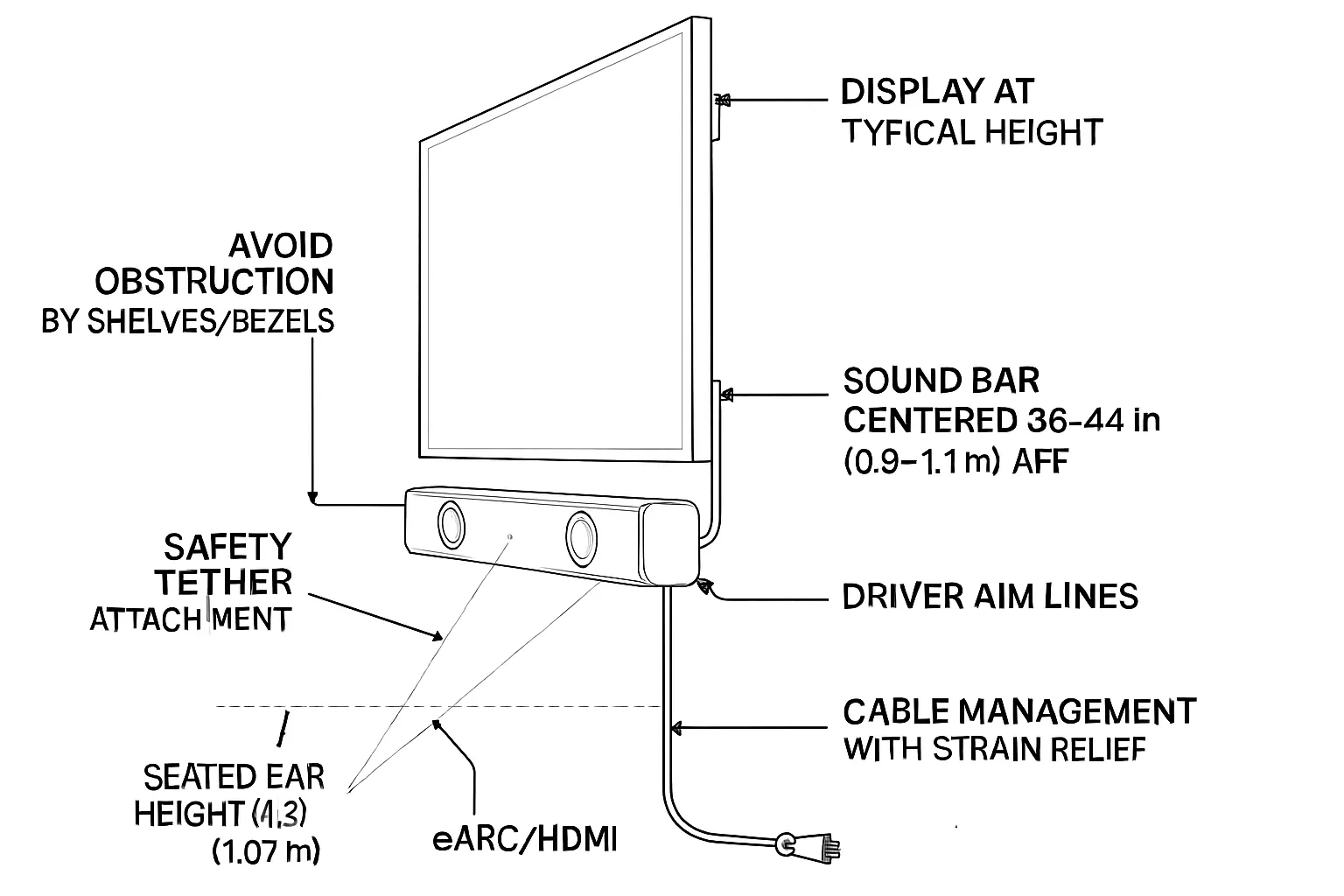
- Mount the sound bar centered below the display, 36–44 in (0.9–1.1 m) AFF where possible; aim drivers to ears.
- Pair with an enterprise-ready conferencing camera bar or an A/V bar (when UC-first) to simplify installs.
- TV settings: ensure PCM/bitstream compatibility, eARC on, CEC off if it causes control conflicts.
- Acoustic touch-ups: a rug, two absorptive panels at first-reflection points, and soft furnishings improve speech clarity.
Executive office / small meeting enclave
- Prioritize dialogue clarity; choose a sound bar with strong center-channel articulation and lip-sync control.
- Integrate via eARC to the display; provide a wired HDMI input at the table for BYOD reliability.
Hospitality suites and amenity lounges
- Occasional use, conversational sound. If listeners sit within a single zone, a sound bar is acceptable. For wider seating, add two small in-ceiling speakers as fills (zoned to same program).
Retail/digital signage bays
- Use a focused sound bar or directional speaker variant to keep sound localized to the display area and avoid spill.
- Tie audio triggers to playback scheduler for consistent levels across dayparts.
Church classrooms / overflow rooms
- Speech-first playback at moderate SPL. A sound bar under the display is tidy and budget-friendly; add hearing assistance where assembly use or code dictates.
Where a Sound Bar Underperforms (and Why)
Large rooms and wide seating spreads
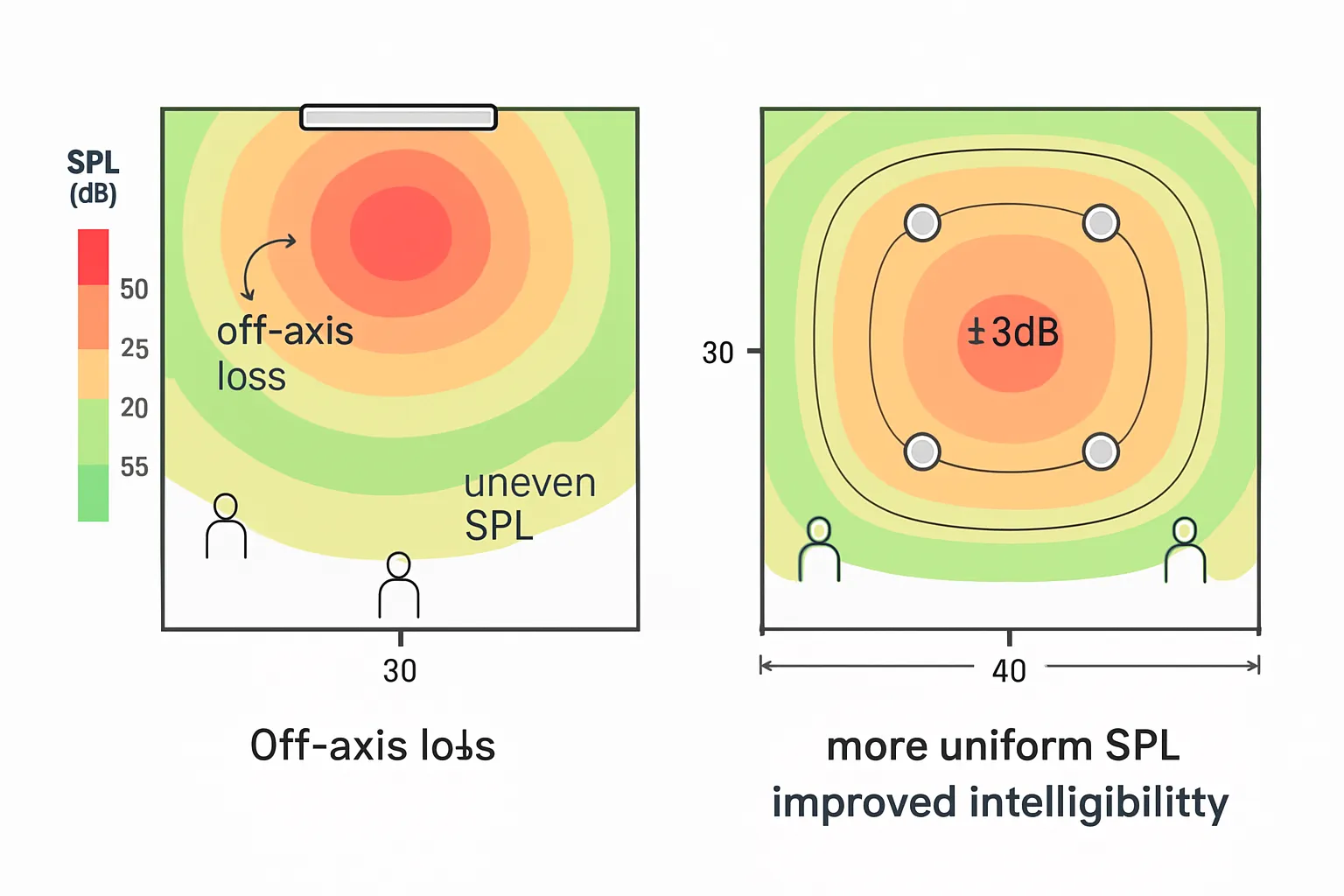
- Challenge: off-axis drop-off and uneven coverage; intelligibility suffers at the back and sides.
- Remedy: distributed in-ceiling/in-wall speakers or steerable column arrays for uniform SPL and STI.
Noisy, reverberant, or open spaces
- Challenge: poor direct-to-reverberant ratio; reflections mask consonants; bass blooms.
- Remedy: multiple speakers closer to listeners, acoustic treatment, and zoning to manage energy.
Multi-zone or multi-use venues (training rooms, divisible spaces)
- Challenge: different content and levels by zone; a single sound bar can’t address independent mixes.
- Remedy: DSP with matrix routing feeding zone speakers; presets recall for room combine/divide.
Restaurants and sports bars
- Challenge: high ambient noise and many seats off-axis to the display wall.
- Remedy: distributed speakers per seating cluster with subwoofers for program impact; paging/ducking logic.
Lobbies and reception
- Challenge: vertical volumes and hard finishes; single-source audio gets lost.
- Remedy: ceiling speakers with careful spacing and delayed fills to maintain level without hotspots.
Spec Checklist: What Makes a Sound Bar “Commercial-Ready”
Audio and performance
- Max SPL (short-term) ≥ 95–100 dB @1m for headroom in small rooms
- Clear center-channel reproduction; adjustable dialogue enhancement; lip-sync control
- Beamwidth/dispersion published and appropriate for seating geometry
I/O and control
- HDMI eARC/ARC with reliable EDID handling; optical as fallback; analog input optional
- Enterprise control: IP/HTTP API or RS-232; discrete power and volume commands
- Optional: Dante/AES67 bridge (or external interface) when integrating with DSPs
Enterprise and facilities
- UL/ETL listed; secure wall-mount with safety tether and theft-deterrent hardware
- Replaceable power supplies; accessible cabling; documented service parts
- Network security posture (if IP-enabled); firmware lifecycle and version pinning
User experience
- Clear on-screen/OSD feedback for input and status; CEC can be disabled
- Presets for speech/music/night modes; volume limiters to protect hearing/adjacent rooms
Commercial sound bar evaluation checklist
| Requirement | Recommended minimum | Why it matters |
|---|---|---|
| Max SPL | ≥95–100 dB @1m (short-term) | Preserves intelligibility and headroom during peaks without distortion in small commercial rooms. |
| Center articulation | Dedicated center channel with adjustable dialogue enhancement | Ensures speech clarity for meetings, signage, and news content where the sound bar sound must favor voice. |
| eARC reliability | HDMI eARC with stable EDID/CEC behavior; optical fallback | Reduces “no audio” and handshaking issues; consistent decode of PCM/bitstream from modern displays. |
| API/RS-232 control | IP/HTTP or RS-232 control with discrete power, input, and volume | Enables integration with control systems for dependable, repeatable operation in commercial AV. |
| EDID management | User-selectable EDID profiles and firmware-stable HDMI behavior | Prevents format/handshake mismatches when sources or displays change in the enterprise stack. |
| Security mounting | Metal wall bracket, safety tether, theft-deterrent hardware | Protects equipment and occupants; aligns with facilities and risk management policies. |
| Listings | UL/ETL safety listing; FCC/CE; plenum-rated accessories where applicable | Meets code and compliance requirements for commercial installations. |
| Firmware policy | Documented lifecycle, rollback/version pinning, signed updates | Prevents unplanned behavior changes; supports IT change control and security posture. |
| Warranty/advance replacement | ≥2–3 year warranty; optional advance exchange | Minimizes downtime and service costs; critical for business continuity. |
| Lip-sync control | Adjustable A/V sync (ms) and per-input offsets | Keeps speech aligned with video across varied sources and conferencing platforms. |
| Presets/limiters | Speech/music/night modes; max volume limiter | Speeds deployment, protects adjacent spaces, and standardizes user experience. |
Acoustic and Code Considerations You Can’t Ignore
Intelligibility targets
- Design to STI ≥ 0.6 for presentations and conferencing in small rooms; confirm with STIPA where feasible.
- Control RT60 with soft finishes; mitigate early reflections at sidewalls and hard desks.
Background noise and exposure
- Measure ambient noise during peak use; set program SPL 10–15 dB above ambient for clarity without fatigue.
Assistive listening and accessibility
- For assembly spaces with amplified sound and fixed seating, plan for assistive listening to meet jurisdictional requirements; confirm local adoption of ADA/IBC provisions.
Electrical and safety
- Use listed power supplies; provide strain relief and safety cables for wall mounts; avoid plenum unless assembly is rated for it.
“OSHA 29 CFR 1910.95 sets a 90 dBA PEL over 8 hours and an action level at 85 dBA TWA for hearing conservation.” – Source
Implementation: Mounting, Cabling, and Control That Won’t Fail
Mounting basics
- Center the sound bar under the display on a rigid, load-rated bracket; add a safety tether and anti-theft screws in public spaces.
- Maintain 3–6 in (75–150 mm) clearance from walls, cabinets, and TV edges to avoid port blockage and heat buildup.
- Anchor into studs/masonry (not drywall only); verify fastener type, spacing, and torque per manufacturer.
- Preserve a clear line of sight if the sound bar uses up-firing drivers (no shelf lips or bezel overhangs).
- Route power and low-voltage separately; protect cables with grommets/brush plates; strain-relief at the bar.
Cabling and signal
- Prefer certified Ultra High Speed HDMI (48 Gbps); keep passive copper runs ≤ 15 ft (5 m) or use AOC/active with eARC support verified.
- Use lockable or retention HDMI where available; label both ends with source/sink and port names.
- In the display: disable TV speakers, set eARC On, and fix audio format (PCM/bitstream) to what the sound bar reliably decodes.
- Manage CEC explicitly: enable only if tested stable with your control system; otherwise disable to prevent state conflicts.
- Provide an optical fallback path (where supported) and document EDID expectations for each source.
Control and monitoring
- Provide a wall keypad or touch panel with discrete commands (Power On/Off, Vol+/Vol−, Mute, Input, Presets). Avoid relying solely on CEC.
- If IP-enabled, place the sound bar on an AV VLAN with reserved DHCP or static IP; disable unused services and default credentials.
- Baseline the firmware version used in commissioning; pin or approve updates through change control.
- Expose status (online, volume, preset) via API/RS-232 for monitoring; log fault states and create a recovery macro (power cycle, input reselect).
Commissioning steps
- Verify channel mapping and lip-sync on native apps and external sources; set target SPL and document at reference seat(s).
- Tune EQ for speech intelligibility first; store “Speech,” “Music,” and “Night” presets with defined max volume limits.
- Validate eARC handshake across power cycles and source switching; confirm fallback behavior (optical/PCM) if eARC drops.
- Label and photograph cabling, IP assignments, presets, and control pages; export configs and store with as-builts.
- Train end users on volume limits, presets, and a simple recovery sequence; schedule a 30–60 day post-install health check.
Budgeting and Lifecycle: TCO Reality Check
When a sound bar lowers cost
- Small rooms where one device replaces amplifier + DSP + multiple speakers + rack space + ceiling labor.
- Minimal construction: no core drilling, fewer conduit runs, reduced permitting and after-hours work.
- Faster commissioning: fewer gain-structure and routing variables; quicker QA and sign-off.
- Lower spare-parts pool: a single spare bar can backstop several rooms for rapid swap-outs.
Hidden costs to watch
- Service calls for HDMI/eARC/EDID handshakes, CEC conflicts, and TV firmware updates that break audio paths.
- Mounting retrofits when the display height changes, furniture moves, or up-firing drivers become obstructed.
- Theft/vandalism replacements in public spaces; budget for anti-theft hardware and safety tethers.
- Firmware drift: unmanaged updates causing behavior changes; time spent version-pinning and regression testing.
- Acoustic band-aids: rugs/panels to meet intelligibility targets when rooms are too live.
- Accessories you didn’t plan: Ultra High Speed HDMI (certified), retention clips, power management/UPS, cable management, and longer rated cables to reach wall plates.
- IT security reviews for IP-enabled bars (AV VLANs, firewall rules, credential rotation) that add hours to deployment.
Standardize to save
- Standardize on one or two commercial-ready SKUs across many rooms to streamline training, spares, and control code.
- Build a golden configuration: fixed eARC/PCM settings, disabled CEC (if unstable), volume limiters, and named presets.
- Stock a spare pool (2–5% of deployed count) for same-day swaps; negotiate advance replacement in the warranty.
- Pilot first: validate user experience, SPL targets, and handshake stability with your specific displays/media players.
- Document once, deploy many: as-built templates, control macros, IP schemas, and labeling standards.
Upgrade paths
- Plan forward: confirm whether the sound bar supports adding a subwoofer or wireless rears and what that does to coverage/SPL.
- Define the “exit ramp”: if the room grows or becomes multi-zone, budget a migration to distributed ceiling/wall speakers with DSP.
- Protect the investment: prefer models with an open control API/RS‑232 so they can live inside your audio visual tech ecosystem longer.
- Lifecycle window: assume 3–5 years for active duty in commercial use; align depreciation, warranty extensions, and spare stock accordingly.
Example TCO line items to include in budgeting
- Hardware: the sound bar, approved mount, retention HDMI, optical fallback, UPS/power.
- Labor: bracket install, cable routing/labeling, commissioning (SPL/eq/presets), user training.
- IT/Security: VLAN setup, credentials, firmware freeze, monitoring hooks.
- Room treatments: basic absorbers/rug (if needed to meet intelligibility goals).
- Support: warranty/advance replacement, spare pool, annual health check truck roll.
A well-chosen sound bar can absolutely lower TCO in small, contained rooms. The win depends on standardization, stable HDMI/eARC behavior, and a clear plan for growth – so you avoid paying twice when the space evolves.
Mini Case Studies: Wins and Gotchas from the Field
Win: 6-seat Teams huddle rooms (corporate)
- Replaced TV speakers with a conferencing A/V bar under the display; mic/speaker in one device reduced echo path issues.
- STI improved from “fair” to “good” after minor acoustic touches (rug + two sidewall panels).
- Support tickets dropped after CEC was disabled and discrete control (power, volume, input, presets) was added via wall keypad.
What made it work:
- Near-field listeners (≤12–15 ft), controlled noise, single display focus.
- Stable eARC/EDID profile and a published API for integration.
Win: Retail endcap (specialty electronics)
- Directional sound bar localized audio to a 6–8 ft bubble; complaints from adjacent aisles fell by 70%.
- Daypart presets scheduled (morning low, afternoon medium, evening low) to match store traffic.
What made it work:
- Targeted listening area aligned to the display wall and shopper dwell path.
- Tight beam pattern plus scheduler-driven level control to prevent “sound creep.”
Gotcha: Sports bar retrofit
- Tried a sound bar per TV wall; patrons off-axis heard mud and shouty highs; bar couldn’t overcome crowd noise.
- Switched to four ceiling speakers per zone + subs; added paging ducking and simple scene presets (Game, Halftime, Late Night).
What we learned:
- High ambient noise + wide seating spreads demand distributed speakers and zoned control.
- A sound bar sound cannot provide uniform SPL/intelligibility across varied seating angles.
Gotcha: Echoey lobby
- Single bar underperformed in a tall, reflective space; raising SPL worsened reverberant smear.
- Solution: a small 2×2 grid of ceiling speakers with light acoustic treatment (entrance rug, soft seating, two cloud panels) restored clarity at moderate levels.
What we learned:
- Improve direct-to-reverberant ratio with multiple sources closer to listeners, not just “turn it up.”
- Even minimal treatment plus distributed loudspeakers outperforms a single-source approach in hard finishes.
Key takeaways:
- If listeners are near-field with one seating zone, a sound bar can be a fast, clean win.
- For open, noisy, or multi-zone areas, distributed loudspeakers with simple presets and paging/ducking logic deliver reliable results and fewer callbacks.
Conclusion: Get Commercial-Grade Results with The Audiovisual Consultant
If your space is small, controlled, and speech-focused, a sound bar can be the clean, cost-effective answer. For larger, louder, or multi-zone areas, distributed speakers will deliver better coverage, intelligibility, and scalability.
Not sure which path fits your rooms? The Audiovisual Consultant designs, pilots, and commissions commercial AV systems that meet intelligibility, coverage, and compliance targets – without surprises. We’ll help you decide when a sound bar is the right tool and when to specify distributed loudspeakers, so your audience gets consistent, high-quality sound bar sound that supports your brand and bottom line.
What you get with us:
- A fast, room-by-room assessment aligned to standards and code
- A right-sized design: sound bar where it fits, distributed audio where it’s required
- Commissioning, documentation, and training that keep support tickets low


