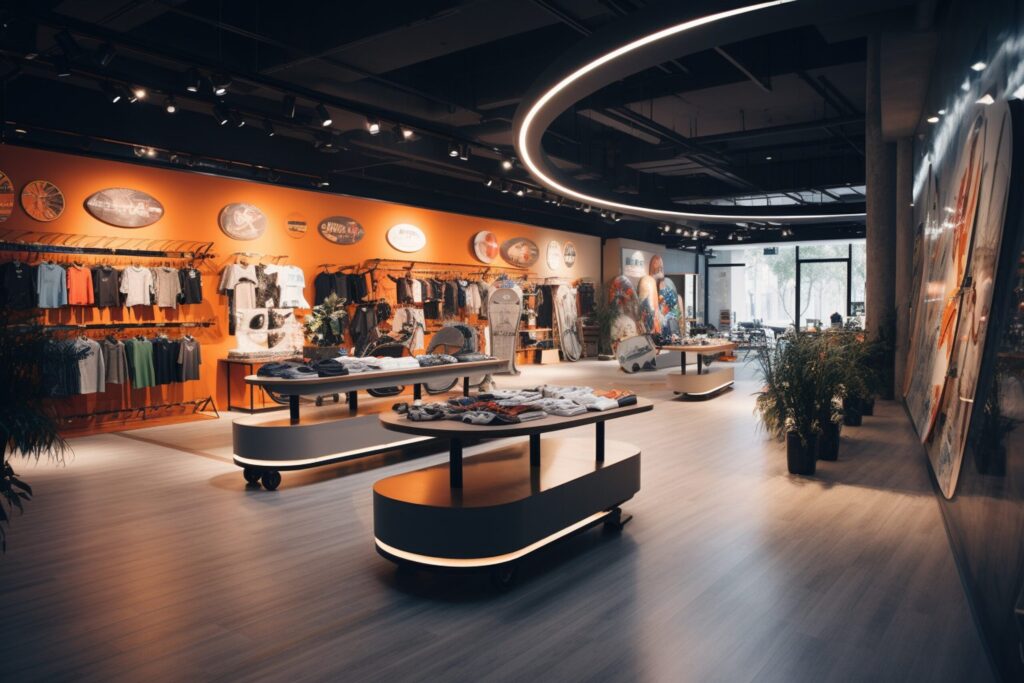

Why Retail Store Sound Systems Matter for Dwell Time and Sales
“Customers spent approximately 42% more time in store when music played versus no music.” – Source
The business case: from ambiance to measurable lift
Great retail design doesn’t end at fixtures and lighting. The right sound system for business use is a quiet profit center: it shapes traffic flow, reduces perceived wait times, and nudges shoppers to browse longer. When you deploy a purpose-built music system for business – rather than a consumer workaround – you gain:
- Consistency: Even coverage from commercial speakers prevents hot spots and dead zones that annoy shoppers and fatigue staff.
- Control: Centralized scheduling and dayparting let you adjust tempo and volume to match traffic cycles and promotions.
- Compliance: Business streaming services and licensed content keep you on the right side of performance rights laws.
- Insights: With locations using the same commercial audio plan, you can A/B test playlists and correlate changes with dwell time, conversion, and AOV.
If you’re serious about experience-led growth, “sound systems for shops” aren’t a nice-to-have; they’re an operational lever. A properly designed business stereo system becomes part of visual merchandising, guiding the pace of the floor and supporting campaign moments without shouting.
How music influences shopper pace, perception, and dwell
Music is one of the simplest ways to influence in-store behavior:
- Tempo sets pace: Faster tracks subtly speed movement and checkout; slower, lower-tempo sets encourage discovery and dwell in high-consideration zones.
- Volume sets comfort: Conversational-level playback lets customers and associates interact naturally; sudden peaks or overly loud tracks raise stress and shorten visits.
- Familiarity sets focus: A blend of recognizable and new tracks keeps attention without feeling repetitive or generic.
The tech behind it matters. Ceiling and pendant commercial speakers create even sound pressure levels so customers experience your soundtrack consistently from entrance to fitting rooms. Directional coverage avoids “audio shadows” behind fixtures, while subwoofers used sparingly add warmth without boominess. In short: the right sound system for business turns acoustic chaos into a calm, branded atmosphere that makes browsing feel effortless.
Aligning sound with brand and merchandising strategy
Audio is part of your brand toolkit. Treat it like you treat planograms:
- Brand-fit first: Curate playlists that match your identity and price point – polished ambient for luxury, bright indie for youth, acoustic textures for artisanal concepts. Brand-fit music strengthens perceived value and keeps shoppers in the right mindset.
- Merchandise mapping: Align playlists to zones. Slower, welcoming sets at the front; energetic micro-moments at new arrivals; relaxed, low-volume tracks in fitting rooms; purposeful cues near checkout to ease lines.
- Dayparting and seasonality: Morning openers should feel warm and familiar; midday can carry more energy; late afternoon returns to balanced, comfortable tones. Shift toward campaign themes during product drops or holidays to keep the store narrative cohesive.
- Operations alignment: Use your music system for business to schedule announcements, timed promos, and safety messaging between songs without jarring the experience.
When your commercial audio plan reinforces brand and merchandising strategy, every speaker becomes a subtle salesperson – supporting discovery, lowering friction, and turning foot traffic into measurable lift.
SEO note: For retailers evaluating sound systems for shops, prioritize commercial speakers designed for even coverage, a licensed music system for business with centralized control, and scalable commercial audio that supports zoning and dayparting across locations.
Set Goals and Brand Guidelines for Your Music System for Business
Define outcomes: atmosphere, dwell time, conversion, zoning, paging
Start by turning “good vibes” into measurable targets. Treat your music system for business like any other retail program with goals and KPIs:
- Atmosphere: Define the mood by zone (welcoming at entry, focused on the floor, calm in fitting rooms). Use commercial audio tools to keep levels even and transitions smooth.
- Dwell time: Set a target percentage lift in average visit length. Track by daypart and zone to see where music impacts browsing most.
- Conversion and AOV: Correlate playlist changes with POS metrics to validate what actually moves the needle.
- Zoning: Specify how many audio zones you need (entry, main floor, promo areas, fitting rooms, checkout), which content plays where, and the desired SPL range (e.g., 60–68 dBA on the sales floor).
- Paging and promos: Define use cases for announcements – e.g., hourly promos, queue management, emergency messaging – and set tone/length guidelines to avoid jarring the experience.
Operational standards:
- Coverage: Even SPL across aisles; no “hot” or “dead” spots. Choose commercial speakers and amplifiers sized for your ceiling height and footprint.
- Compliance: Confirm commercial licensing and explicit-content filters across all locations.
- Control: Centralize schedules and volume policies; lock down in-store devices with role-based permissions.
Map your audience: demographics, psychographics, and store mission
Know who you’re sonically designing for. Build a quick audience map:
- Demographics: Age ranges, income, family status – do selections feel relevant and welcoming?
- Psychographics: Mindset, lifestyle, musical eras they love, and how they want to feel in your space.
- Missions and journeys: Quick errands vs. leisurely discovery; high-consideration purchases vs. impulse add-ons.
- Accessibility: Keep volume at conversational levels, avoid harsh highs, and limit sudden transitions to reduce fatigue.
“Connecting the brand identity to the target customers is key – what are their demographics, psychographics, lifestyles, and motivations? These will be the cues that define their favorite type of music, artists, and expectations as they enter the business and associate with your brand.” – Source
Pro tip: Create two to three audience “sound profiles” per concept (e.g., Gen Z discovery, Millennial family, boomer premium) and align playlists and zones accordingly. This is where sound systems for shops with precise zoning pay off.
Create sonic brand rules: genres, energy, do/don’t lists, volume policy
Codify your brand’s “sound” so it scales consistently:
- Genres and influences: Define primary/secondary genres, decades, and cultural references that fit your brand story.
- Energy curve: Set acceptable BPM ranges by zone (e.g., 80–100 BPM at open, 100–118 BPM at mid-day, 90–105 BPM near fitting rooms).
- Do/don’t lists: Approved artists, lyrical themes, and holiday rules; banned content (explicit lyrics, aggressive sub-bass, genre mismatches).
- Transitions: Smooth, no hard cuts; avoid dramatic key or volume jumps between tracks.
- Volume policy: Target dBA by zone and time; max caps to prevent spikes; normalize track loudness to keep a consistent bed of sound.
- Promo insertions: Cap promo frequency (e.g., 1 short message per 20–30 minutes) and match tone to the surrounding playlist.
With clear rules, any location can run a professional-grade music system for business without diluting your identity.
Daypart framework: morning open, peak mid-day, late-afternoon reset, close
Design a predictable yet flexible daypart plan:
- Morning open (welcome): Warm, familiar tracks; 80–95 BPM; low-to-moderate volume to ease staff and early shoppers into the day.
- Peak mid-day (momentum): Upbeat, brand-fit songs; 100–118 BPM; slightly higher volume to carry energy and manage traffic flow.
- Late-afternoon reset (refocus): Dial back energy to reduce shopper fatigue; 90–105 BPM; soften volume to support longer dwell in consideration zones.
- Close (wind-down + ops): Calm, tidy-feel set; 75–90 BPM; reduced volume to cue end-of-day and support closing tasks.
Align dayparts with promotions and merchandising shifts. Schedule short, on-brand announcements between tracks for queue updates, limited-time offers, and event reminders – never over the music unless it’s safety-critical.
Staff enablement: permissions and safeguards to keep the experience on-brand
Create simple, enforceable guardrails so your commercial audio stays consistent:
- Roles and permissions: Corporate sets master rules; managers can adjust volume within a small range; associates can pause/resume only.
- Approved sources: Lock systems to brand playlists; block personal streaming apps.
- Caps and filters: Global profanity filter on; hard max volume; loudness normalization enabled.
- Fallback and continuity: Preload an offline “evergreen” playlist per zone; auto-failover if internet drops.
- Training and feedback: Quick staff guide on volume checks, daypart schedules, and how to log customer feedback; quarterly reviews to keep playlists fresh.
When your strategy, rules, and safeguards are clear, sound systems for shops become a reliable growth lever – scalable, compliant, and unmistakably on-brand across every location.
Choose the Right Sound System for Business: Wired, IP, or Hybrid?
Option 1: 70V/100V wired commercial audio (reliable coverage at scale)
This is the retail workhorse. A constant-voltage (70V/100V) system feeds many commercial speakers from a few amplifiers over long cable runs with minimal loss – ideal for even coverage and simple volume zoning.
- Strengths: Bulletproof reliability, predictable coverage, easy to scale with more speakers, minimal network dependency.
- Considerations: Requires cabling and forethought for zones; changes post-build are more involved.
Ideal use cases:
- Grocery, department stores, pharmacies, car showrooms, big-box retail
- Environments needing consistent bed-of-sound and clear paging
Option 2: Networked/IP audio and streaming (central control, analytics)
IP audio endpoints live on your network and receive streams from cloud or on-prem sources. With a music system for business, you get centralized scheduling, reporting, and policy controls across locations.
- Strengths: Remote management, rich analytics, easy dayparting, fast content updates, security policies, and role-based access.
- Considerations: Requires robust network design, QoS, and PoE planning; subscription costs for streaming/licensing.
Ideal use cases:
- Multi-location brands, specialty retail with frequent campaign changes
- Concepts that rely on audio zoning and targeted promos
Option 3: Hybrid designs (wired backbone + flexible wireless zones)
Combine a wired 70V backbone for the core sales floor with IP audio endpoints or wireless speakers for temporary zones, pop-ups, or window displays. This gives you reliability where it matters and agility where you need it.
- Strengths: Best of both worlds – rock-solid core plus rapid reconfiguration for merchandising changes.
- Considerations: Needs thoughtful gain structure, latency alignment, and failover planning.
Ideal use cases:
- Flagship stores, dynamic floor sets, seasonal retail, experiential spaces
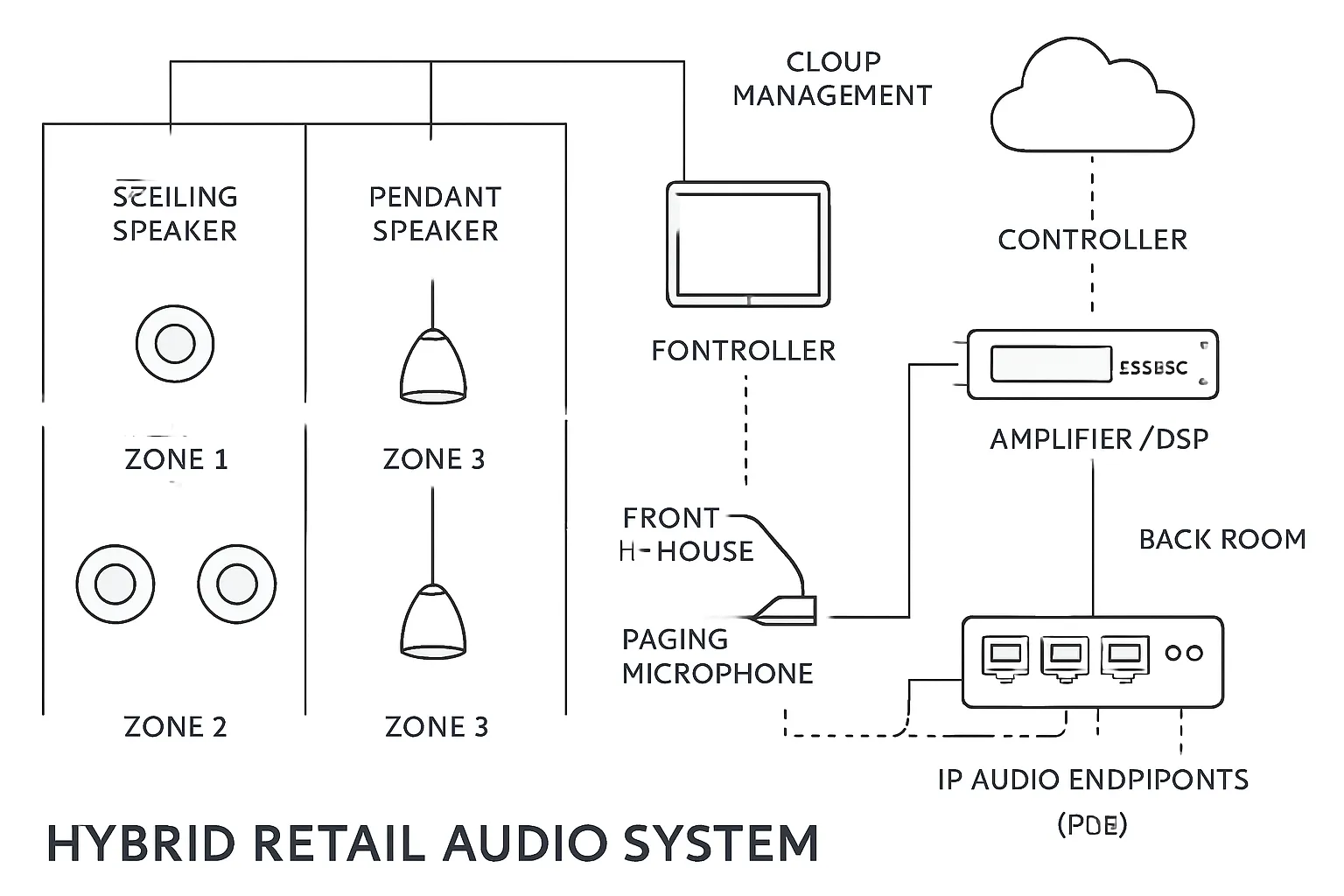
Source devices: purpose-built players vs. tablets/PCs for a music system for business
- Purpose-built players: Hardened devices with local cache, offline playback, and remote lockdown. Best for compliance, reliability, and chain-wide control.
- Tablets/PCs: Flexible and low-cost, but risk app interruptions, OS notifications, and staff tampering. If used, lock them down with MDM, disable system sounds, and enable auto-launch with offline fallbacks.
Tip: Whatever you choose, normalize loudness, disable EQ “enhancers,” and run a balanced output into your DSP to keep levels consistent across playlists.
Amplifiers and DSP: why commercial-grade beats a consumer business stereo system
- Commercial amps: 70V/100V taps, high channel density, thermal protection, remote monitoring, and life-safety mutes.
- DSP processors: Per-zone EQ, high-pass filters for ceiling/pendant speakers, limiters to protect drivers, ducking for paging, and delay to time-align mixed speaker types.
- Why it matters: A consumer “business stereo system” lacks the zoning, protection, and control required for long daily runtimes. Commercial audio gear ensures clarity, longevity, and safe paging integration.
When to involve an AV integrator
Bring in an integrator when:
- You have 3+ zones, high ceilings, or reflective finishes that need acoustic modeling.
- You’re mixing ceiling and pendant speakers or adding subwoofers and need crossover/limiters set correctly.
- You require paging, fire-alarm interface, ADA considerations, or enterprise network/security compliance.
- You’re rolling out multi-site with centralized control, SLAs, and analytics.
A qualified integrator will provide drawings, speaker counts and spacing, amp/DSP sizing, commissioning, and a service plan.
System types vs. use cases
| System type | Best for | Pros | Cons | Typical components |
|---|---|---|---|---|
| 70V/100V wired commercial audio | Large floors, consistent coverage, clear paging | Reliable, scalable, long cable runs, even SPL | Less flexible after build; cabling required | Ceiling/pendant speakers, 70V amps, DSP, paging mic, zone controllers |
| Networked/IP audio | Multi-site brands, rapid updates, analytics, zoning | Central control, dayparting, PoE endpoints, content security | Network dependency, QoS/PoE planning, subscriptions | IP audio endpoints, network switch (PoE), streaming player, DSP, amps |
| Hybrid (wired + IP/wireless) | Dynamic retail, pop-ups, seasonal zones | Wired reliability + flexible add-ons, fast reconfiguration | More complex gain/latency management | 70V backbone, DSP/amps, IP endpoints/wireless satellites, controller tablet |
| Purpose-built player (source) | Compliance and uptime | Offline cache, remote lockdown, stable output | Hardware cost | Commercial player, secure rack, balanced IO to DSP |
| Tablet/PC (source) | Budget, small shops | Flexible, easy to update | App interruptions, staff tampering risk | Tablet/PC, MDM lockdown, audio interface to DSP/amp |
Acoustic Design: Make Commercial Audio Comfortable, Even, and On‑Brand
“Optimizing store acoustics has been shown to boost revenues by 5% to 10%.” – Source
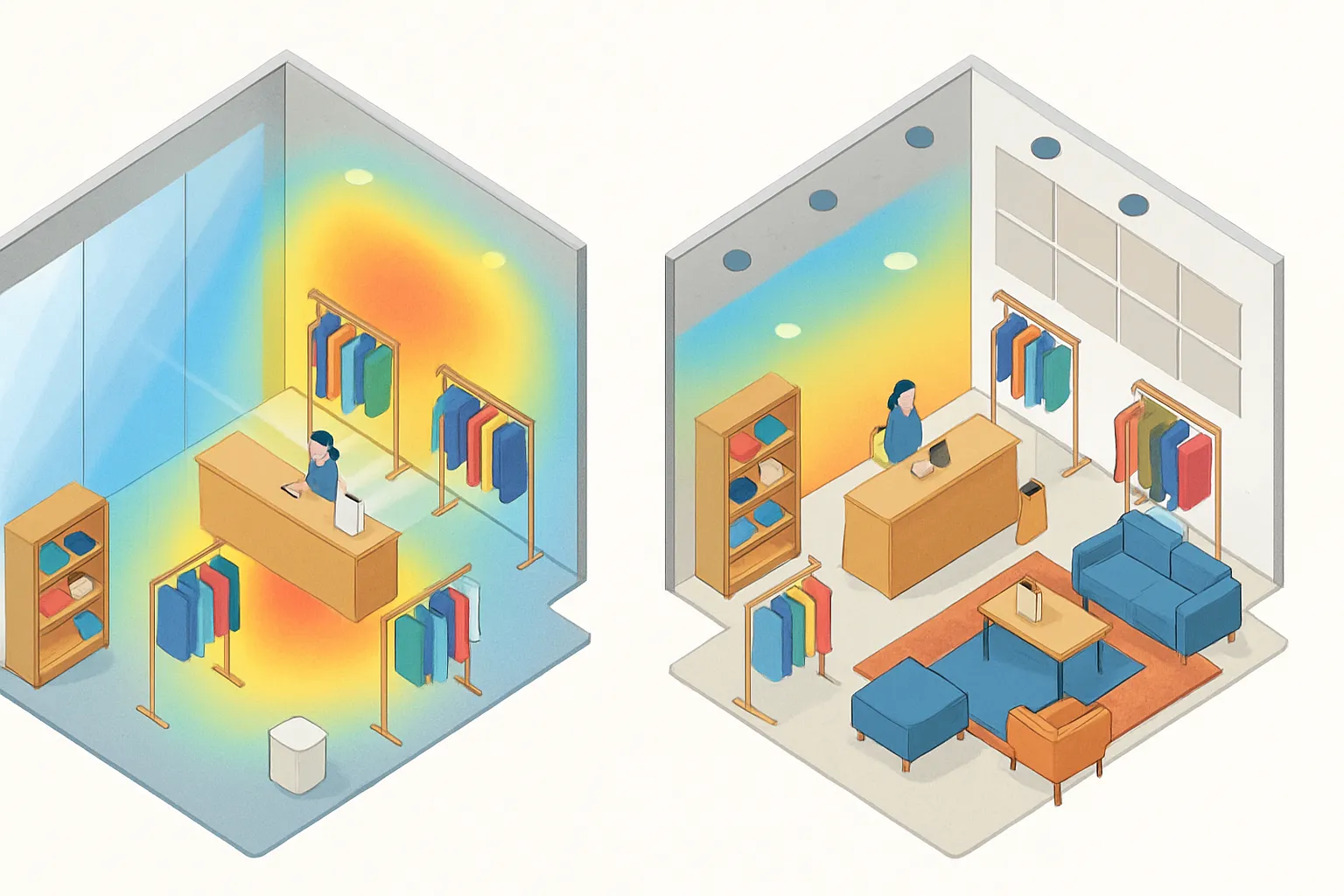
Why room acoustics matter (reflections, RT60, intelligibility)
Retail spaces are full of reflective surfaces – glass, concrete, tile – that extend reverberation time (RT60) and smear clarity. Excess reflections raise perceived loudness, mask vocals, and cause listener fatigue. In commercial audio, intelligibility is everything: music should feel present but not overwhelming, and pages should be crisp and easy to understand. Target a balanced RT60 for your volume and ceiling height so your soundtrack supports browsing instead of competing with it.
Key issues to address:
- Early reflections that make music harsh and paging unintelligible
- Flutter echoes between parallel walls
- Modal buildup (boomy low end) in rectangular rooms
- Uneven sound pressure from sparse or poorly aimed speakers
Materials audit: glass, tile, concrete vs. absorptive finishes
Start with a materials sweep:
- Highly reflective: Glass storefronts, polished concrete, tile, metal fixtures
- Diffusive/absorptive: Wood slat walls, textiles, merchandise density, acoustic panels
Map where reflections are strongest (entrance canyons, double-height atriums, long aisles). Add absorption where it’s discreet and effective; use diffusion where you want energy without glare (e.g., feature walls).
Quick wins: rugs, displays, soft seating, and strategic acoustic panels
Fast, brand-friendly fixes that pay off:
- Area rugs and soft merch tables in hard-surface zones
- Upholstered seating near fitting rooms and lounges
- Fabric-wrapped or micro-perf acoustic panels at first reflection points
- Ceiling baffles or clouds in high-volume atriums
- Back-of-house treatment to reduce spill into the floor
- Normalize track loudness and apply gentle high-pass filters in DSP to reduce boom
These tweaks shorten RT60, improve intelligibility, and let you run lower SPLs – reducing fatigue and returns.
Sound bleed control between zones (directionality, speaker aiming)
Zoning only works if zones stay sonically distinct:
- Use tighter-coverage ceiling or pendant speakers and aim toward listening areas.
- Keep speakers inside each zone boundary; avoid firing across aisles.
- Apply per-zone EQ and limiters; add slight delays to align mixed speaker types.
- For promo hotspots, consider directional or pendant clusters with controlled dispersion.
- Use architectural cues (soffits, slats, product walls) as acoustic boundaries.
Result: less bleed, clearer pages, and a smoother walk-through experience.
Target SPLs by area to reduce fatigue and returns
Set and maintain conversational-level SPLs that respect context:
- Entry and decompression zone: 60–65 dBA
- Main sales floor: 65–70 dBA (brief peaks ≤75 dBA)
- Fitting rooms and lounges: 55–60 dBA, warmer EQ
- Checkout/queue: 62–66 dBA with dynamic ducking for announcements
- Window displays/pop-ups: 65–70 dBA, controlled low end to limit street bleed
Use calibrated meters during peak hours, not empty-store conditions. Pair sensible SPL targets with brand-fit playlists and even coverage to keep customers relaxed, increase dwell, and protect staff comfort over long shifts.
Commercial Speakers and Placement: Getting Coverage Right
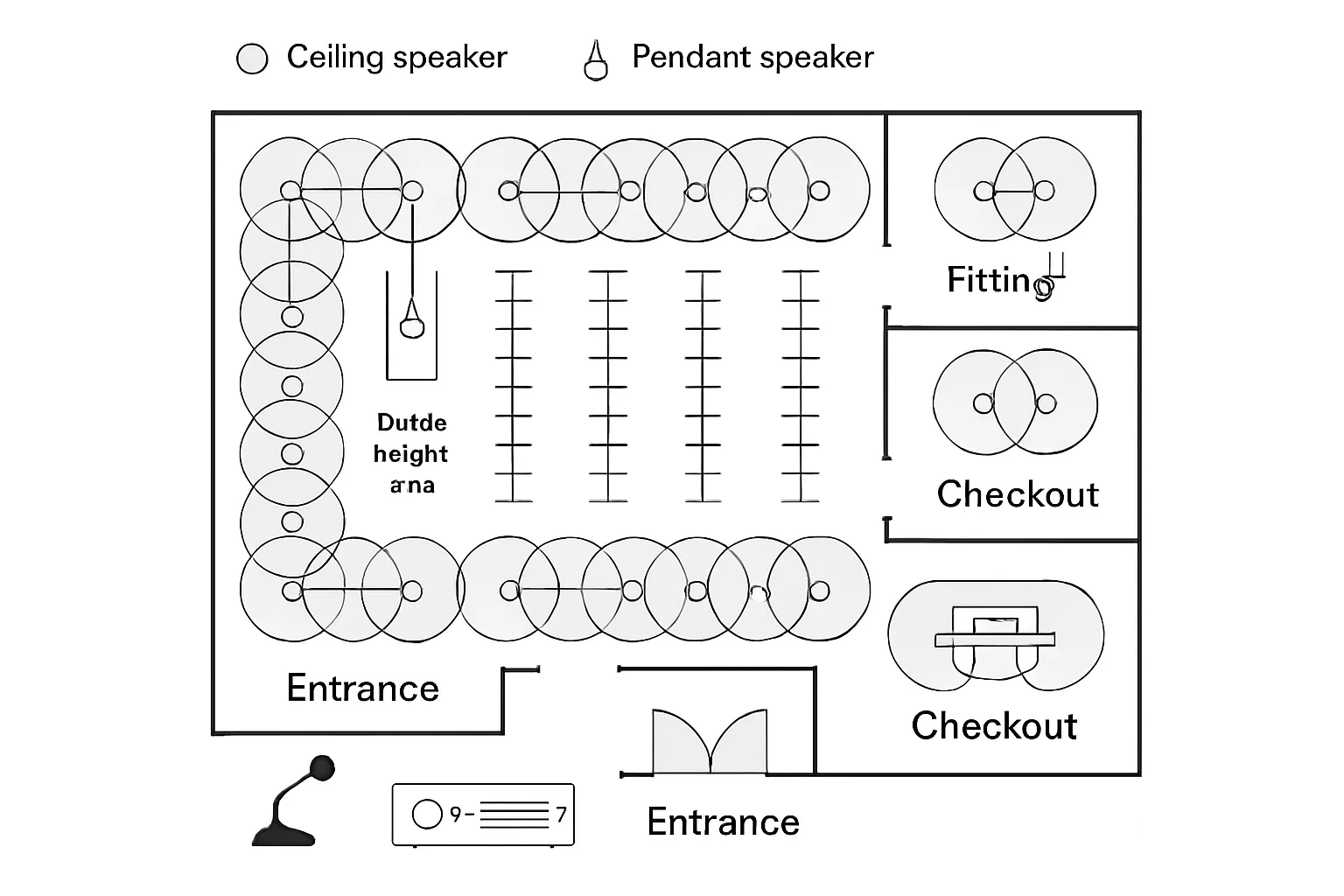
Speaker types: commercial speakers (ceiling, pendant, surface‑mount) and when to use them
- Ceiling speakers: Best for standard-height shops needing even background coverage. Flush fit, wide dispersion, and discreet aesthetics. Ideal for aisles, boutiques, pharmacies.
- Pendant speakers: Hang from conduit or cable in high or open ceilings (warehouse, atriums). Controlled dispersion keeps energy on the floor, not the rafters.
- Surface-mount speakers: Useful along walls, windows, and focused promo areas where ceiling access is limited or directionality is needed. Select models with rotatable horns/tweeters for precise aiming.
Tip: Mix types within one store – ceiling speakers for the floor, pendants over double-height zones, and surface-mounts for window displays or difficult corners.
Subwoofers and low-frequency management for energy without boom
- Add modest low-frequency support for warmth and “body,” especially for fashion and lifestyle concepts.
- Use distributed micro-subs or one to two compact subs per large zone; avoid corner-loading that excites room modes.
- In DSP, set high-pass filters for small ceiling/pendant speakers (e.g., 80–120 Hz) and low-pass the subs appropriately. Apply limiters and gentle room EQ to prevent boom. Aim for musical, not nightclub-level bass.
Coverage planning basics: dispersion, ceiling height, spacing, and overlap
- Match speaker dispersion to ceiling height: higher ceilings benefit from narrower beam angles to keep energy on the floor.
- Space speakers so their -6 dB coverage cones overlap ~20–30% at ear height for even SPL. Align rows with aisles.
- Avoid firing across zone boundaries; aim toward listening areas and away from hard, reflective surfaces.
- Use delay and gentle EQ per zone to time-align mixed types (ceiling + pendant + sub).
Fixtures, finishes, and color-matching for brand aesthetics
- Choose grilles and enclosures in brand-appropriate colors; many commercial speakers offer paintable grilles.
- Maintain sightline cleanliness around feature walls and digital signage; recess or pendant-mount strategically.
- Coordinate with lighting grids to keep a clean ceiling plan; avoid clustering that draws visual attention.
Accessibility and safety: cable management and code compliance
- Use plenum-rated cabling above drop ceilings and strain-relieved suspensions for pendants.
- Maintain clear egress paths and ADA access; keep speakers and wiring outside reach in fitting rooms.
- Integrate with life-safety systems where required; ensure amps/DSPs support emergency mute/ducking.
- Label zones and terminations in the rack; provide a simple laminated quick guide for managers.
Ceiling height and coverage guide
| Ceiling height | Recommended speaker type | Typical spacing range | Notes |
|---|---|---|---|
| 8–10 ft (2.4–3 m) | Wide-dispersion ceiling speakers | 10–15 ft (3–4.5 m) | Aim straight down; overlap ~25% at ear height for even bed-of-sound |
| 10–14 ft (3–4.3 m) | Ceiling speakers (standard/narrow dispersion) | 12–18 ft (3.6–5.5 m) | Consider slightly narrower patterns to avoid wall splash; add micro-sub if needed |
| 14–20 ft (4.3–6 m) | Pendant speakers (narrower coverage) | 15–25 ft (4.5–7.6 m) | Suspend to 12–14 ft hang height; aim to listening plane; increase overlap in reflective spaces |
| 20–30 ft (6–9 m) | Pendant clusters or horn-loaded pendants | 20–30 ft (6–9 m) | Use tighter beams to hit the floor; verify with modeling; supplement with subs for warmth |
| Mixed heights / feature atriums | Mix ceiling + pendant | Varies by zone; 20–30% overlap | Time-align and level-match zones with DSP; avoid cross-firing across boundaries |
Zoning, DSP, and Volume Policy: Guide Shopper Flow Without Fatigue
Define zones: entrance, main floor, fitting rooms, cashwrap, window displays
Plan your floor as distinct listening environments so the music system for business supports how customers move and decide:
- Entrance/decompression: Warm, familiar opener that signals your brand; inviting but not loud to reduce bounce-outs.
- Main floor: Even, unobtrusive bed-of-sound that makes browsing feel effortless; tempo and energy match product mix.
- Fitting rooms/lounges: Softer, warmer EQ, minimal bass; reduce cognitive load to increase try-on comfort and conversion.
- Cashwrap/queue: Slightly higher presence for energy; enable paging and ducking so messages remain clear.
- Window displays/pop-ups: Focused, directional sound with controlled low end to limit street bleed and neighboring zone spill.
Tip: Keep physical zone boundaries aligned with acoustic coverage (don’t fire across aisles); use DSP per-zone EQ and level to maintain identity without fatigue.
DSP essentials: EQ, limiters, ducking for paging, and loudness normalization
Commercial audio DSP makes the difference between “nice” and “effortless”:
- EQ/filters: High-pass small ceiling/pendant speakers (80–120 Hz) to remove mud; notch obvious room resonances; gentle high-shelf roll-off in bright spaces.
- Limiters: Per-zone brickwall limiters prevent spikes and protect drivers; set thresholds below fatigue levels to safeguard the brand experience.
- Ducking: Side-chain the paging mic so program audio drops 6–12 dB during announcements for intelligibility.
- Loudness normalization: Normalize content (e.g., -16 to -18 LUFS equivalent) so tracks, playlists, and promos remain consistent across dayparts.
- Delay/time alignment: Add milliseconds of delay to align mixed speaker types (ceiling + pendant) for a seamless walk-through.
Daypart scheduling: tempo/genre shifts by traffic pattern
Use your sound system for business to score the day’s rhythm:
- Morning open: 80–95 BPM, warm/familiar tracks; ease in staff and early shoppers.
- Midday peak: 100–118 BPM, brand-fit energy; lift pace without shouting.
- Late-afternoon reset: 90–105 BPM; soften transients and trim low end to reduce fatigue.
- Close: 75–90 BPM; calm, tidy-feel selections for last-minute decisions and store tasks.
Layer seasonal/campaign themes sparingly. Cap promotional inserts to ~1 short message every 20–30 minutes and match tone to the surrounding playlist.
Volume policy: target SPL ranges (quiet browsing vs. high-turn environments)
Set measurable SPL targets and stick to them during peak hours:
- Entrance/decompression: 60–65 dBA
- Main floor (discovery): 65–70 dBA, with brief peaks ≤75 dBA
- Fitting rooms/lounges: 55–60 dBA, warmer EQ and lower bass
- Cashwrap/queue: 62–66 dBA; enable ducking for pages
- Window displays/promo zones: 65–70 dBA; limit sub-80 Hz to reduce bleed
Enforce with per-zone limiters and a weekly spot-check using a calibrated meter. Lower overall SPL as acoustics improve – comfort beats loudness for dwell and conversion.
Protecting the brand: role-based access and lockouts for staff
Create guardrails so every location stays on-brand:
- Role-based access: HQ controls playlists, dayparts, and max volumes; managers adjust within a narrow range; associates have pause/resume only.
- Whitelisted sources: Lock the system to approved, licensed streams; block personal apps and device sounds.
- Hard caps and filters: Global explicit filter on; per-zone max SPL; playback resumes to schedule after manual changes.
- Change control: Audit logs for volume/playlist changes; monthly reports tie adjustments to sales and dwell.
- Fallback and continuity: Pre-cached “evergreen” playlists per zone; automatic failover if the network drops; emergency mute integration.
With clear zones, smart DSP, and a firm volume and access policy, your commercial audio becomes an invisible guide – shaping flow, protecting comfort, and reinforcing brand identity all day.
Sources, Streaming, and Licensing Compliance (PROs)
“Under U.S. copyright law, businesses that play music in public generally must obtain public performance licenses – or face potential legal damages.” – Source
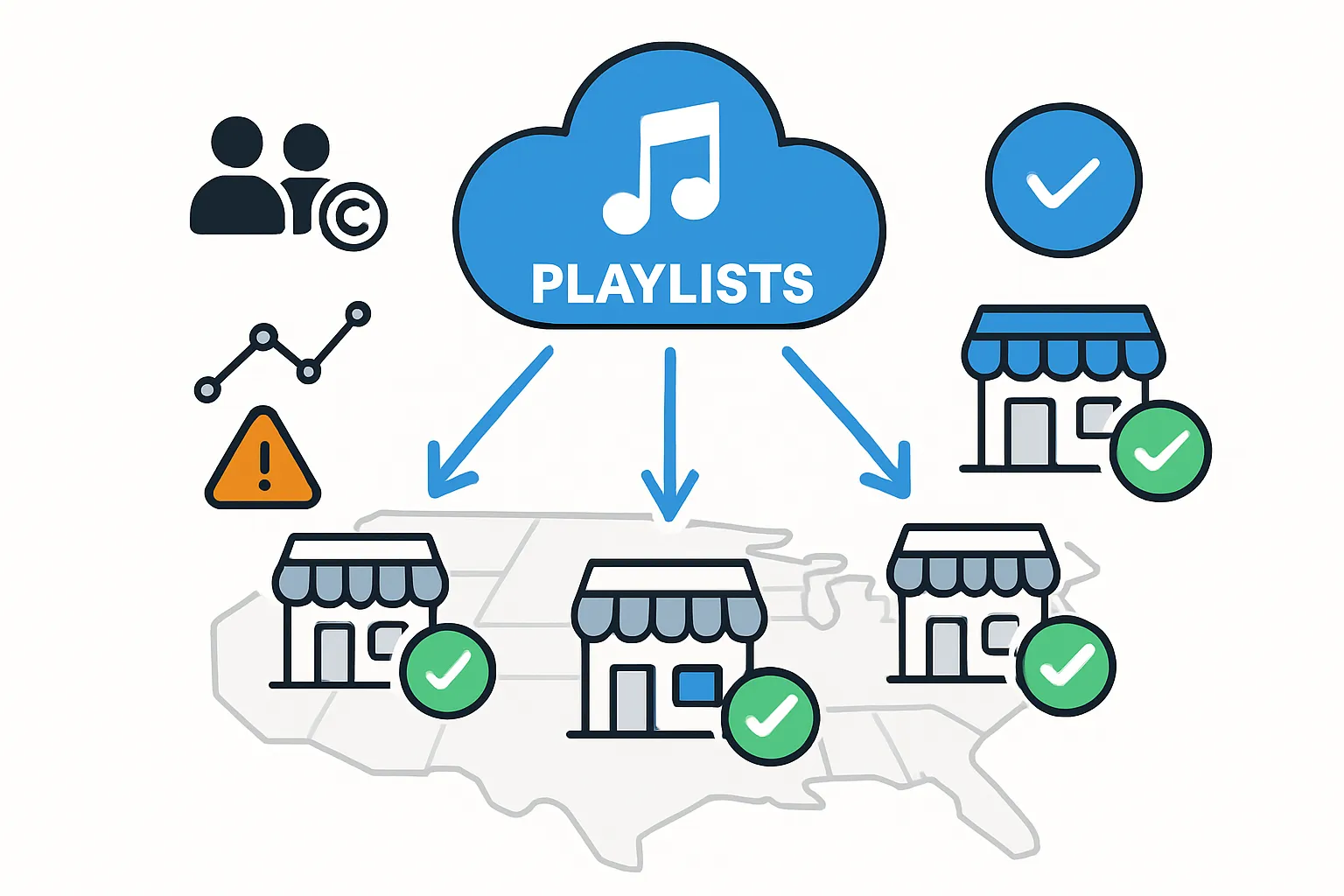
Source options: licensed streaming services vs. local media
- Licensed streaming for business: Purpose-built platforms provide commercial-use catalogs, PRO coverage, explicit filtering, offline caching, and remote policy control across locations. Best for compliance and consistency.
- Local media (on-prem files/players): Reliable in low-connectivity sites and useful as a failover. Still requires that every track be properly licensed for public performance; consumer purchases or personal subscriptions do not cover business use.
Recommendation: Use a licensed business streaming provider as your primary “single source of truth,” with a small, preapproved offline library for continuity during outages.
Content management at scale: brand playlists, explicit filters, rotations
- Brand playlists: Standardize by concept and region; publish rotation schedules and campaign tie-ins.
- Filters: Enable explicit-language filters globally; block disallowed genres and live versions that vary in loudness.
- Rotations: Refresh weekly; plan seasonal and promo sets; cap repeat frequency to avoid staff fatigue.
- Inserts: Limit announcements to short, on-brand messages between tracks, not over them.
Multi-site control: central scheduling, overrides, and monitoring
- Central schedules: Daypart by local time zones; push updates chain-wide from HQ.
- Role-based overrides: Allow managers limited range control (±2–3 dB) and temporary mute for safety messages.
- Monitoring: Health dashboards for player status, SPL compliance snapshots, and alerting for offline endpoints.
Licensing 101: public performance, PROs (ASCAP/BMI/SESAC/GMR), and why consumer apps aren’t legal for stores
- Public performance: Playing music in a store is a public performance under U.S. law and requires licensing.
- PROs: ASCAP, BMI, SESAC, and GMR each represent different catalogs; one PRO’s license doesn’t cover the others.
- Why consumer apps don’t qualify: Personal subscriptions (e.g., standard Spotify/Apple Music) do not grant commercial performance rights; using them in stores risks infringement and statutory damages.
- Safer path: Business music services aggregate rights, handle reporting, and keep you compliant across catalogs.
Choosing a provider: features to look for (reporting, failover, support)
- Licensing: Multi‑PRO coverage, territory clarity, and explicit-language controls
- Reliability: Local cache/offline mode, automatic reconnect, and robust players
- Control: Centralized playlist management, dayparting, role-based permissions
- Reporting: Play history, rights reporting, SPL/volume policy logs, and store-level analytics
- Integration: Paging ducking, API access, network security options (SAML/SSO)
- Support: SLAs, multi-site rollout assistance, and field-replaceable hardware
When your sources, schedules, and licenses are unified under a compliant platform, your music system for business becomes dependable, brand-safe, and easy to scale across every location.
Measure and Optimize: A/B Tests and Retail KPIs
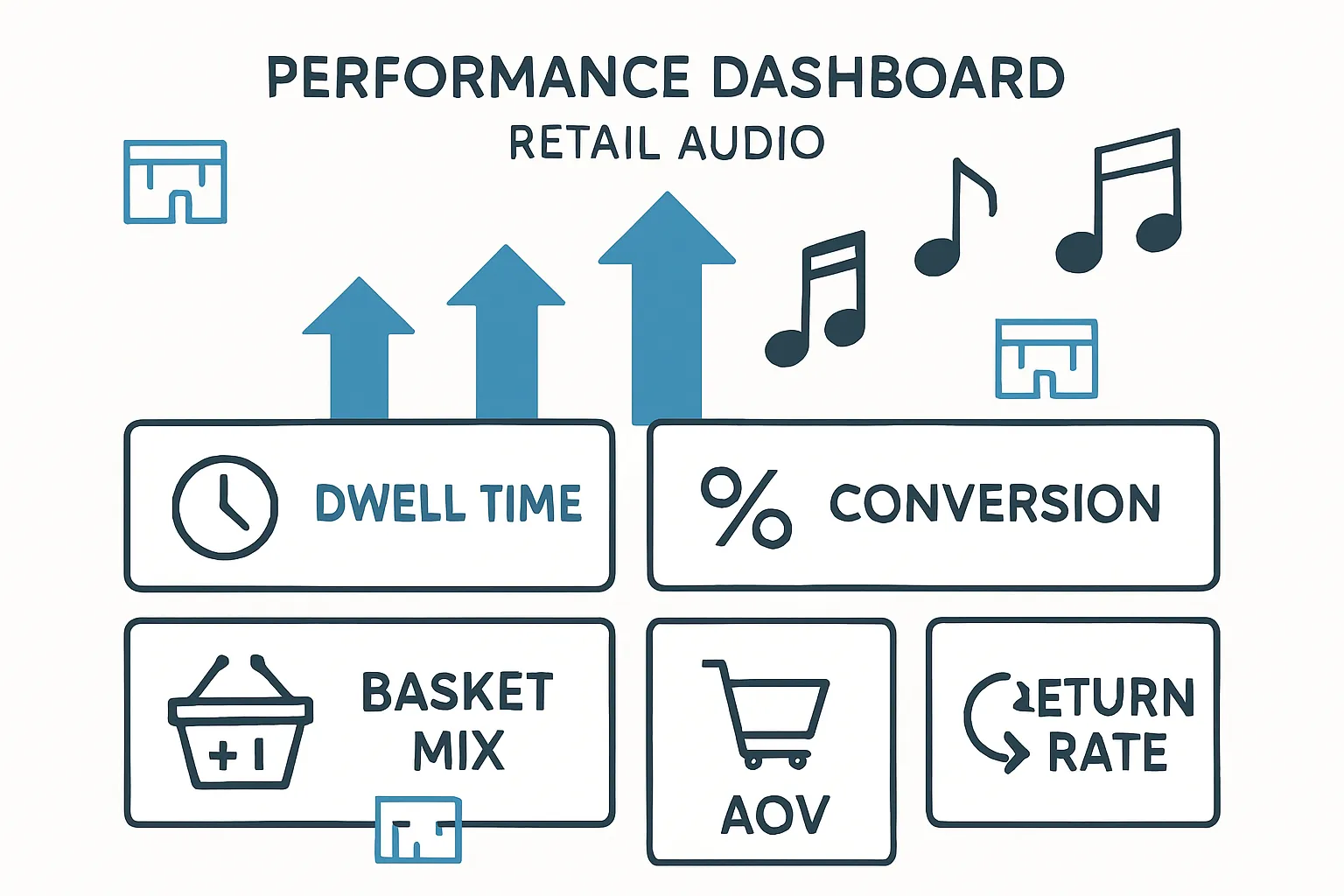
KPIs to track: dwell time, conversion, AOV, basket mix, return rate
Align your sound strategy to measurable outcomes:
- Dwell time: Average minutes in-store and per zone; longer sessions often correlate with higher conversion for considered purchases.
- Conversion rate: Browsers-to-buyers by daypart to validate playlist impact.
- AOV and units per transaction: Does a calmer tempo increase thoughtful add-ons?
- Basket mix and category lift: Track uplift in zones with targeted playlists.
- Return rate and NPS: Comfortable acoustics and consistent volume can reduce buyer’s remorse and improve sentiment.
A/B and multivariate tests: playlist A vs. B by daypart or zone
- Single-variable A/B: Alternate Playlist A and B on matched weekdays for two to four weeks; keep promos, pricing, and staffing constant.
- Daypart tests: Run energetic sets at lunchtime vs. calmer sets late afternoon; compare conversion and dwell.
- Zone tests: Apply different playlists to fitting rooms vs. main floor; track try-on rate and close rate.
- Multivariate light: Combine tempo and volume tweaks in a controlled matrix; avoid overlapping promotions during test windows.
Analysis basics: Use median and confidence intervals to reduce outlier skew; segment by store traffic bands (low/medium/high).
Traffic and behavior signals: people counters, heatmaps, try-on rates
- People counters: Hourly footfall for dwell and conversion denominators.
- Heatmaps: Vision sensors or Wi-Fi analytics to see linger zones and pathing changes.
- Fitting room telemetry: Try-on rate, time-in-room, conversion post-try.
- Queue metrics: Abandonment and throughput at cashwrap during different playlists.
- Engagement: Promo interaction near endcaps when music energy is elevated.
Closing the loop: POS correlation windows and staff feedback
- Correlate POS with music logs: 15–60 minute windows are usually tight enough to attribute mood changes without confounds.
- Control for seasonality and promos: Use matched-period comparisons year-over-year or week-over-week.
- Staff inputs: Collect quick end-of-shift notes on vibe, customer comments, and fatigue; operators sense friction before metrics spike.
Continual improvement: quarterly tune-ups and seasonal refreshes
- Quarterly tuning: Revisit EQ, SPL caps, and dayparts; refresh 20–30% of tracks to avoid staff burnout.
- Seasonal sets: Align to campaigns and holidays with brand-fit genres; normalize loudness to keep transitions smooth.
- Scale what works: Roll winning playlists network-wide with guardrails; maintain a small backlog of A/B ideas per quarter.
- Document and repeat: Keep a simple playbook with test results, target KPIs, and configuration snapshots for each concept.
Budgeting, Installation, and Maintenance
Building a realistic budget: hardware, software, licensing, labor, and TCO
Create a 3–5 year total cost of ownership (TCO) plan so your sound system for business stays reliable and compliant across locations. Consider:
- Hardware
- Commercial speakers (ceiling, pendant, surface-mount), subwoofers
- Amplifiers (70V/100V) and DSP processors
- Source players (purpose-built), paging mics, rack/UPS/power conditioning
- Cabling, connectors, mounts, conduit, plates, network switches (PoE for IP endpoints)
- Software and services
- Licensed music system for business (multi‑PRO coverage), per‑store subscriptions
- Monitoring/management platform, SPL policy tools
- Firmware/feature licenses for DSP or IP audio endpoints
- Licensing
- Public performance licensing via your provider; if not bundled, budget PRO coverage (ASCAP/BMI/SESAC/GMR)
- Labor
- Discovery/design (drawings, modeling), programming, installation, commissioning
- Project management, travel/lift rental, permits, as‑built documentation
- Contingency and spares
- 10–15% contingency for site surprises; spares kit (3–5% of hardware) for fast swaps
- Ongoing operations
- Maintenance/support contract (8–12% of hardware/yr), player replacements (3–5 years), amp/DSP lifecycle (7–10 years), speaker lifecycle (10–15 years)
Budgeting guidance:
- Small boutique (single zone, standard ceiling): prioritize commercial speakers and a reliable player/DSP over a consumer business stereo system.
- Mid/large store (multi‑zone, higher ceilings): plan for a 70V/100V backbone, pendant speakers where needed, and a centralized DSP with zone control.
- Multi‑site: standardize a “kit of parts” and leverage volume pricing.
Phased rollouts: pilot store → regional expansion → chainwide standards
- Pilot store
- Validate zone plan, SPL targets, playlist/daypart templates, paging workflow
- Measure dwell, conversion, and staff comfort; gather punch-list items
- Regional expansion
- Lock standard BOM/SKUs, rack elevations, speaker counts/spacing per footprint
- Train regional installers on commissioning checklist; codify QC steps
- Chainwide standards
- Publish playbook: drawings, programming files, label schemes, tuning presets
- Define SLAs for deployment, monitoring, and break/fix; establish RMA process
Tip: Treat music and commercial audio like a brand system – versioned, measured, and updated on a set cadence.
RFP checklist for integrators: drawings, SPL targets, product equivalents
Include clear, measurable requirements so bids are apples-to-apples:
- Scope and drawings
- Reflected ceiling plans with speaker types/quantities and spacing
- Rack elevations, I/O lists, network topology, signal flow
- Performance targets
- SPL goals per zone (Leq + peak), max variation across listening plane (e.g., ≤±3 dB)
- Intelligibility for paging (STI target where applicable), low‑frequency limits near boundaries
- Programming and commissioning
- DSP presets (EQ, crossovers, limiters, ducking), loudness normalization policy
- Final tuning report with measurement points and as‑built configs
- Product and equals
- Preferred manufacturers and “3‑equals” acceptable substitutions
- Color/finish requirements; plenum ratings, seismic/suspension hardware for pendants
- Compliance and integration
- Fire alarm mute/override, ADA considerations, cable types, labeling standards
- Licensing approach (bundled business streaming) and monitoring platform
- Services and support
- Schedule, training, documentation handoff, warranty terms, spare parts strategy
Reliability: network, power conditioning, and playback failover
- Network
- VLAN/QoS for audio traffic; PoE budget for IP endpoints; dual WAN where feasible
- Offline cache on players; watchdog timers for auto‑recovery; secure remote access
- Power
- UPS on the rack; surge protection and power conditioning; proper grounding
- Thermal management: vented racks, clean cable management, service loops
- Playback failover
- Priority order: primary stream → cached playlist → local USB/SD → analog backup
- Auto‑resume to schedule after outages; test failover quarterly
- Physical reliability
- Proper tap settings on 70V/100V speakers to prevent overload
- Pendant safety cables, strain relief, and compliant suspension hardware
Preventive maintenance: firmware, health monitoring, and on-call support
- Firmware and updates
- Quarterly maintenance windows for DSP, players, and amp firmware; staged rollouts to reduce risk
- Health monitoring
- Cloud dashboards for device online status, amp temperature/clipping, limiter activity, SPL policy adherence
- Automated alerts and escalation paths; monthly health reports by location
- On‑call support
- Tiered help desk with response SLAs (e.g., P1 within 2 hours), loaner pool, next‑business‑day replacement
- Physical inspections
- Semiannual checks: grille cleanliness, pendant hardware, cabling, rack fans/filters
- Re‑verify SPLs during peak hours; re‑tune after remodels or fixture moves
- Continuous improvement
- Track incidents and root causes; update the standard kit and playbook accordingly
With a clear budget, phased deployment, and disciplined maintenance, sound systems for shops stay compliant, consistent, and comfortable – turning your commercial speakers and streaming platform into a dependable driver of dwell time and sales.
Conclusion: Elevate Your In‑Store Audio
Recap: why a purpose-built retail sound system boosts dwell time and sales
A well-designed, licensed music system for business does more than fill silence – it guides shopper pace, reduces fatigue, and lifts conversion. Even, comfortable coverage from commercial speakers, smart zoning with DSP, and brand-fit playlists turn your store’s sound into a measurable driver of dwell time, basket size, and loyalty.
Next steps: site survey, acoustic audit, and pilot playlist plan
Getting started is straightforward:
- Site survey: Map zones, ceiling heights, fixtures, and paging needs.
- Acoustic audit: Identify reflections, RT60 challenges, and quick-win treatments.
- Pilot playlist plan: Establish brand rules, daypart schedules, and volume policy; run a two-week A/B to validate lift.
- Standards kit: Lock in your “kit of parts” for scalable rollouts and consistent results.

