
Choosing a video wall solution for small office environments shouldn’t be overwhelming. At The Audiovisual Consultant, we’ve distilled the essentials to help you plan, compare, and budget with confidence – whether you’re outfitting a lobby, huddle room, or compact conference space.
“Knowledge workers spend 19% of their workweek searching for information.” – Source
TL;DR
- A practical buyer’s guide to choosing and installing a video wall solution for small office spaces (lobbies, huddle rooms, conference rooms).
- Quick recommendations on LCD vs direct-view LED (dvLED), sizing, pixel pitch, content/control, and realistic pricing.
- A curated list of the top 10 video wall manufacturers (with links) and when to go DIY vs hiring a pro.
What this guide covers
- Small-office use cases and space planning basics
- Tech choices (LCD vs dvLED), pixel pitch, brightness, and viewing distances
- Content distribution and video wall control options (including BYOD)
- Price ranges and budgeting for common configurations
- Top 10 manufacturers (with websites) to start your shortlist
- DIY vs professional installation (risks, warranty, calibration)
- FAQs and source links
Who this is for
- Corporate, retail, churches, restaurants, and sports bars – any business seeking commercial AV education for small-office deployments
- Facility managers, IT/marketing leaders, small business owners, and integrators evaluating compact video wall setups
How to use this guide
- Skim the TL;DR and Section 2 for fast tech selection, then dive into sizing (Section 3) and budgeting (Section 5)
- Use the manufacturers list (Section 6) to create a shortlist and compare data sheets
- Decide on DIY vs pro (Section 7), then borrow a “room recipe” (Section 8) to move forward
Choosing display tech for a small office: LCD vs dvLED, pixel pitch and brightness
For a video wall solution for small office spaces, the right display tech comes down to viewing distance, ambient light, and the type of content you show. Here’s how to quickly decide between ultra‑narrow‑bezel LCD and direct‑view LED (dvLED), pick the proper pixel pitch, and avoid brightness/glare pitfalls.
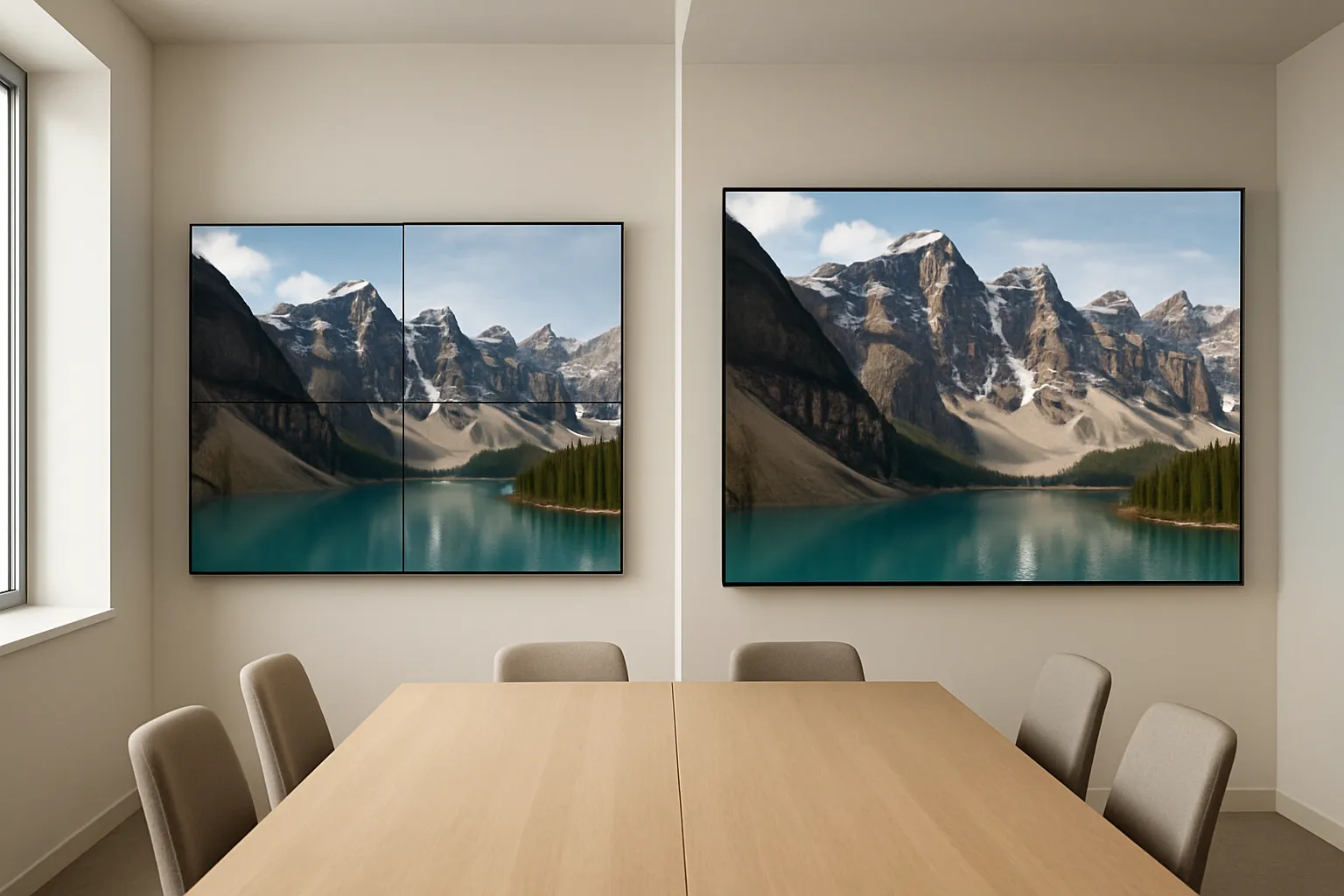
LED vs LCD for small spaces
- When to choose ultra‑narrow‑bezel LCD
- Best for budget-conscious 2×2 or 3×3 walls in conference rooms and huddle spaces with controlled lighting.
- Easy to service and calibrate; strong color accuracy for presentations and video calls.
- Example: Barco UniSee II (LCD) – https://www.barco.com/en/product/barco-unisee-2
- When to choose dvLED
- Seamless, bezel‑free canvas with scalable sizes and higher brightness; excellent for lobbies, storefronts, and premium meeting rooms.
- Higher upfront cost but flexible aspect ratios and fewer glare issues at higher nit levels.
- Examples: Planar TVF Series – https://www.planar.com/products/led-video-walls/tvf-series/; Planar MGP Series – https://www.planar.com/products/led-video-walls/mgp-series/
- Also consider: LCD lines from LG and Samsung
- LG Video Walls – https://www.lg.com/us/business/digital-signage/video-wall
- Samsung Video Walls – https://displaysolutions.samsung.com/products/video-wall
Pixel pitch and viewing distance (the decision that makes or breaks clarity)
- Simple rule‑of‑thumb
- Aim for pixel pitch in millimeters roughly equal to the nearest viewing distance in meters. If viewers sit 2 meters away, ~2.0 mm dvLED is a good starting point.
- Practical examples for small rooms
- ~0.9–1.5 mm for about 6–15 ft (2–5 m)
- ~1.5–2.0 mm for about 15–25 ft (5–8 m)
- Tight fonts, dashboards, and spreadsheets benefit from finer pitches within these ranges.
“Planar’s simplified guideline: optimal viewing distance (in feet) ≈ 10 × pixel pitch (in millimeters).” – Source
Ambient light, brightness, and glare management
- Brightness (nits) by environment
- LCD: 500–800 nits suits most controlled-light conference rooms and huddle spaces.
- dvLED: 800–1500+ nits is ideal for brighter rooms, glassy lobbies, and retail fronts.
- Glare control tips
- Use matte finishes, window shades, and cross‑lighting to reduce reflections.
- Avoid placing screens directly opposite large windows; angle slightly when possible.
- For mixed content (presentations + signage), target mid‑brightness to preserve contrast without causing eye fatigue.
Quick selector comparison (feature trade-offs at a glance)
| Tech | Ideal viewing distance | Typical brightness range | Seamlessness (bezels) | Maintenance | Pros | Trade-offs |
|---|---|---|---|---|---|---|
| LCD (ultra-narrow bezel) | 6–20 ft (2–6 m) per panel size | ~500–800 nits (higher available) | Thin bezels; not seamless | Panel-based; straightforward servicing | Best value for 2×2/3×3, excellent color accuracy, widely available | Visible bezels, size increments fixed to panel dimensions |
| dvLED (direct‑view LED) | Depends on pixel pitch; ~0.9–2.0 mm common indoors | ~800–1500+ nits | Seamless, bezel‑free | Module/Power supply level; periodic calibration | Premium look, scalable sizes/aspect ratios, high brightness | Higher upfront cost; fine pitch increases cost; careful handling required |
| OLED (for completeness) | Close viewing; premium visual experiences | ~400–800 nits (varies by model) | Seamless per panel but tiled arrays uncommon | Varies by vendor; sensitive to static content | Exceptional contrast and black levels; stunning visuals | Less common for tiled walls; potential burn‑in with static UIs |
Product examples to explore
- LCD: Barco UniSee II – https://www.barco.com/en/product/barco-unisee-2
- dvLED: Planar TVF Series – https://www.planar.com/products/led-video-walls/tvf-series/
- dvLED: Planar MGP Series – https://www.planar.com/products/led-video-walls/mgp-series/
- Additional LCD/dvLED lines: LG – https://www.lg.com/us/business/digital-signage/video-wall; Samsung – https://displaysolutions.samsung.com/products/video-wall
Watch: pixel pitch vs viewing distance explained
Plan the wall: room size, viewing distances, mounts, and sightlines
Quietly great video walls start with great space planning. Measure, map sightlines, and size the canvas to your room – not the other way around.
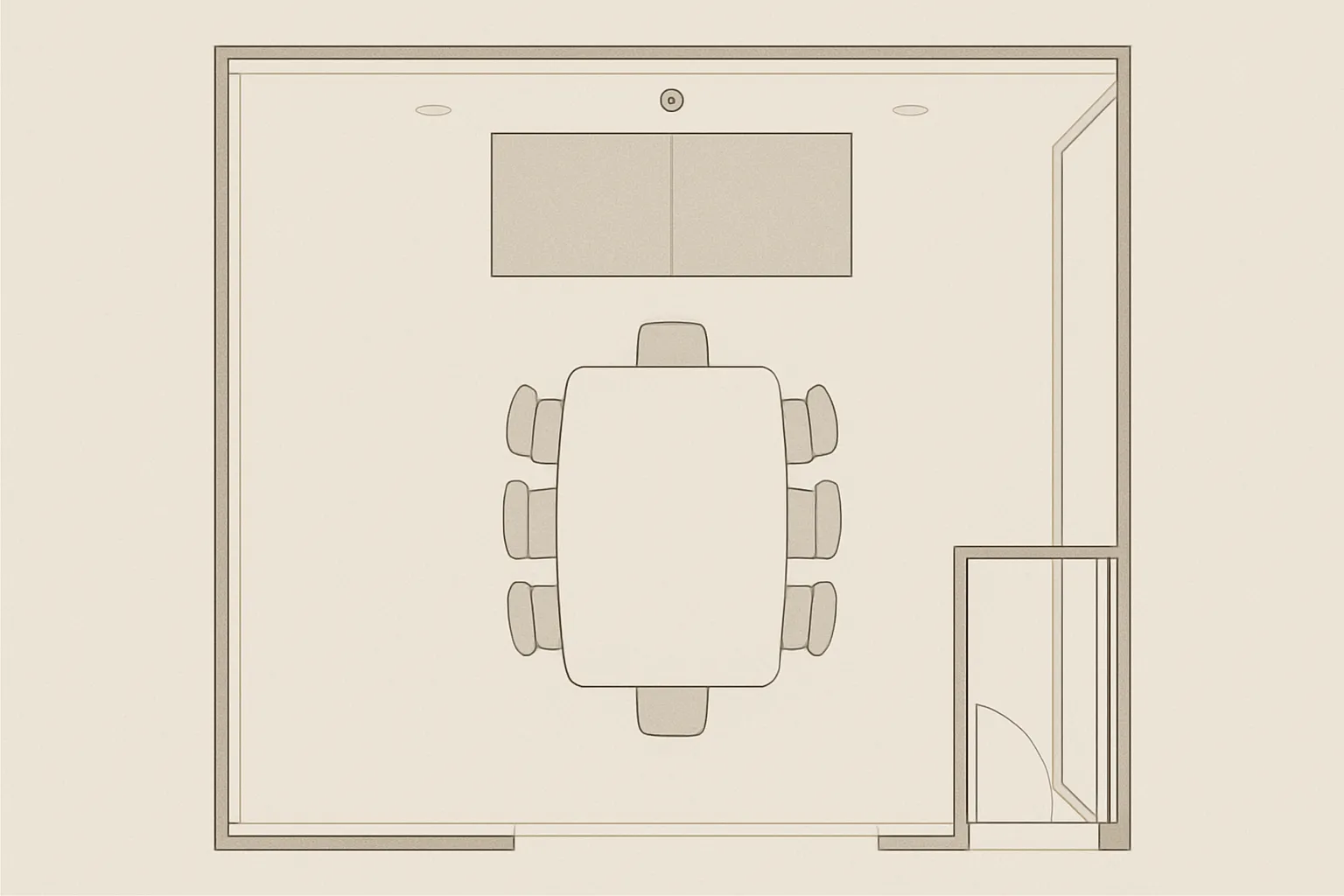
Measure the room and define a primary viewing zone
- Identify closest and furthest seats; confirm sightlines around conference table, doors, and glazing
- Note obstructions: columns, credenzas, cameras, pendant lights, and door swings
- Establish a “primary viewing zone” (front 60–80% of seats) and size the wall so body posture stays neutral (head tilt under ~15°)
Sizing and aspect ratio picks that work in tight spaces
- 2×2 of 49–55″ LCD panels vs single ~110–138″ dvLED kits
- 2×2 LCD is compact, budget‑friendly, and aligns well with small rooms (8–14 ft viewing)
- ~110–138″ dvLED all‑in‑one kits deliver a seamless canvas with flexible brightness for mixed‑use rooms and premium lobbies
- Use‑case‑based sizing
- Dashboards: prioritize legibility; go wider or finer pixel pitch for dense text/metrics
- Presentations: 16:9 aspect with comfortable font sizes at the back row
- Branding/ambient: favor impact and brightness; consider portrait or custom aspect dvLED
Mounting, serviceability, and safety
- Pop‑out service mounts for LCD enable safe panel access and fast alignment
- Front‑service dvLED cabinets simplify maintenance when rear access isn’t possible
- Verify weight and wall reinforcement; use engineered mounting rails and check stud layout
- Maintain ADA clearances for protrusions; consider low‑profile frames in corridors
- Plan for ventilation and thermal load; avoid HVAC supply directly blasting the wall
Cable paths and power
- Conduit planning from rack to wall: video, control, and network paths with pull strings
- Provide dedicated circuits; add surge protection and UPS for clean shutdowns
- Home‑run network drops for the wall processor, wireless presentation, and signage players
- Consider PoE for accessories (cameras, touch panels, occupancy sensors) and label both ends
Content distribution and control: processors, CMS, and BYOD
To get real value from a video wall solution for small office environments, plan what you’ll actually put on screen and how you’ll control it. Think in three layers: content (what), controller/processor (how), and collaboration/BYOD (who shares and when).
What content matters most in small offices
- Video conferencing layouts
- Dual-use walls that host UC platforms benefit from clean layouts: participants + shared content. Aim for legible fonts at the back row and preserve margins so faces aren’t at bezel lines (for LCD) or screen edges.
- KPIs and dashboards
- Prioritize high-contrast color palettes and larger font sizes. Schedule different dashboards by time of day; consider a darker theme to reduce eye fatigue in dim rooms.
- Dynamic signage and branding
- Rotate announcements, wayfinding, and brand messages; use motion sparingly for distraction-sensitive spaces. Keep a safe “no-critical-text” area near edges.
- Multi-window presentations
- For team reviews, display slide decks, live demos, and browser windows simultaneously. Choose a processor that supports windowing, scaling, and simple presets.
Controller options (good, better, best)
- Simple: single-source HDMI/USB‑C from a dedicated PC or signage player
- Ideal when the wall typically shows one full-screen source (presentations or signage).
- Representative players: BrightSign media players – https://www.brightsign.biz/digital-signage-products
- Tips: Lock the PC resolution to the wall’s native canvas, disable OS notifications, and use a wired connection for reliability.
- Moderate: multi-input switcher/processor and basic video wall software
- Enables multiple sources, simple windowing, and presets for meetings vs signage.
- Representative processors:
- Datapath (e.g., Fx4, WallControl) – https://www.datapath.co.uk
- tvONE CORIO (e.g., CORIOmaster/CORIOview) – https://tvone.com/products/coriomaster
- Use cases: 2×2 LCD showing two sources side-by-side; scheduled signage with quick conference overrides.
- Advanced: software-defined or hardware processors for windowing and scaling
- Full canvas control with flexible layouts, scene recall, and high-quality scaling.
- AV-over-IP distribution can simplify long runs and future growth.
- Representative families:
- Crestron DM NVX (AV-over-IP) – https://www.crestron.com/Products/Featured-Solutions/DM-NVX-AV-over-IP
- Datapath VSN systems – https://www.datapath.co.uk
- tvONE CORIOmaster2 – https://tvone.com/products/coriomaster2
- Best for: mission-critical dashboards, lobby features, or rooms needing fast layout changes.
Note: The brands above are representative examples, not endorsements. Always confirm compatibility, resolution support, and control APIs for your specific display and room.
Collaboration & BYOD
- Wireless presentation
- Barco ClickShare for quick, secure wireless sharing – https://www.barco.com/en/clickshare
- Pair with a stable wired fallback (USB‑C/HDMI) for guest devices or high-bitrate demos.
- UC platform integration
- Teams Rooms, Zoom Rooms, and Google Meet devices can route meeting content to the wall via HDMI/USB‑C ingest or an AV-over-IP endpoint.
- Map one-touch meeting presets: “Meet,” “Present,” and “Dashboard,” so staff can switch modes without hunting through menus.
- Admin and IT considerations
- Separate VLANs for AV-over-IP, enable DHCP reservations for processors/players, and enforce content approval workflows in your CMS.
- Implement remote management (firmware updates, scheduling, health monitoring) to reduce on-site maintenance.
Practical content and control tips
- Match the canvas: Build content at the wall’s native resolution to avoid scaling softness.
- Protect legibility: Favor high contrast, avoid ultra-fine fonts, and keep key text away from LCD bezel lines.
- Use presets: Pre-configured layouts (single full-screen, side-by-side, quad) speed up meetings.
- Record and replicate: Document signal paths, EDID settings, network subnets, and login credentials to make support painless.
- Plan for growth: Choose controllers with spare inputs/outputs and a CMS that supports user roles, scheduling, and simple playlist swaps.
Prices of video walls: typical ranges and cost drivers
Budgeting a video wall solution for small office spaces means balancing tech, size, and integration effort. The numbers below reflect typical US market averages for commercial-grade hardware plus a professional small-office install. Your actual costs will vary by region, vendor, site conditions, union rules, electrical needs, ceiling height, and finish requirements.
What drives cost most
- Technology: ultra-narrow-bezel LCD vs dvLED (fine pixel pitch raises cost quickly)
- Size and pixel pitch: bigger canvases and tighter pitches demand more tiles/panels and precision
- Processing and control: from simple players to advanced windowing processors and AV-over-IP
- Mounting and structure: pop-out mounts, custom frames, wall reinforcement, and ADA considerations
- Labor, commissioning, and finish work: alignment, calibration, programming, cable management, trim
- Site variables: power circuits, conduit/rack, network readiness, after-hours work, union rates, logistics
Typical small-office ranges and what’s included
- Ranges below assume commercial-grade displays, mounting hardware, basic processors/players, pro alignment/calibration, and standard cable terminations.
- Exclusions often include: sales tax, freight, permits/engineering, major electrical upgrades, millwork, complex network/security work, and extended support contracts.
| Hardware range | Typical install/labor range | Estimated total range | Notes (assumptions) | |
|---|---|---|---|---|
| 2×2 55″ LCD video wall (Ultra‑Narrow Bezel) with pop‑out mount and basic processor | $10,000–$20,000 | $4,000–$9,000 | $14,000–$29,000 | 4 commercial LCD panels, pop‑out mounts, entry video wall processor or signage player, standard wall, controlled light, basic cabling. |
| 3×3 55″ LCD wall (value build) with entry processor | $22,000–$45,000 | $8,000–$18,000 | $30,000–$63,000 | 9 panels, pop‑out mounts, entry processor (simple windowing), more alignment time, standard wall reinforcement. |
| 110–138″ all‑in‑one dvLED kit (integrated controller) | $60,000–$120,000 | $8,000–$18,000 | $68,000–$138,000 | Pre‑engineered dvLED package with frame, integrated controller, single‑canvas setup, typical brightness 800–1,000 nits, standard power and network. |
| Premium fine‑pitch dvLED ~120″ custom build | $90,000–$180,000 | $12,000–$30,000 | $102,000–$210,000 | 0.9–1.2 mm fine pitch, custom structure, dedicated processor, color calibration workflows, recommended spare modules. |
Ownership and support
- Warranty and service level
- LCD: commonly 3-year commercial warranty; options for advance exchange and extended coverage.
- dvLED: commonly 3–5 years; review on-site service terms and brightness maintenance specs.
- Spares strategy
- LCD: keep at least one spare panel from the same batch for fast swaps.
- dvLED: budget 2–5% extra tiles/modules and spare power supplies/receivers for uptime.
- Calibration and maintenance
- LCD: periodic color/brightness checks, firmware updates, and panel health monitoring.
- dvLED: scheduled calibration to maintain uniformity; dust management and careful cleaning practices.
- Operating costs and lifecycle
- Power consumption scales with brightness and size; plan for UPS/surge protection.
- Keep content/CMS licensing and remote management subscriptions in the budget.
- Document EDID, processor presets, and network settings for faster support and staff onboarding.
Top manufacturers to shortlist for a small-office video wall
Building a reliable, space-smart video wall solution for small office deployments starts with the right vendors. Use this annotated shortlist to compare capabilities, form factors, and documentation. Product examples are provided for research only – these are not endorsements.
- Barco – https://www.barco.com/
- Known for bezel‑critical LCD platforms (UniSee II) and robust dvLED families suitable for premium conference rooms and lobbies.
- Example: Barco UniSee II (LCD) – https://www.barco.com/en/product/barco-unisee-2
- Planar – https://www.planar.com/
- Deep portfolio across indoor dvLED and LCD; strong documentation and support for small to mid‑scale walls.
- Examples: Planar TVF Series (dvLED) – https://www.planar.com/products/led-video-walls/tvf-series/; MGP/MGS for value indoor dvLED.
- LG Business – https://www.lg.com/us/business/digital-signage
- Ultra‑narrow bezel LCD lines and expanding dvLED offerings; solid choice for cost‑effective 2×2 or 3×3 builds.
- Example: LG VL5F Series (LCD) – https://www.lg.com/us/business/digital-signage/lg-55vl5fq-a
- Samsung Display Solutions – https://displaysolutions.samsung.com/
- VHR/VMT ultra‑narrow bezel LCD and All‑in‑One LED kits (IAC) that simplify deployment in tight spaces.
- Example: IAC All‑in‑One LED – https://displaysolutions.samsung.com/led-signage/all-in-one/
- Sharp/NEC – https://www.sharpnecdisplays.us/
- Proven UN‑series LCD for tiled walls and curated dvLED bundles; dependable for standard conference‑room video walls.
- Christie – https://www.christiedigital.com/
- Offers LCD video walls and indoor dvLED (Core/Professional series); strong processing ecosystem for more advanced layouts.
- Sony Professional – https://pro.sony/
- Crystal LED for premium experiences; tiling‑friendly Pro BRAVIA panels for LCD‑based walls in small rooms.
- Absen – https://www.absen.com/
- Absenicon all‑in‑one dvLED meeting‑room kits and fixed‑install indoor dvLED options tailored to small to mid‑size spaces.
- Unilumin – https://www.unilumin.com/
- UTV/USeries indoor dvLED with various pixel pitches; good coverage for close‑range viewing in compact rooms.
- Philips Professional Displays (PPDS) – https://www.ppds.com/
- X‑Line LCD video wall series; commercial feature set for signage, dashboards, and meeting‑space canvases.
DIY vs professional installation: which path is right for you?
Choosing the right path for a video wall solution for small office environments comes down to complexity, risk tolerance, and the experience of your in-house team. Here’s how to decide – and what to demand if you hire a pro.
When DIY can work
- Small LCD arrays (e.g., 2×2) with simple sources and pop‑out mounts
- Experienced in‑house technicians comfortable with mounting, leveling, and basic EDID management
- Rooms with straightforward cable paths, standard wall construction, and controlled lighting
When to hire a pro (recommended for most business deployments)
- dvLED walls (all‑in‑one kits or custom builds) where handling and calibration are critical
- Larger arrays (3×3 and up), custom structures, or non‑standard wall substrates
- Networked control, AV‑over‑IP distribution, and multi‑window processing
- Executive/lobby installs where visual quality, uptime, and finish work are paramount
Risks and hidden costs of DIY
- Alignment drift and bezel misgaps causing distracting seams and uneven sightlines
- Poor ventilation or power planning leading to thermal throttling, flicker, or premature failure
- Warranty exposure from improper handling (especially dvLED modules and power supplies)
- Long‑term color/brightness non‑uniformity without calibration tools and workflows
- Rework, schedule overruns, and staff downtime that eclipse any perceived savings
What a pro integrator delivers
- Site survey and engineered drawings with load calculations and wall reinforcement plan
- ADA compliance review, cable management and conduit design, dedicated circuits/UPS
- Processor programming, EDID/HDCP strategy, and network segmentation for AV gear
- Precision alignment, color/brightness calibration, and acceptance testing
- Staff training, documentation (as‑builts, IP maps, presets), and a support/warranty plan
Integrator evaluation checklist
- Mounting approach
- Pop‑out LCD mounts or front‑service dvLED cabinets? Confirm model and service clearances.
- Spares and lifecycle plan
- Spare panel (same batch) for LCD; 2–5% spare dvLED modules plus PSUs and receiving cards.
- Color calibration plan
- What tools/software are used? How often is recalibration scheduled?
- Warranty terms
- Coverage length, on‑site response times, included labor/materials, and loaner policies.
- Commissioning deliverables
- Acceptance checklist, processor presets, EDID profiles, network/IP documentation, and training.
- Safety and compliance
- Load calculations, seismic/bracing (if required), and ADA protrusion compliance.
Practical room recipes for a video wall solution for small office
Use these field-tested “recipes” to move from planning to action. Each includes a copyable sample BOM and accessory ideas to streamline procurement and deployment.
Recipe A: Reception area (branding + info)
- 2×2 55″ LCD ultra‑narrow‑bezel, pop‑out service mount, signage player, basic processor
- Light ambient control, scheduled content via CMS
Core components (sample BOM)
- 4× 55″ commercial LCD panels (ultra‑narrow bezel), matched batch
- 4× pop‑out video wall mounts (micro‑adjustable)
- 1× media player (signage) – BrightSign: https://www.brightsign.biz/digital-signage-products
- 1× basic video wall processor or 4‑output controller (if needed for bezel compensation/layout)
- CMS account and templates for brand messaging, announcements, and wayfinding
- Cabling/terminations (HDMI/DP to processor, network for CMS, power), low‑profile cable management
- Surge protection/UPS sized for 4 displays + player
- Optional: in‑ceiling speakers for subtle ambient audio
Notes & setup tips
- Keep high-contrast visuals and avoid critical text over panel seams.
- Schedule dayparted playlists (morning announcements, midday highlights, late‑day events).
- Target 500–700 nits and matte finishes to reduce lobby reflections.
Recipe B: Huddle/conference (collaboration)
- All‑in‑one ~110–138″ dvLED kit with built‑in controller, UC integration, wireless presentation
Core components (sample BOM)
- 1× All‑in‑one dvLED kit (~110–138″) with integrated controller and stand/wall frame
- 1× wireless presentation system – Barco ClickShare: https://www.barco.com/en/clickshare
- 1× UC room system (Teams/Zoom/Meet) with HDMI ingest to the wall
- 1× simple matrix or AV‑over‑IP endpoint (if multiple room sources)
- Camera, mic array/soundbar, and room control panel (preset recall: Meet/Present/Dashboard)
- Network switch with VLAN for AV endpoints; conduit and labeled cabling
- UPS/surge protection and dedicated circuits
Notes & setup tips
- Use presets for meeting modes and enforce the wall’s native canvas resolution.
- For close seating, select appropriate pixel pitch (e.g., ~1.2–1.9 mm depending on room depth).
- Calibrate for skin tones and presentation legibility; avoid overly vivid “store” modes.
Recipe C: Team ops/metrics wall
- 3×3 LCD or ~120″ dvLED depending on budget; multi‑window processor; redundant power for critical uptime
Core components (sample BOM)
- Option 1: 3×3 55″ LCD with pop‑out mounts (9 panels)
- Option 2: ~120″ dvLED (fine pitch if text-heavy dashboards)
- 1× multi‑window processor with preset layouts (quad, ticker + dashboards, split sources)
- 1–2× reliable signage/data players (primary + backup) – BrightSign: https://www.brightsign.biz/digital-signage-products
- Redundant power strategy (UPS, surge, spare supplies for dvLED) and spare panel/module plan
- Environmental monitoring (temperature, uptime alerts) and remote management
- Structured cabling, rack space, and tidy labeling for rapid troubleshooting
Notes & setup tips
- Standardize dashboard color palettes and font sizes for at‑a‑glance readability.
- Keep bezel lines in mind for LCD; place critical KPIs away from seams.
- Schedule calibration checks (especially for dvLED) to maintain uniformity.
Suggested accessory categories and example product families
- Mounts
- Chief/Legrand AV video wall mounts – https://www.legrandav.com/products/chief
- Peerless‑AV video wall mounts – https://www.peerless-av.com/en-us/categories/video-wall-mounts
- Processors
- Datapath (Fx4/VSN, WallControl) – https://www.datapath.co.uk
- tvONE CORIOmaster family – https://tvone.com/products/coriomaster
- Players (signage/data)
- BrightSign media players – https://www.brightsign.biz/digital-signage-products
- Wireless presentation/BYOD
- Barco ClickShare – https://www.barco.com/en/clickshare
These recipes are starting points – adjust pixel pitch, brightness, and processing depth to your content mix and viewing distances, and document presets so teams can switch modes in seconds.
Frequently asked questions
1) What pixel pitch do I need at 10–12 feet?
For mixed content and crisp text at about 10–12 ft (3–3.7 m), target ~1.2–1.5 mm dvLED or consider a 2×2 of 55″ LCDs. Always validate with real content (fonts, dashboards, UI elements) at the actual viewing distance before you buy.
2) Can I mix different brands of LCD panels in a wall?
Not recommended. Even small differences in bezel size, color/brightness uniformity, mounting tolerances, control protocols, and firmware can prevent a consistent, professional look – making calibration and long-term maintenance harder.
3) Do I need a dedicated video wall processor?
Not always. If you only ever show one full-screen source, a PC or signage player can be sufficient. If you need multiple sources, windowing, scaling, or fast layout presets, use a dedicated processor or software-defined controller (AV-over-IP endpoints can help for growth). For any video wall solution for small office deployments, plan EDID/HDCP, native canvas resolution, and reliable control.
Sources used in this guide (link list)
- Barco Video Wall Solutions overview: https://www.barco.com/en/products/video-walls/overview
- Planar LED video wall resources (pixel pitch and application guidance): https://www.planar.com/
- LG Commercial Displays: https://www.lg.com/us/business/digital-signage
- Samsung Display Solutions: https://displaysolutions.samsung.com/
- Christie Video Walls: https://www.christiedigital.com/
- Sharp/NEC Displays: https://www.sharpnecdisplays.us/
- Absen LED: https://www.absen.com/ | Unilumin: https://www.unilumin.com/
- Philips Professional Displays (PPDS): https://www.ppds.com/
Ready to plan your video wall solution for a small office?
You now have the core framework: how to choose between LCD and dvLED, how to size and mount it correctly, what to budget, and which manufacturers to explore. The next step is tailoring it to your exact room, content, and workflow.
Your small office can absolutely support a professional-grade video wall. With a few informed decisions, you’ll have a setup that looks sharp, runs reliably, and makes meetings – and metrics – easier to see.


